On Thu, Jun 18, 2009 at 4:15 PM, Kris Tilford<[email protected]> wrote:
> You're saying I can have 802.11n clients using only the 5GHz band, and
> simultaneously use 802.11b/g clients on the 2.4GHz band?
That's my understanding of what it means when the specs for the
AirPort Extreme (Early 2009) say it supports "2.4GHz and 5GHz
simultaneously". You should be able to set it up to use different
protocols on the different bands. (That *is* the version of the
AirPort Extreme you have, correct?)

> How do I set this up with Apple Airport 802.11n router? Wouldn't this require
> the
> router to appears as two separate networks on different channels?

Unfortunately, since I don't own one of the new dual band AirPort
Extremes, I haven't a clue. I tried going to the Apple support section
to see what I could find there, but I came up empty. (Perhaps I just
don't know where to look?) What I kept running into were instructions
in the manuals along the lines of "Open AirPort Utility, select your
base station, and follow the onscreen instructions to create your new
network".

I know almost everyone else apparently *loves* it when Apple shields
its customers from details. But for me I often find them a bit *too*
much like an appliance for my tastes. Sometimes I *want* to work with
the details. Oh, well.

I expect you would set this up it by specifying a different SSID and
protocol for each band. The SSID is often referred to as the wireless
"network name" but in this context that's misleading. You'd only have
one wireless (and wired) local network that all the connected devices
would be part of. The SSID in this case is more of a name for the
method used to connect to that network.

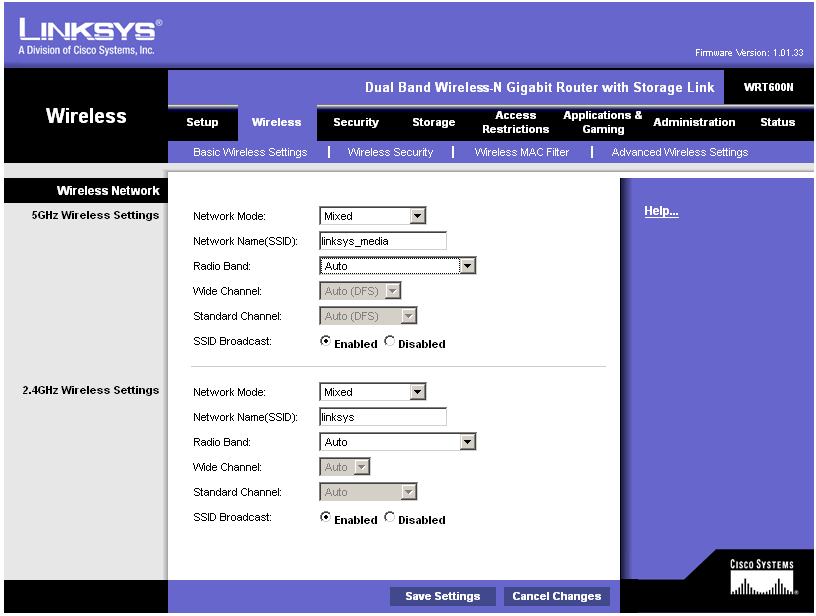
Since I could not find anything on the Apple site, the best I could do
was a link to a screen shot from a review of a LinkSys WRT600N dual
band router over at smallnetbuilder.com. All the screen shot shows you
is that you can configure both the 2.4 and the 5GHz band separately. I
expect the AirPort Extreme also provides this capability ... somehow.
http://www.smallnetbuilder.com/myincludes/image_page.php?/images/stories/wireless/linksys_wrt600n/linksys_wrt600n_wireless_basic.png

Of course, all the above assumes that your wireless (client) PCI
adapter also supports using the 5GHz band. Not all of them do. Adding
support for the extra band adds to the cost of the adapter so it's
often left out to reduce the manufacturing cost of an adapter. If the
802.11n adapter you're thinking of getting says it supports 802.11b,
802.11g, and 802.11n but leaves out 802.11a then it would not be able
to talk to your airport on the 5GHz band. It would only support
802.11n in the 2.4GHz band.

-irrational john

--~--~---------~--~----~------------~-------~--~----~
You received this message because you are subscribed Low End Mac's G3-5 List, a
group for those using G3, G4, and G5 desktop Macs - with a particular focus on
Power Macs.
The list FAQ is at http://lowendmac.com/lists/g-list.shtml and our netiquette
guide is at http://www.lowendmac.com/lists/netiquette.shtml
To post to this group, send email to [email protected]
To unsubscribe from this group, send email to
[email protected]
For more options, visit this group at
http://groups.google.com/group/g3-5-list?hl=en
Low End Mac RSS feed at feed://lowendmac.com/feed.xml
-~----------~----~----~----~------~----~------~--~---