LeAnthony Mathews wrote:

> I'm a long time lisp lurker who has been playing with different
> implementations of lisp IDE.  What I need is a simple walkthrough example
> that will allow me to:
>
>    1. Install Lispbox on my windows machine.
>    2. Install GUI toolkit( Say wxCL).
>    3. Write a simple windows GUI application (lets say hello world).
>    4. Compile this file to an .exe
>    5. Run on any windows based machine "hello world" application
>
> Does this type of example exist?  This would make a great movie if some LISP
> pro will show us the way.  This is a basic stepping-stone to get us new to
> the language creating something productive.
This is easy:

- download CLISP from
http://sourceforge.net/project/showfiles.php?group_id=1355 and install it

- download wxcl-1.1.1 from
http://prdownloads.sourceforge.net/wxcl/wxcl-1.1.1.zip?download and unzip
it

- change the DLL path in wxcl-1.1.1/clisp-wrappers:
(defconstant +library-name+ "wxc-msw2.6.2.dll"))

- open a command line prompt and change to the wxcl-1.1.1/examples
directory

- copy the wxCL DLL: copy ..\miscellaneous\wxc-msw2.6.2.dll .

- use one of the example programs or create a file repl.lisp from
http://www.frank-buss.de/tmp/repl.lisp

- start CLISP, e.g. \Programme\clisp-2.36\clisp.exe -K full

- load your program: (load "repl.lisp")

- save the image: (ext:saveinitmem "repl" :init-function #'main)

- quit CLISP: (quit)

now you have the file repl.mem and you can start the program like this:

\Programme\clisp-2.36\clisp.exe -K full -M repl.mem

After this you can copy all files to one directory and perhaps add a
lisp.exe.manifest in the "full" directory to enable the new Windows Look
and Feel: http://www.frank-buss.de/tmp/lisp.exe.manifest

Now you can pack it with zip, but more professional is to use an installer:

- download Inno Setup from http://www.jrsoftware.org/isinfo.php

- use this setup file: http://www.frank-buss.de/tmp/repl.iss (which shows
you all files you need to copy to the same directory, too; uncomment the
last line, if you like German installer messages)

- open the repl.iss in Inno Setup and build the installer

and finally you have a 2.7 mb file: http://www.frank-buss.de/tmp/repl.exe

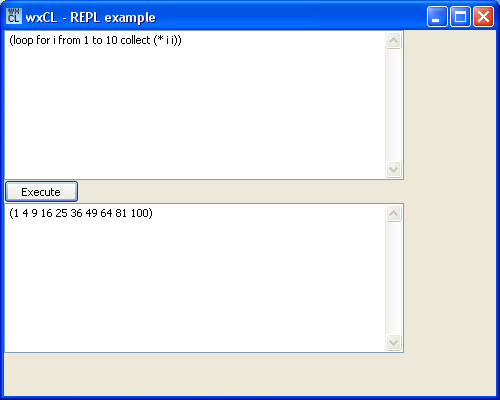
which looks like this when installed and started:
http://www.frank-buss.de/tmp/repl.jpg

The only thing missing for a professional program is the DOS box, which is
visible at program start. But you can donwload CLISP and substitute the
"main" with "WinMain", which should solve this problem.

But I wonder if I'm allowed to sell closed-sourced programs with CLISP. The
CLISP FAQ says, that everything which is dynamicly loaded by CLISP must be
GPL, is this a problem with wxWidgets, which has another licence? And if
I'm developing some application specific DLLs, I'm is it possible not to
publish the source code of these DLLs?

But perhaps it is even easier, because the FAQ says it is GPL because of
the GNU readline. Is it not GPL, if I compile it without readline (which
should be possible, if it is used for the interactive prompt, only) ?

--
Frank Buß, [EMAIL PROTECTED]
http://www.frank-buss.de, http://www.it4-systems.de

_______________________________________________
Gardeners mailing list
[email protected]
http://www.lispniks.com/mailman/listinfo/gardeners