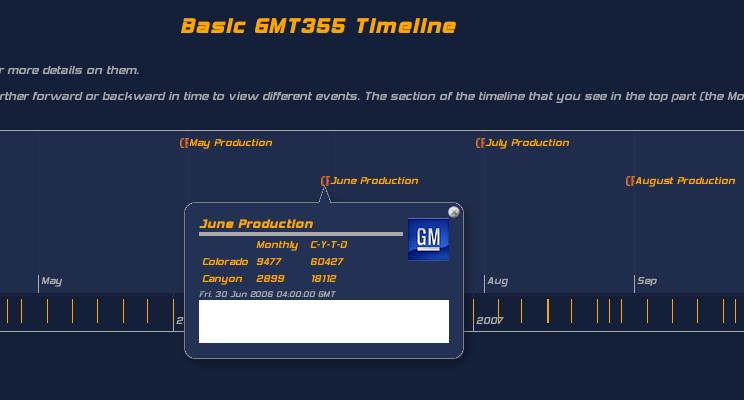
Thanks for the quick response Peter...silly me in Linux land,  I didn't
bother switching to Windows and seeing if its any better behaved over
there.  Anyway, I rebooted into Windows and tested in in Firefox as well as
IE (6, I think I'm running) and it worked fine in IE, however, Firefox in
Windows it displayed the same as it does in Firefox in Linux, with a
discolored band across the bottom of the detail window, just below the
timestamp.  I've uploaded a portion of a screenshot showing what I'm talking
about to http://www.naskie18.com/colorado/timeline/DetailWindow.jpg
I'll get to widening the columns in the bubbles so it fits properly when
people not running my silly font set view it, as well, thanks for the
heads-up on that.

--
Nick Denis


2008/2/28 Peter Frederick <[EMAIL PROTECTED]>:

>  Hi Nick
>
> Neat application! When I look at it with MS IE7 it has no problems in that
> area - the background of the bubble is all dark blue. I think you could make
> the bubble a little wider - I'm getting scrolling on this bit
>
>   Monthly C-Y-T-D
>
> What browser are you testing it with?
>
> Cheers
> Peter
>
>
>  ------------------------------
> *From:* [EMAIL PROTECTED] [mailto:
> [EMAIL PROTECTED] *On Behalf Of *Nick Denis
> *Sent:* Friday, 29 February 2008 10:00 AM
> *To:* [email protected]
> *Subject:* Timeline Detail Window Problem
>
> I've spent the last couple days becoming familiar with Timeline, and am
> trying to put it to use, but I've developed a problem that I can't seem to
> figure out.
>
> I've got my timeline running at
> http://www.naskie18.com/colorado/timeline/CFansTimeline.html and as you
> can see, I've managed change the colors of most of it to match the scheme
> site I'm intending to use it on,,,,however, I've run into a problem with the
> Detail window.  Click on June Production (should be about where it
> auto-centers you) and you can see that where the last few lines of the
> detail window should be, I can't get the color to match what I'm using in
> the rest of the Detail window.
>
> Can anyone help me figure out which setting I need to change to change the
> background color of that part of the window?  I'm drawing a blank for some
> reason.
>
> Thanks!
> --
> Nick Denis
>
> _______________________________________________
> General mailing list
> [email protected]
> http://simile.mit.edu/mailman/listinfo/general
>
>
_______________________________________________
General mailing list
[email protected]
http://simile.mit.edu/mailman/listinfo/general