On Wed, Feb 6, 2013 at 2:05 PM, Grant Edwards <[email protected]> wrote:
> On 2013-02-06, Grant Edwards <[email protected]> wrote:
>
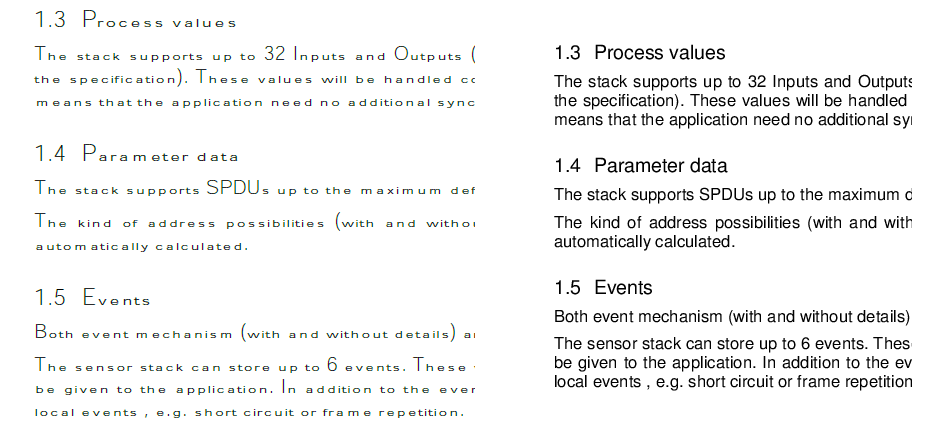
>> I don't know when exactly, but sometime in the past 6 months or so,
>> font support in acroread got broken.  Most of the PDF documents
>> generated by MS Office don't render correctly. I think the most common
>> font that doesn't render properly is Ariel. Acroread didn't used to
>> have any problems with these documents, and viewing them with out
>> applications seems to work OK.
>
> Blerg.  That should read "viewing them with _other_ applications seems
> to work OK".  IOW, emacs, epdfview, and mupdf all render the document
> using the correct fonts.
>
>>   http://www.panix.com/~grante/acroread-vs-emacs.png
I just installed acroread (I usually use Okular) and mine works fine
on all of the PDF files I tried... but I don't know if any files I
have were generated by MS Office. Ensure your have the corefonts
package installed. Newer versions of MS Office (2007+) don't use Arial
as the default sans-serif font anymore, they use Calibri. I'm not sure
if that one is included in corefonts or not.

If you open /opt/Adobe/Reader9/bin/acroread in a text editor, it is
actually a shell script. There is a section that has:

# Enable this if you want Adobe Reader to cache Font-config fonts
ACRO_ENABLE_FONT_CONFIG=1
export ACRO_ENABLE_FONT_CONFIG

Maybe you can try commenting that out and see if it makes a difference.