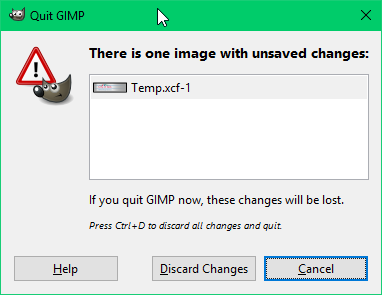
Short answer: This dialog is used because there may potentially be more than
one image open with unsaved changes.
Long answer: First, a few questions...

1 - Are you running GIMP in single-window mode or not?
2 - How many image windows did you have open?
3 - What command/shortcut did you use to close the window and/or exit GIMP?

Because here's the scenarios that may be in play:

1 - If you are simply closing the window, then in single-window mode this is
interpreted as exiting GIMP entirely while in multiple-window mode it is
interpreted as closing only that window (not exiting GIMP).
2 - In multiple window mode, when you close the last open image GIMP does not
exit at this time but instead leaves behind an empty placeholder window (in
case you need to open a new image, etc.).  You have to close the empty window
to actually exit GIMP.
3 - If you have multiple image windows open and you try to close all windows
and/or exit GIMP, there may be more than one image open with unsaved changes.
This is why the particular dialog shows a list of open images and only has
choices to discard all changes or cancel.

However, I do agree that the current logic is flawed and needs discussion --
the following points in particular:

- In single-window mode, multiple images are displayed as a row of tabs
(comparable to Internet browsers); however, when only one image is open the tab
bar is not shown -- leaving the user without a VISIBLE button to close only
that window (because hitting the standard Close button will exit GIMP
entirely).  Yes there is the menu command and the keyboard shortcuts work, but
this is the touchscreen era.  Other applications handle this scenario in
various ways -- e.g. Firefox always displays the tab bar even when only one tab
is open, Office displays a secondary Close button on the right side of the
menubar (distinct from the window's main Close button).

- When only one image is open, regardless of whether the user is closing the
window or exiting GIMP, GIMP should ALWAYS use the single-image version of the
"unsaved changes" prompt (i.e. save/discard/cancel) instead of the
multiple-images version (list of images, discard/cancel).

- The multiple-images version of the "unsaved changes" prompt should include,
in its list of open images, buttons to save the individual images directly from
this prompt.

-- Stratadrake
[email protected]
--------------------
Numbers may not lie, but neither do they tell the whole truth.


> Date: Mon, 4 Apr 2016 01:17:00 +0200
> From: [email protected]
> To: [email protected]
> CC: [email protected]
> Subject: [Gimp-user] Suggestion for dialog displayed on Gimp exit
>
> I can't seem to find anywhere specifically for suggestions/improvements to
> Gimp,
> and GimpTalk seems to be pretty much inactive so here I am:
>
> When I make a change to a .XCF project and go to close Gimp after forgetting
> the
> save the file, I see the dialog in the (hopefully) posted Image.
>
> There are three buttons: "Help", "Discard changes" and "Cancel"
>
> Now, 9 times out of 10 when I get this, the thing I want to do is save the
> file.
> Why is there no "Save" button on this dialog? The accepted standard for this
> scenario is a dialog with "Save", "Don't Save" and "Cancel" buttons and for
> me,
> this covers all the bases.
>
> Attachments:
> * http://www.gimpusers.com/system/attachments/241/original/Gimp4.png
>
> --
> RrnR (via www.gimpusers.com/forums)
> _______________________________________________
> gimp-user-list mailing list
> List address:    [email protected]
> List membership: https://mail.gnome.org/mailman/listinfo/gimp-user-list
> List archives:   https://mail.gnome.org/archives/gimp-user-list

_______________________________________________
gimp-user-list mailing list
List address:    [email protected]
List membership: https://mail.gnome.org/mailman/listinfo/gimp-user-list
List archives:   https://mail.gnome.org/archives/gimp-user-list