On Mon, 6 Jun 2016 15:56:37 +0200
YuGiOhJCJ Mailing-List <[email protected]> wrote:
> On Mon, 6 Jun 2016 02:22:04 -0400
> Steve Kinney <[email protected]> wrote:
>
> >
> >
> > On 06/05/2016 08:28 PM, Bob Long wrote:
> > > YuGiOhJCJ Mailing-List wrote on 06/06/16 07:13:
> > >
> > >> On Sun, 5 Jun 2016 23:11:43 +0200
> > >> YuGiOhJCJ Mailing-List <[email protected]> wrote:
> > >>
> > >>> Hello,
> > >>>
> > >>> I have cross-compiled gimp-2.8.16 (from linux 32 bit to windows 32 bit).
> > >>>
> > >>> It runs well on Windows 8.1, but when I do "File > Save As... > Save",
> > >>> I get the following popup window:
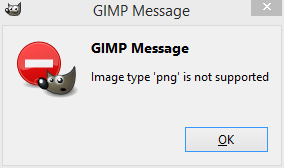
> > >>> "GIMP Message Image type 'png' is not supported"
> > >>>
> > >>> Any idea what could be the cause?
> > >
> > > You need to do "File > Export..." when "saving" as non-XCF format.
> > >
> > >>> Thank you.
> > >>> Best regards.
> > >>
> > >> Here is a screenshot of this popup window:
> > >> http://yugiohjcj.free.fr/gimp-save-xcf-error-png-not-supported.png
> > >
> > > My Web browser could not connect to that.
> >
> > wget wgot it.  It's a notification window with the title "GIMP Message,"
> > saying:
> >
> > GIMP Message
> > Image type 'png' not supported
> >
> > (OK button follows)
> >
> > I checked my local notification by "saving" a PNG file with GIMP 2.8.10
> > on Mint.  I got a bigger notification window, with the title "Extension
> > Mismatch," saying:
> >
> > You can use this dialog to save to the GIMP XCF format.  Use File >
> > Export to export to other file formats.
> >
> > "Take me to the Export dialog" follows as an underlined hyperllink, and
> > when clicked the notification window closes and replaces the Save dialog
> > with the Export dialog.
> >
> > (OK button follows)
> >
> > If the notification dialog has not changed to the first one described
> > above in GIMP 2.10.16, the problem sounds more like DLL Hell or
> > something similar than export vs. save commands.  Is your compiled
> > version linked to a PNG library it knows how to find and use?
> >
>
> Your "Extension Mismatch" notification window is not the same than mine.
> Your notification window appears because you try to save an image on GIMP in
> the PNG format.
> On GIMP, when you want to save an image you must use the XCF format.
> If you want to save in PNG format, you need to export the image instead of
> saving it.
> I am aware of that.
>
> My notification window appears when I try to save an image on GIMP in the XCF
> format.
> I know it is confusing because I save in XCF format but the notification
> window is about the PNG format.
>
> I don't think that GIMP is unable to find a DLL because if that was the case,
> the program would not run at all.
> When a DLL is missing, on Windows, I got a notification window telling me
> that I need a DLL.
>
> So, I think that at compile time, GIMP or one of its dependencies requires
> the PNG library but can be compiled without it if not found.
> So, I think the PNG support is disabled for a program or a library (maybe
> GIMP or one of its dependencies).
> If you know a way to find what is the program/library that is not compiled
> with the PNG support please tell me because I have no idea.

I have checked all the dependencies of GIMP that I need to build in order to
cross-compile GIMP:
* atk-2.16.0
* babl-0.1.16
* bzip2-1.0.6
* cairo-1.14.6
* fontconfig-2.11.1
* freetype-2.4.10
* gdk-pixbuf2
* gegl-0.2.0
* gettext-0.19.7
* gimp-2.8.16
* glib-2.42.1
* gtk+2-2.24.28
* harfbuzz-1.2.3
* icu4c-56.1
* libffi-3.0.13
* libiconv-1.14
* libjpeg-v9b
* libpng-1.6.18
* libtiff-4.0.6
* libxml2-2.9.2
* pango-1.39.0
* pixman-0.32.6
* zlib-1.2.8

What I can see is that these dependencies have a configure option to enable the
PNG support:
* cairo-1.14.6 (--enable-png)
* gegl-0.2.0 (--with-libpng)
* gimp-2.8.16 (--with-libpng)
* pixman-0.32.6 (--enable-libpng)
* gdk-pixbuf2 (--with-libpng)

I have rebuilt these packages with the corresponding PNG option enabled but I
still have the notification window on GIMP when I save in XCF format.
Well, that's just a minor problem because the file is saved correctly but I am
just wondering why this notification window about the PNG support appears.

Any idea?
_______________________________________________
gimp-user-list mailing list
List address:    [email protected]
List membership: https://mail.gnome.org/mailman/listinfo/gimp-user-list
List archives:   https://mail.gnome.org/archives/gimp-user-list