On 21/11/16 21:35, usagora wrote:
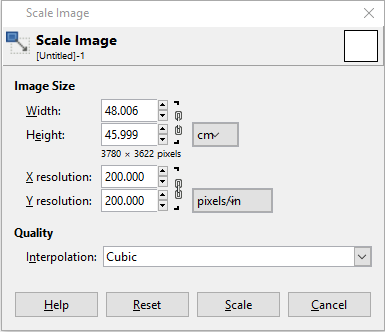
I'm running Gimp 2.8.16 on Windows 10.  When creating a new image or resizing a
current one, and I enter the dimensions for length and width, Gimp keeps
changing the fractional part of the units I enter.  For example, if I enter
48.000cm x 46.000cm, it changes it to 48.006cm x 45.999cm.  What gives?  It
doesn't do this with some units of measure, but it does for others.
See attachment

Attachments:
* http://www.gimpusers.com/system/attachments/336/original/Capture.PNG
Because the physical size you require doesn't convert to an integer
number of pixels, so Gimp computes the nearest integer value, and then
computes back the actual physical size. Yes, this looks a bit
superfluous, at current sizes and print definitions...
_______________________________________________
gimp-user-list mailing list
List address:    [email protected]
List membership: https://mail.gnome.org/mailman/listinfo/gimp-user-list
List archives:   https://mail.gnome.org/archives/gimp-user-list