Hello,

I'll start off by saying that I'm super-new to this program, so I'm a bit
clueless to what the tools are, where they are found, and what all they can do.
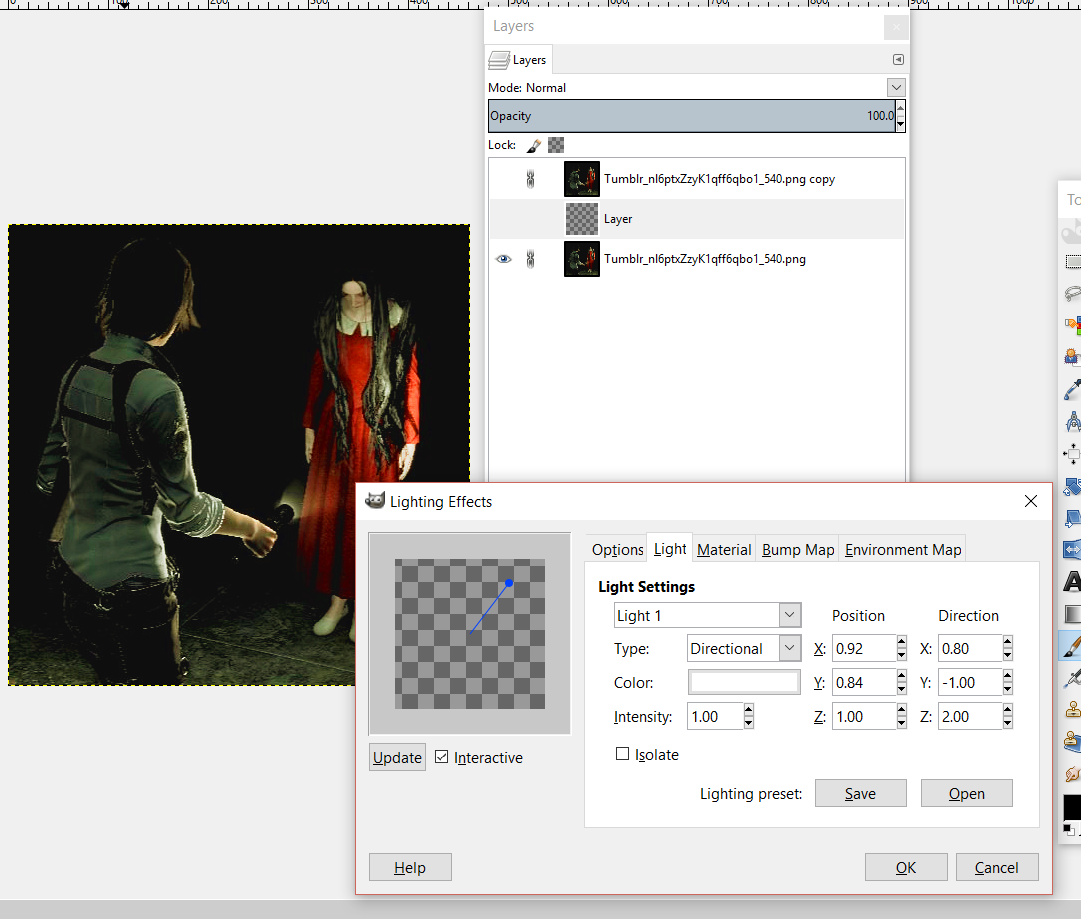
Now, the topic of the hour: I've been trying for the past hour to add a lighting
effect filter to this icon that I'm making.  As you can see in the snapshot,
there is a flashlight in it, so my goal here is to use the lighting effects to
intensify the light being shown on the girl in the red dress.

This was my intended plan:

Bottom layer - the original pic

Middle layer - a transparent layer with the lighting effect filter that I can
move around to match the angle/position of the flashlight

Top layer - everything in front of the flashlight cut away so only the woman
with the flashlight and the area behind her remains.

The transparent layer won't let me add lighting effects, though, as you can see
in the pic.  I can add the flares, but not a lighting effect.  I tried
video/written tutorials, but none of them addressed what to do about this issue.
Since then, I've tried extra layers, masks, etc., but nothing will allow me to
accomplish what I want to do.  I'm seriously on the verge of screaming.  x_x
Any help that anyone could offer would be very much appreciated.

Thank you!

Attachments:
*
http://www.gimpusers.com/system/attachments/422/original/Juli_Laura_icon_light.png

--
RunSebastian (via www.gimpusers.com/forums)
_______________________________________________
gimp-user-list mailing list
List address:    [email protected]
List membership: https://mail.gnome.org/mailman/listinfo/gimp-user-list
List archives:   https://mail.gnome.org/archives/gimp-user-list