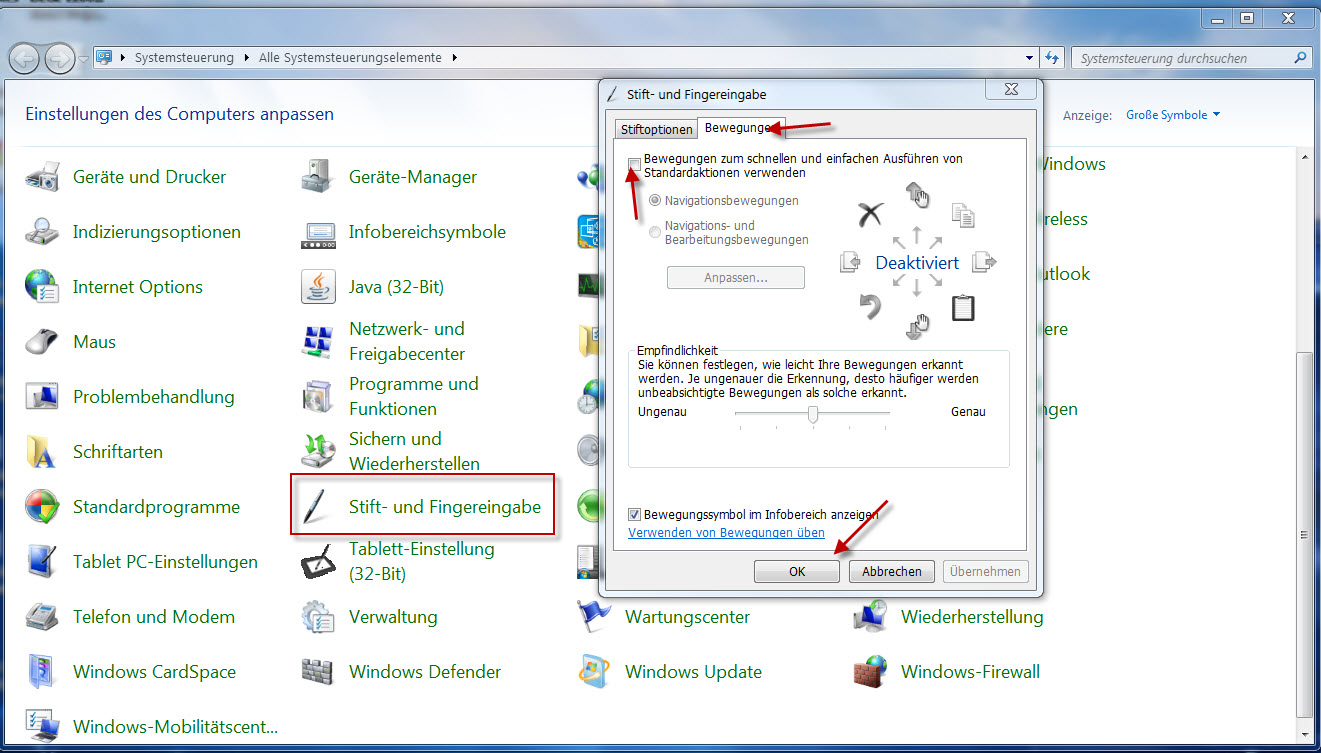
Hi, had the same problem, but found a solution (and just registered here to brag
about it... ;)).
The GIMP configuration is correct, i.e. change the tablet action from disabled
to "screen".
But Windows has a pen system setting which translates from German (sorry)
roughly as pen and finger input.
On the second tab "movements" you need to untick the movement box.

Then it should work fine.
Please let me know your result.

Cheers, Björn

>Hi,
>
>Just purchased an XP-Pen STAR 03 tablet. Installed the drivers and can
>see the pressure (2048) change in the app that came with the tablet.
>
>In GIMP 2.8(latest) > Configure Input devices. I can see the device as
>a "3  button stylus pen". If i leave the mode to disable then I can
>draw on a canvas (but no pressure sensitivity)
>
>If i select screen or window then I can no longer draw on the canvas..
>the cursor is no longer a circle/paintbrush (see second screengrab) as
>if the cursor is off the page..
>
>Weird thing is.. 2.6 GIMP seems to work (after a fashion...)

Attachments:
*
http://www.gimpusers.com/system/attachments/484/original/GIMP_Setting_System_Tray.jpg

--
BjoernML (via www.gimpusers.com/forums)
_______________________________________________
gimp-user-list mailing list
List address:    [email protected]
List membership: https://mail.gnome.org/mailman/listinfo/gimp-user-list
List archives:   https://mail.gnome.org/archives/gimp-user-list