>Hi,
>
>I have just installed GIMP v2.8.22
>
>I may have missed this function in the help system.
>
>is there an easy way to Straighten Horizons?
>
>i can use the ROTATE tool but is there a LINE DRAWING TOOL?
>
>Basically is there a way to draw a line along the horizon in the photo
>using the mouse and have GIMP make this the horizontal axis?
>
>Thanks
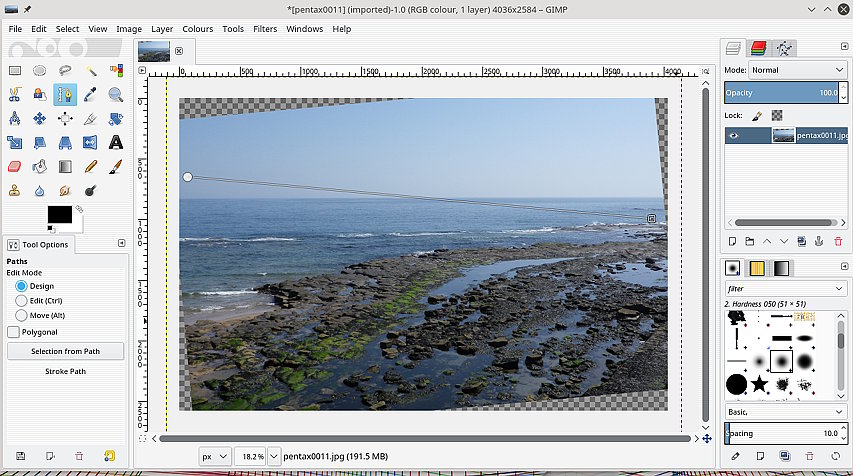
The standard way is the Rotate tool in 'Corrective (Backward)' mode, line the
grid up with the horizon, click rotate, and the image is rotated accordingly.

However, to draw a 'line' you need a script. One attached 'auto-rotate.scm'
**unzip** it pop it into your Gimp profile scripts folder

Windows C:\Users\"yourname"\.gimp-2.8\scripts

or Linux ~.gimp-2.8/scripts

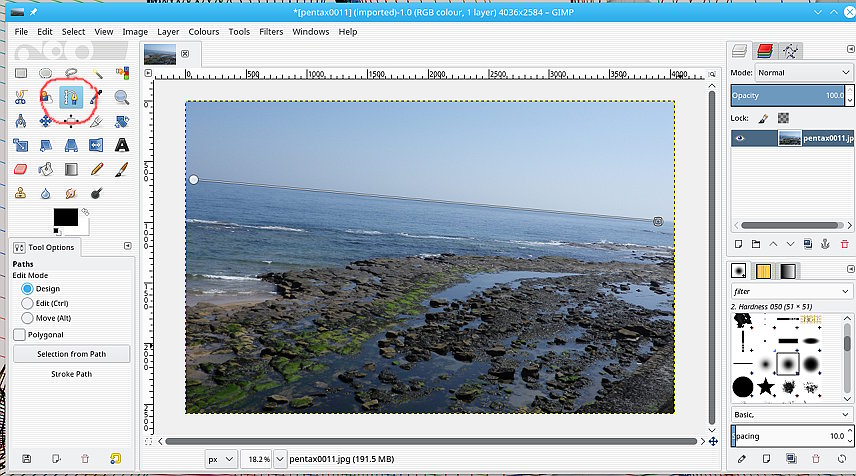
Usage: Draw a **path** along the horizon, then apply the script, Layer ->
Auto-Rotate

Attachments:
* http://www.gimpusers.com/system/attachments/670/original/path.jpg
* http://www.gimpusers.com/system/attachments/671/original/level.jpg
* http://www.gimpusers.com/system/attachments/672/original/auto-rotate.scm.zip

--
rich2005 (via www.gimpusers.com/forums)
_______________________________________________
gimp-user-list mailing list
List address:    [email protected]
List membership: https://mail.gnome.org/mailman/listinfo/gimp-user-list
List archives:   https://mail.gnome.org/archives/gimp-user-list