>Hi
>
>I created an image and saved it as a png file.  I thought this was
>supposed to get rid of the white background color.  However when I
>tried to upload it to Printful to create a black t-shirt ,  the white
>background color is still there. What can I do? Any suggestions. I'm
>trying to crate t-shirts for a charity event and need them ASAP.
Did you remove the white background? Just saving as a png does not do that.

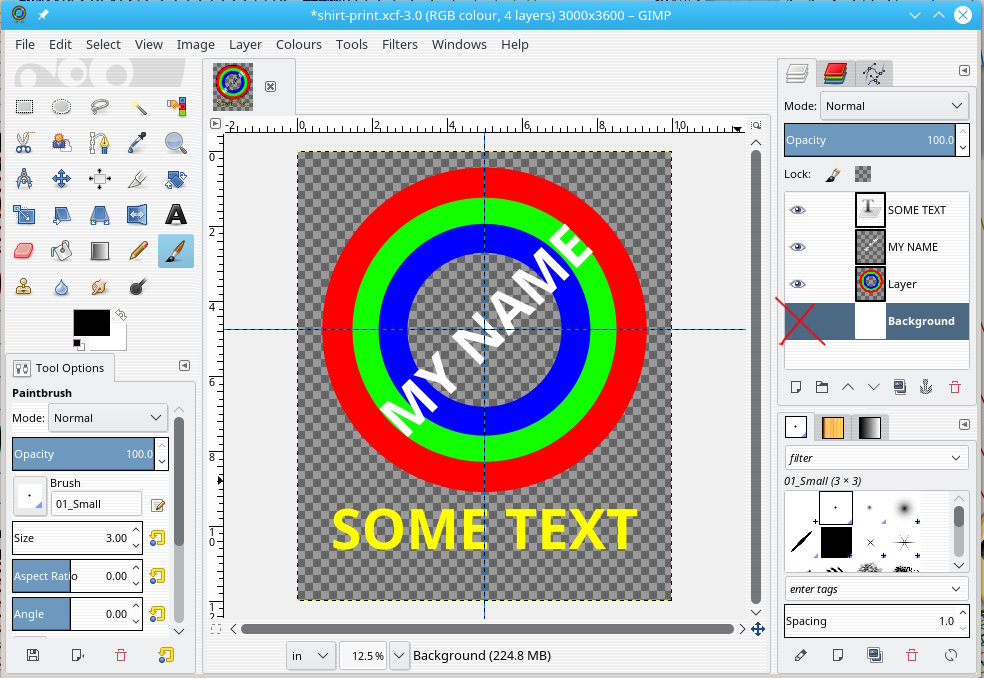
Did your png image look like the attached screenshot before your exported it?
The 'transparent' parts should show the typical checker-board pattern denoting
transparency.

White can be removed using Gimp menu: Colors -> Color-to-Alpha , white is the
default color to remove.

That will also remove parts that you might want as white, so you might have to
start again or add as required.

I have not come across Printful before but they do have very reasonable
requirements,

https://www.printful.com/blog/everything-you-need-to-know-to-prepare-the-perfect-printfile/

Make your base image in inches (say 10"x12" = 3000 x 3600 pix) and 300 ppi.
*But* remember Gimp is a raster editor and works in pixels so small imported
images when scaled up will be less-than-wonderful.

Work on new transparent layers.

The Gimp default for adding a new layer is with transparency. Keep the base
layer visible (if it helps) until you are finished. Before exporting as a png
turn the visibility off. The 'eye' icon toggles on/off.

**Save** your work as a Gimp .xcf This keeps all layers, guides, 'text-as-text'
etc. in case you need to go back and alter.

**Export** as a png will merge the visible layers and 'lose' the guides and
layer boundaries only seen in Gimp.

Reminder, export as a jpeg and you lose transparency, back to square one.

rich: www.gimp-forum.net

Attachments:
* http://www.gimpusers.com/system/attachments/712/original/print-shirt.jpg

--
rich404 (via www.gimpusers.com/forums)
_______________________________________________
gimp-user-list mailing list
List address:    [email protected]
List membership: https://mail.gnome.org/mailman/listinfo/gimp-user-list
List archives:   https://mail.gnome.org/archives/gimp-user-list