>Hi All - I'm trying to add some curved text to an image using the text
>to path methodology.
>I've tried half a dozen fonts - but the all distort to the point of
>being unreadable.
>Is there a solution to this (that's easy to follow!, I'm pretty basic
>lol)
>
>Thanks
It could be all sorts of things

- A high degree of curvature for the path. Sharp corners do not work.

- A very small font size will make for poor quality.

- and of course if the text is too long for the path, it will shoot off to a
corner.

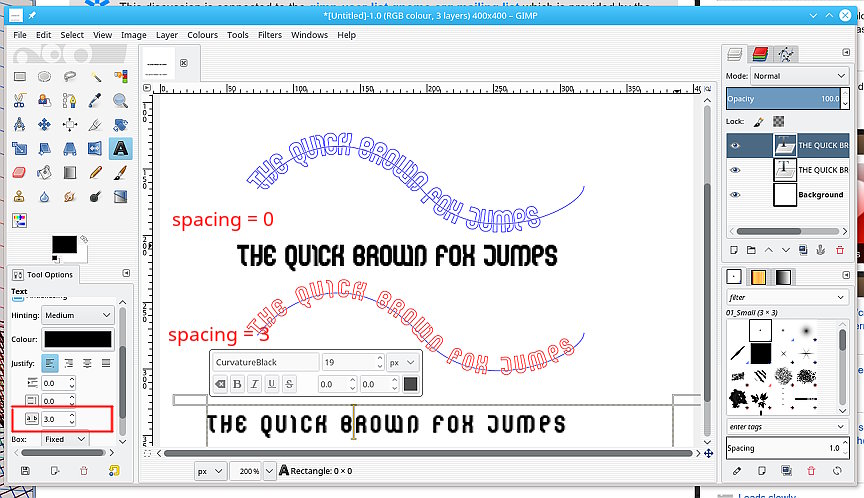
Try increasing the character spacing. You might have to also reduce character
size to fit the path. It is a trade off. see the attached screenshot.

An alternative is a python plugin from
http://sourceforge.net/projects/gimp-path-tools/files/scripts/

The top one at the moment: ofn-text-along-path.zip  Unzip it, pop the
ofn-text-along-path.py in your Gimp profile (for Windows
C:\Users\your-name\.gimp-2.8\plug-ins Read the html description of use. It will
make a best-fit to a path as well as better kerning of characters.

rich: www.gimp-forum.net

Attachments:
* http://www.gimpusers.com/system/attachments/733/original/fonts.jpg

--
rich404 (via www.gimpusers.com/forums)
_______________________________________________
gimp-user-list mailing list
List address:    [email protected]
List membership: https://mail.gnome.org/mailman/listinfo/gimp-user-list
List archives:   https://mail.gnome.org/archives/gimp-user-list