>Hi, I too have an issue understanding how resizing works, especially
>with reference to Word.
>I wasn't sure if I should post a new thread, but decided this was sort
>of pertinent to my issue.
>Please let me know if I should create a new post.
>
>Basically, If I have a big image (a signature, black and white, about
>1000 pixels wide), then insert into Word, and resize it ( to about a
>tenth of it's size) it looks fantastic.
>If I take the image, resize it in Gimp (or anything else for that
>matter) from 1000 to 100, it looks really bitty and blocky, and
>inserting to Word it remains bitty and blocky..
>
>Why is this? Is this to do with the dpi as well? And is there a work
>around?
>
>Thanks
Gimp is a raster editor and works in pixels. When you scale an image, the pixels
are not scaled they stay the same so for your signature image reduced to 10%
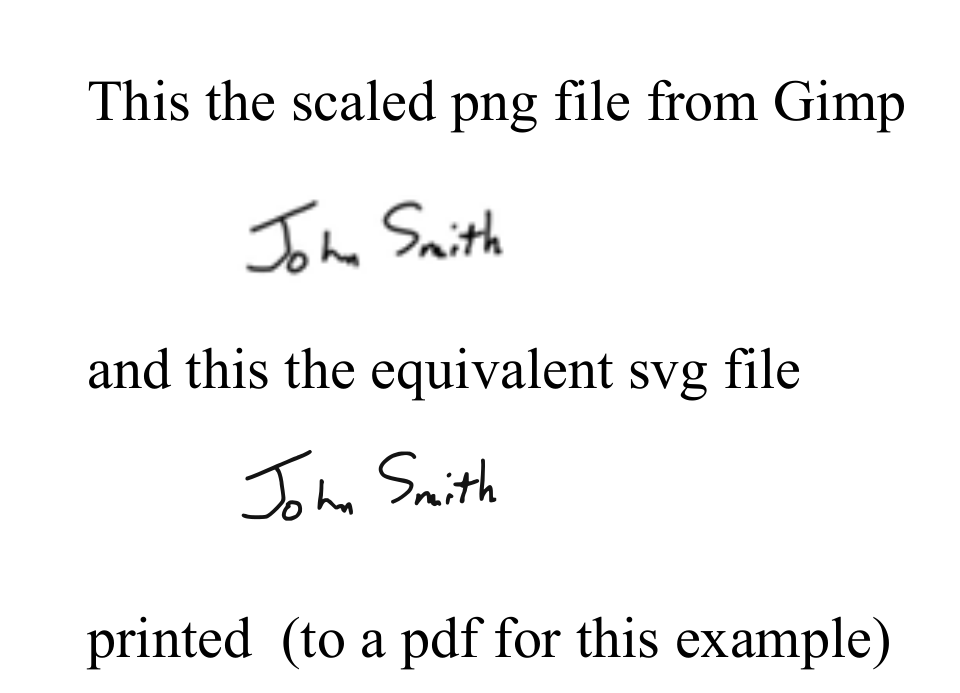
means several hundred pixels are crammed into maybe a dozen: see screenshot 1

You can get a little improvement by pre-blurring the large image but 1-10th the
size is asking a lot.

For a better result convert the raster image into a vector image, typically a
SVG. You can do this using freeware Inkscape or there are online converters.

In a document for comparison, the type size is 14 to give some idea of scale.
screenshot 2

rich: www.gimp-forum.net

Attachments:
* http://www.gimpusers.com/system/attachments/760/original/reduced.png
* http://www.gimpusers.com/system/attachments/761/original/example.png

--
rich404 (via www.gimpusers.com/forums)
_______________________________________________
gimp-user-list mailing list
List address:    [email protected]
List membership: https://mail.gnome.org/mailman/listinfo/gimp-user-list
List archives:   https://mail.gnome.org/archives/gimp-user-list