>When I use the scale tool, I can see the dimension in pixels of my
>selection. I can also switch the unit and see measurement in mm. When
>printing this image, will I get the mm annouced in Image --> scale
>image ? Which are the same seen with the scale tool by the way.
>Because if I get what I have at the screen, it will be much smaller.
>Indeed, taking off the dot for dot, changes quite a lot the visual
>dimension. And it is much closer but still different...
>The screen resolution seems to be good though... I don't understand
>the difference between the image properties and the measurement on the
>screen...
Sorry I do not really understand you.

When you use Image -> Scale Image you change the number of pixels in the image.
Gimp will produce an image width pixels x height pixels.

see: https://docs.gimp.org/en/gimp-image-scale.html

Printing is a different matter. The printed width is from the width pixels
divided by the pixels per inch (ppi). So the same image can be printed in many
different sizes just by changing the ppi.

see: https://docs.gimp.org/en/gimp-image-print-size.html

You can get the actual print size there or as before in Image Properties.

>I am trying to resize an image according to an image detail (the rule
>in my exemple) of which I know the size. When I select my detail
>reference, and set the dimensions with the scale tool, what I get is
>the resizing of the selection. The rest of the image is not resized at
>all. What I'd like to have is a homgenous resizing of the whole image
>thanks to the detail reference. To say it differently. I'd like to say
>to gimp : "resize the whole image knowing that this little detail is
>100mm long".
>

It is possible but you will have to do some arithmetic. use the gimp measure
tool

 https://docs.gimp.org/en/gimp-tool-measure.html

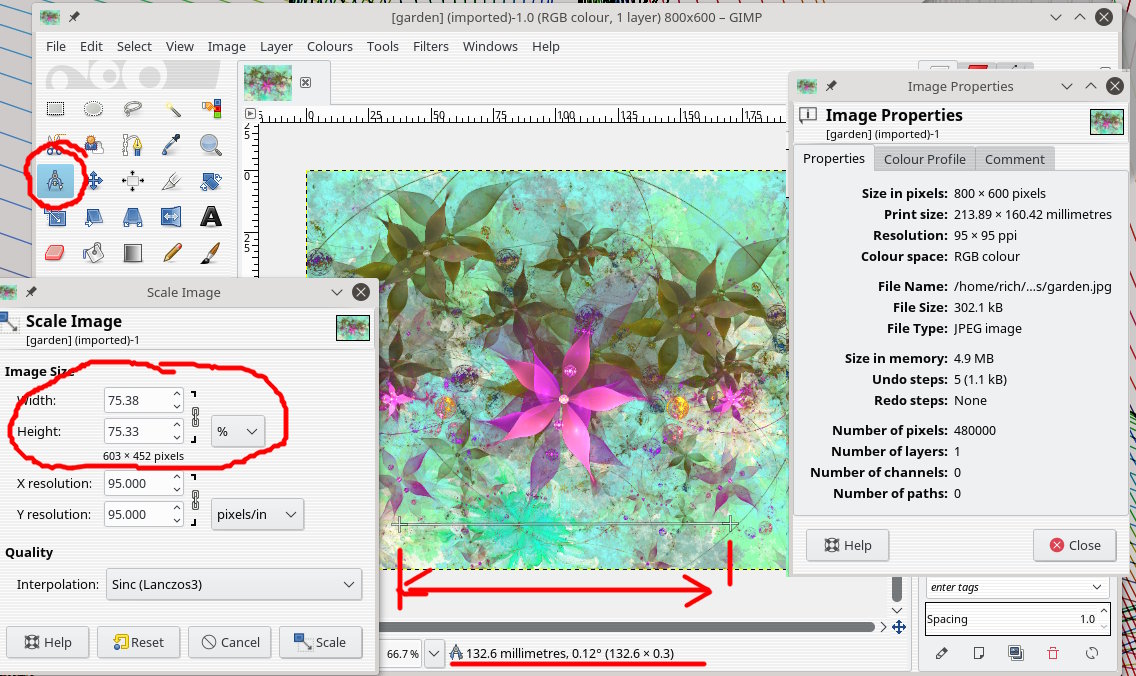
Measure the distance on the image - the example is 132.6 mm needs to be 100 mm
scale factor is 100/132.6 As a percentage 77.4% There is a small error because
Gimp has to fit it to ***pixels***. see screenshot

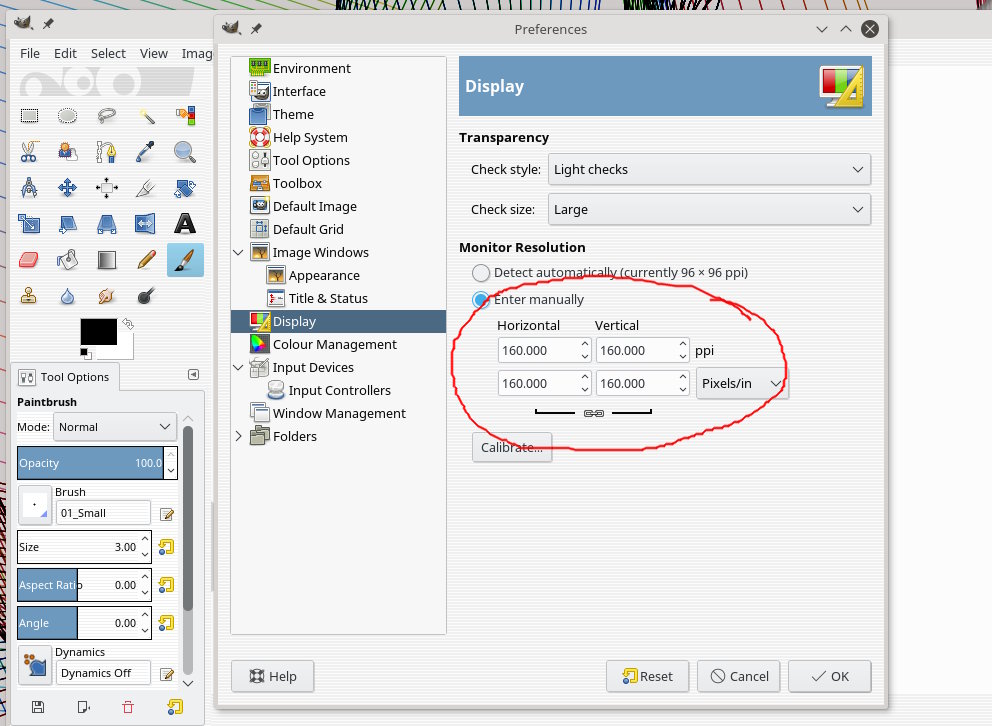
The other question on screen resolution. Has to do with the monitor pixel
density.

There is a setting Edit -> Preferences -> Display. Gimp might not get the
automatic setting correct. Sometimes you have to set it manually. The screenshot
shows my HD laptop (1920x1080) settings.

Attachments:
* http://www.gimpusers.com/system/attachments/790/original/scale.jpg
*
http://www.gimpusers.com/system/attachments/791/original/display_resolution.jpg

--
rich404 (via www.gimpusers.com/forums)
_______________________________________________
gimp-user-list mailing list
List address:    [email protected]
List membership: https://mail.gnome.org/mailman/listinfo/gimp-user-list
List archives:   https://mail.gnome.org/archives/gimp-user-list