>HI
>I know how to save a preset, restore a preset, delete a preset etc..
>
>Ok I select the smudge tool,  but what do I do to pick a preset which
>I made for the smudge tool  out of the list of presets???????
>
>Thank you,
>Terry
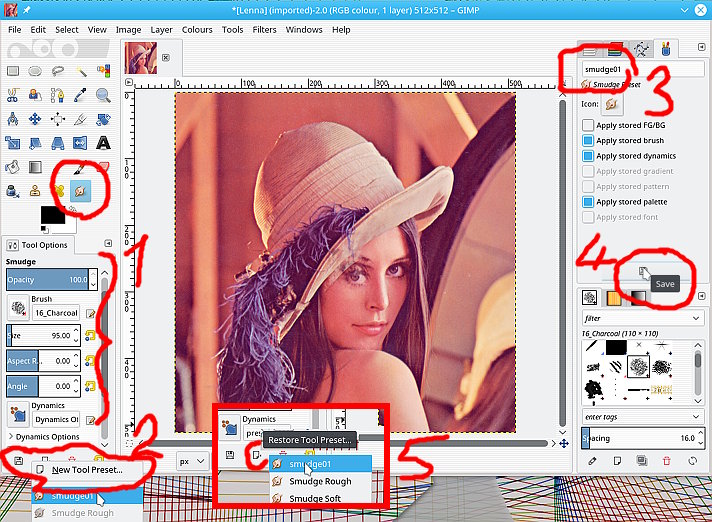
I am sure you have saved the preset correctly. Just a run through. Tried to show
everything in one composite screenshot.

Set up the tool with all the options you want, brush, size..etc (1)

Click on New Tool Preset (2)

Which brings up the presets dialogue, give it a name (3)

Set any options, and save (4)

...and when you use the restore icon with the ***smudge tool active*** the entry
is missing (5)

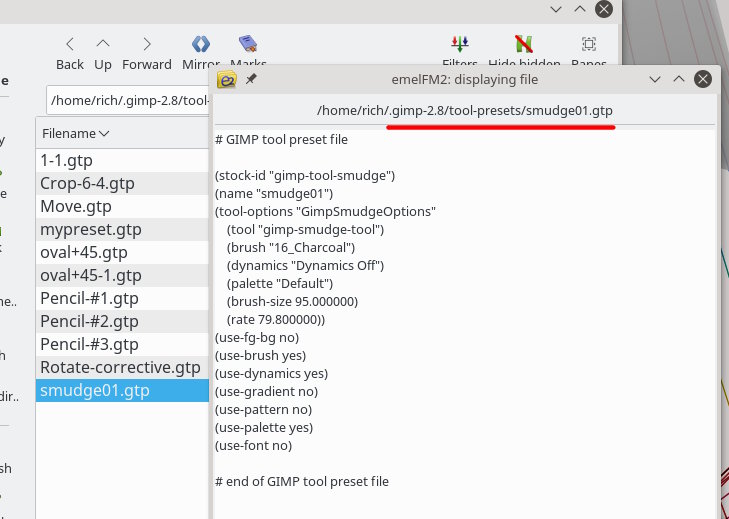
No real answer, it works here. You can check the preset, which is a text file,
in your Gimp profile

C:\Users\your-name\.gimp-2.8\tool-presets\some-name.gtp example in screenshot.

Attachments:
* http://www.gimpusers.com/system/attachments/890/original/01-preset.jpg
* http://www.gimpusers.com/system/attachments/891/original/02-preset.jpg

--
rich404 (via www.gimpusers.com/forums)
_______________________________________________
gimp-user-list mailing list
List address:    [email protected]
List membership: https://mail.gnome.org/mailman/listinfo/gimp-user-list
List archives:   https://mail.gnome.org/archives/gimp-user-list