>Hi, I just upgraded to the latest GIMP (2.10.0) and I am very happy
>with the update, however I have an issue that I can't seem to resolve:
>
>When I am exporting my file to TIFF format, from my 32-bit precision
>GIMP file the color information seems to be corrupt (or goes back to
>4-bit precision), as can be seen in the comparison screenshot
>attached.
>- Whenever I export to tiff from a 8-bit GIMP file (same as in the
>previous GIMP version) everything seems fine.
>- Whenever I export to jpg, png or pdf from my 32-bit file, everything
>is fine.
>
>
>I have tried to reproduce my findings (successfully) with the MWE in
>the link below:
>
>https://drive.google.com/open?id=1Av0LBrVf7NBKnu9odO2DO68v5VL7zt_M
>
>All help is welcome!
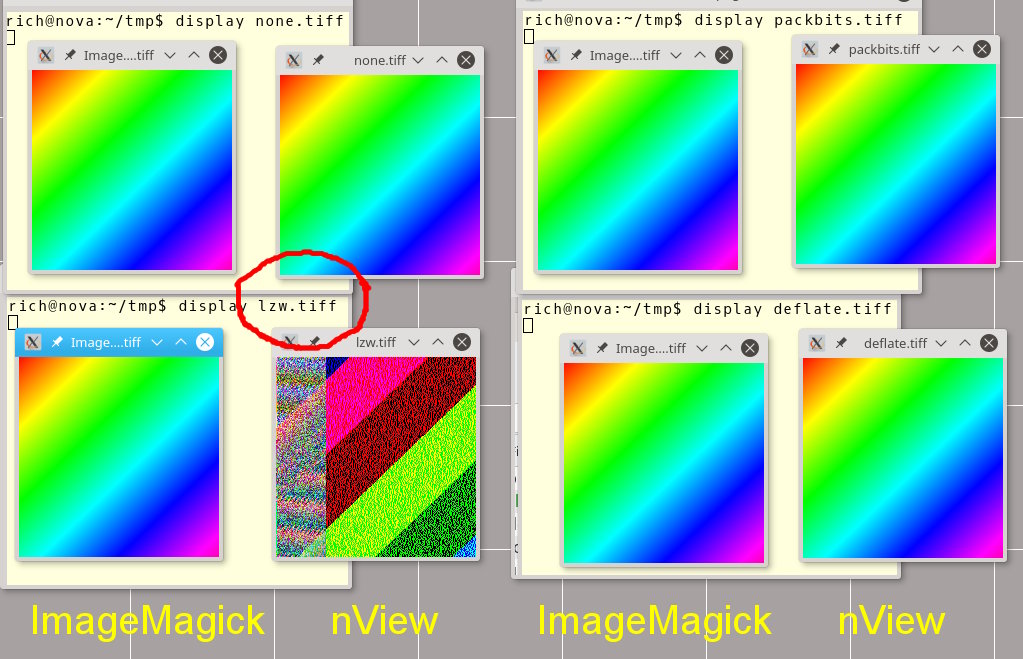
Could be Gimp, could be the Image Viewer.

I use linux so can not comment on the Windows Viewer but two different linux
viewers and the four different compression modes that support 32 bit.

ImageMagick works on all four - nView scrambles the lzw compressed tiff.

Attachments:
* http://www.gimpusers.com/system/attachments/896/original/compare.jpg

--
rich404 (via www.gimpusers.com/forums)
_______________________________________________
gimp-user-list mailing list
List address:    [email protected]
List membership: https://mail.gnome.org/mailman/listinfo/gimp-user-list
List archives:   https://mail.gnome.org/archives/gimp-user-list