I downloaded 2.10.4 build for Windows from https://www.gimp.org/downloads/ and
installed it. No errors during the install, but when I run it I get two error
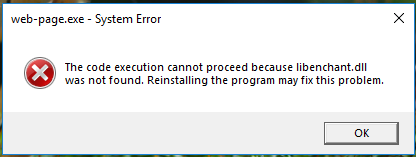
msgboxes during startup. The first msgbox has the title "web-page.exe - System
Error" and says "The code execution cannot proceed because libenchant.dll was
not found. Reinstalling the program may fix this problem."
The second msgbox has the title "help-browser.exe - System error", and the text
in this msgbox is identical to the text in the first msgbox.

Once I answer the two msgboxes, Gimp starts up and appears to run ok.

I checked the SHA-256 hash of my downloaded install file, and it matches the
value given on the download web page. I also ran the install a second time, as
suggested in the error msgs, but the two startup error msgboxes still appear.

See attached screenshot of one of the msgboxes.

Attachments:
* http://www.gimpusers.com/system/attachments/979/original/starterr.png

--
NickP (via www.gimpusers.com/forums)
_______________________________________________
gimp-user-list mailing list
List address:    [email protected]
List membership: https://mail.gnome.org/mailman/listinfo/gimp-user-list
List archives:   https://mail.gnome.org/archives/gimp-user-list