>On 10/16/2010 07:05 AM, BlackDalek wrote:
>> Ok, what I want to do is turning out to be a little more difficult than
>> usual.
>> I can find plenty of tutorials on making parts of images transparent or
>> semi-transparent.
>> I can work out how to do this from scratch, creating an image.
>> The problem here is I am not creating an image from scratch - I want to take
>> an existing flat image with existing background and remove background and be
>> left with an image (complete with transparent and semi-transparent areas)
>> which I can then save to a PNG or use on any other background I wish.
>>
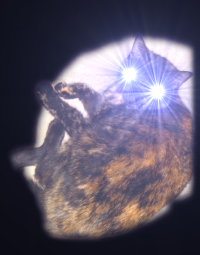
>> To illustrate what I want to do, I have made mockup images below.
>> Image 1 shows an image with a black background. I want to remove the black
>> background but leave the image and semi-transparent "rays" intact so they
>> can be placed onto a different background, as in image 2. Note that the
>> "rays" appear over the new background colour.
>>
>> image 1 http://i7.photobucket.com/albums/y265/BlackDalek/kbblack.png
>>
>> image 2 http://i7.photobucket.com/albums/y265/BlackDalek/kbcolour.png
>>
>> If anyone knows how to achieve this, please ellaborate. Feel free to
>> download and use the above kbblack.png image to explain how to get from
>> image 1 to image 2.
>>
>> Thanks
>>
>>
>I get fairly close results by using two layers for the cat from top to
>bottom:

>1) Plain cutout from original by using the magic wand on the background
>(the goal being to get  a cutout of the center of the cat) with a 5pix
>grow/feather

>2) "color to alpha" from original using black as the color.

>3) Diagonal gradient using colors picked from your color version


I tried your suggestion. Your method produced far better results than what I
managed (trying to use a layer mask). I think I can get around the problem
using a combination of clever curve manipulation, desaturation and colour to
alpha. Thanks.


--
BlackDalek (via gimpusers.com)
_______________________________________________
Gimp-user mailing list
[email protected]
https://lists.XCF.Berkeley.EDU/mailman/listinfo/gimp-user