Hi,
Thanks for the good idea. I really like the concept. However, this isn't
very useful when there are three or more desktops in linear view. Does
anyone has other ideas to solve this issue?
But in general, the idea is great!

Best regards,

Kaj-Ivar

Op 15-04-10 15:41, Ryan Peters schreef:
On 04/15/2010 07:40 AM, Rovanion Luckey wrote:
Good day, I have an idea to present that I would like to call the
PieThrower.
The idea resolvs around providing the user with an easy and fast
interface to "throw" application windows to
different workspaces.
The inspiration came from this very mailing list. Basically the
discussion went around adding buttons
to the window list. Either many buttons representing each direction
to which a window could go or
one button spawning a secondary menu showing one button for each
currently existing workspace.
While these designs solve the issue they either clutter the window
border in a way that might seem
too much or they are based on two a two step menu with small icons.
What the PieThrower bases around is the concept of the user throwing
or sending windows to other
workspaces with the use of a pie or circle menu, depending on what
you like to call it. A pie menu is
a menu shaped as a circle with one slice for each option. There are
two ways as I see it that this
interface could be accessed, either by a button located on window
border or when the middle mouse
button is pressed on the border. When the user triggers interface a
pie or circle menu appears
showing one piece for each one of maximally four directions possible.
The menu is spawned around
the mouse or button location and the different are activated either
by mouse position or release of the
mouse button.
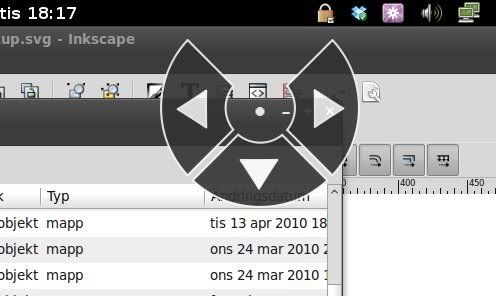
To break up the preceding wall of text and further explain the
design, here is the PieThrower spawned
by a button when three other workspaces are open to the left, to the
right and underneath:
i296.photobucket.com/albums/mm167/Rovanion/ButtonMockup.jpg?t=1271184688
<http://i296.photobucket.com/albums/mm167/Rovanion/ButtonMockup.jpg?t=1271184688>
This pie menu in this mockup is spawned by a button. In this case the
user can either press the
button, then release the mouse again, and then press the slice he or
she wishes to. But this is not
the most efficient way to go. Pressing the button, but never
releasing it brings up the menu just as
fast.
Now there are two different ways to go here. One where a slice is
activated when the user releases
his mouse on or outside of a slice. The inner circle always cancels
the menu. The other where
activation of a slice happends either when the user releases his
mouse on a slice or directly when the
mouse reaches outside of a slice. This second option is the one that
would give a real edge to the
function making it feel as if you were throwing the window to your
next workspace.
Here is a second mockup spawned from middle mouse button showing a
usecase where Gnome
Shell is sorting the workspaces in linear view. Here the user has one
workspace open to the left but
none to the right, but the interface allows for the user to open up a
new workspace and send the
window to it:
i296.photobucket.com/albums/mm167/Rovanion/ButtonMockup2.jpg?t=1271184731
<http://i296.photobucket.com/albums/mm167/Rovanion/ButtonMockup2.jpg?t=1271184731>
So after this throw at explaining the PieThrower I would like to ask
the code writers who managed to
read through the whole idea, is this possible to do? And if it is
possible to realize this idea, what happens next?
PS: The same design could be used to switch workspaces, middle click
background or other suitable area and off you go.
--
www.twitter.com/ <http://www.twitter.com/Rovanion>Rovanion


_______________________________________________
gnome-shell-list mailing list
[email protected]
http://mail.gnome.org/mailman/listinfo/gnome-shell-list
Love it! This makes sense, as it more easily exposes the idea of
switching workspaces and doesn't require going to the overlay or using
some kind of keyboard shortcut. I hope something similar to this is
implemented in the future!
_______________________________________________
gnome-shell-list mailing list
[email protected]
http://mail.gnome.org/mailman/listinfo/gnome-shell-list
_______________________________________________
gnome-shell-list mailing list
[email protected]
http://mail.gnome.org/mailman/listinfo/gnome-shell-list