On Sat, 2005-12-03 at 01:21 -0500, Volker Englisch wrote:
> Testing continues with the File --> Open menu option:
> - I'm not sure if this is intended but just in case it is not I
>    wanted to mention it:
>    When I have the main Accounts window open I see the following
>    sub menus listed
>       Open...
>       Open Budget
>       Open Account
>       Open Subaccounts
>    When I have a Budget tab active I only see the sub menus:
>       Open...
>       Open Budget
>    It may be desirable to being able to select and open an account
>    from the Budget window as well.

Makes sense.  I've added support for opening an account from the budget
page.

> - In the Accounts window, when I select an account without sub accounts
>    the 'Open Subaccounts' option is available.
>    I would have expected this option not to be available for accounts
>    without a sub account.  However, if this option is supposed to
>    provide a way to open an account in the Journal View then it should
>    probably just do that.

This opens the account and all (including zero) child accounts in
journal mode.  This could be changed so the menu item is only active if
a child has sub-accounts, but it complicates the code.  Especially in
the budget page where you can select multiple accounts at once.  [And
now open them all at the same time. :-) ]

> - The following item is probably more related to the Budget Preferences
>    but it shows up when opening a budget:
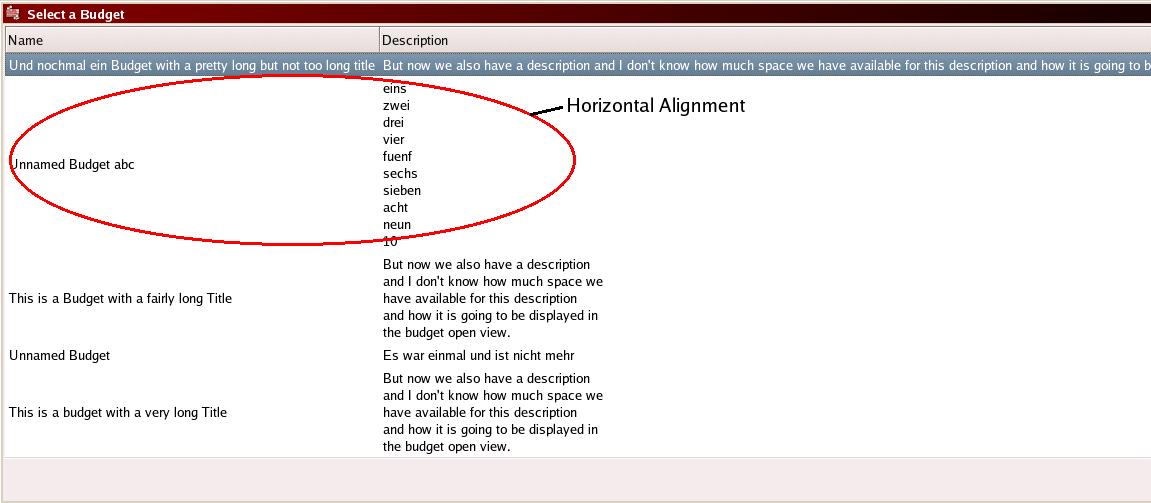
>    When entering a long description for a budget without specifically
>    entering line breaks, the 'Select a Budget' window extends over the
>    width of the screen.  It may be better to restrict the description to
>    something like 40 to 60 characters or provide horizontal scroll bars.
>    Please see
>        http://www.englisch.us/~volker/G2_Testing/BudgetOpen.jpg
>    The image displays the entire screen width.
>
> - The same is true for long 'vertical descriptions'.
>
> - The vertical alignment for the budget name in the 'Select a Budget'
>    window is set to 'center'.  Personally, I would prefer this to be
>    aligned to the top.

All the vertical alignments are set to 'center'. The reason this looks
funny is the names are a single line of text, and the descriptions are
two lines (with the second line being empty).  If you remove the
carriage return from the end of your description you'll see what I mean.
Chris, I don't know what you want to do here.  Keep the user description
formatted exactly as input (minus any trailing carriage return) or
always reformat the text.

> - Also, at the moment the splash screen is displayed _behind_ the
>    active window

This seems to be a window manager thing.  I never had an issue with
using FC3, but when using FC4 the splash always appears behind the
active window.  (Not just gnucash, but other apps as well.)  IIRC, this
change was made to prevent popup windows from getting keystrokes meant
for the active application.

I've tried changing the code a couple of different ways and can't find
one that puts the splash screen on top on my FC4 system.

David


_______________________________________________
gnucash-devel mailing list
[email protected]
https://lists.gnucash.org/mailman/listinfo/gnucash-devel