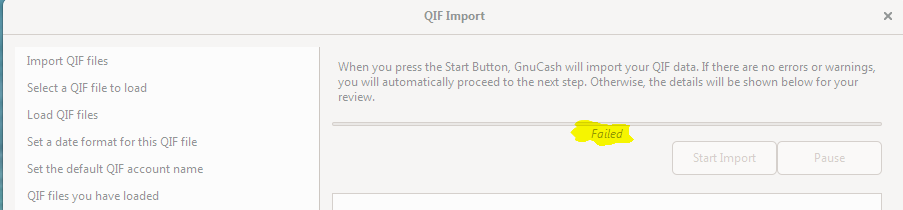
there is no trace file generated
The import fails on the second step (importing the QIF file). The first being
checking the transfers.
By the way I'm able to use my data as I install GNU version 3.1 import the data
then install version 3.5 and use the data.
Is just that the importing fails otherwise I find version 3.5 better and faster
than the previous one.

Hopefully they will fix the importing function with the next release.

________________________________
From: gnucash-user <[email protected]> on
behalf of [email protected] <[email protected]>
Sent: Tuesday, June 4, 2019 12:00 PM
To: [email protected]
Subject: gnucash-user Digest, Vol 195, Issue 4

Send gnucash-user mailing list submissions to
        [email protected]

To subscribe or unsubscribe via the World Wide Web, visit
        https://lists.gnucash.org/mailman/listinfo/gnucash-user
or, via email, send a message with subject or body 'help' to
        [email protected]

You can reach the person managing the list at
        [email protected]

When replying, please edit your Subject line so it is more specific
than "Re: Contents of gnucash-user digest..."


Today's Topics:

   1. Re:  GNUCASH Android (Geert Janssens)
   2. Re:  GC CTD lost saved reports (Geert Janssens)
   3. Re:  QIF import fails in GnuCash 3.5, win 7 (Tom Hatzigeorgiou)
   4. Re:  QIF import fails in GnuCash 3.5, win 7 (Derek Atkins)


----------------------------------------------------------------------

Message: 1
Date: Mon, 03 Jun 2019 18:20:33 +0200
From: Geert Janssens <[email protected]>
To: [email protected]
Cc: Derek Atkins <[email protected]>
Subject: Re: [GNC] GNUCASH Android
Message-ID: <[email protected]>
Content-Type: text/plain; charset="us-ascii"

Op maandag 3 juni 2019 17:02:33 CEST schreef Derek Atkins:
> Hi,
>
> nor via gnucash-user <[email protected]> writes:
> > Some more feedback for Mr. Jon,when i try to open a file saved with
> > gnucash
> > desktop v.3.5 (windows) the error reports,  "unable to parse transaction
> > time 2019-04-30 20:00:00" However, same file could be opened when exported
> > as "Export Accounts" in xml format. i.e file without any transactions. nor
>
> Well, sure, because when you Export Accounts, there are no transactions,
> so the transaction parser is never used on read.
>
> A better question is, what's wrong with that transaction time and why is
> the parser barfing on it?
>
> > Please remember to CC this list on all your replies.
> > You can do this by using Reply-To-List or Reply-All.
>
> -derek

John recently changed the date format in Gnucash to no longer include timezone
information, but gnucash-on-android still expects it to be there.

We got aware of this issue last week and John updated the gnucash side again
to include the timezone information to accomodate the Android users.

Geert


------------------------------

Message: 2
Date: Mon, 03 Jun 2019 19:28:01 +0200
From: Geert Janssens <[email protected]>
To: [email protected]
Cc: Chris Good <[email protected]>, [email protected]
Subject: Re: [GNC] GC CTD lost saved reports
Message-ID: <[email protected]>
Content-Type: text/plain; charset="us-ascii"

Op maandag 3 juni 2019 17:28:50 CEST schreef Chris Good:
> > Message: 4
> > Date: Sun, 02 Jun 2019 22:34:14 +0200
> > From: Geert Janssens <[email protected]>
> > To: [email protected]
> > Cc: Elmar <[email protected]>
> > Subject: Re: [GNC] GC CTD lost saved reports
> > Message-ID: <[email protected]>
> > Content-Type: text/plain; charset="us-ascii"
> >
> > Op zondag 2 juni 2019 20:37:44 CEST schreef Elmar:
> >> OK, this is a weird.  I was editing some of the options in a report,
> >> specifically unhighlighting one account and highlighting another to
> >> include, and tried to save the report.  GC crashed to desktop.
> >> Reopening it (open anyway), now GC tells me that I have no saved reports
> >> at all!  Looking in .gnucash folder, I see saved-reports-2.4 (and its
> >> backup file) dated in 2018, so they are there, and they are in the
> >> backup 7zip archive dated 15APR2019 (created by BackupGnuCash.jar along
> >> with the .gnucash.gcm and the .gnucash files itself).  OTOH aqbanking
> >> works fine.  This is GC 3.5 running under Linux Mint 19.1 Mate desktop.
> >> How do I get my reports back? - Elmar
> >
> > For gnucash 3.x and up gnucash looks for this file in
> > $HOME/.local/share/gnucash
> > Are files in that directory also backed up by BackupGnuCash.jar ? You
> > should restore to that directory as well if you want gnucash to find your
> > saved reports again.
> >
> > Regards,
> >
> > Geert
>
> Hi Elmar and Geert,
>
> Yes latest BackupGnuCash (1.3.1) handles all the default locations for
> GnuCash 3.x Configuration files.
>
> See
> https://github.com/goodvibes2/BackupGnuCashLinux
> Or
> https://github.com/goodvibes2/BackupGnuCashWin
>
> Regards, Chris Good

Good to hear that. Thanks for the update!

Geert


------------------------------

Message: 3
Date: Mon, 3 Jun 2019 21:01:54 +0000
From: Tom Hatzigeorgiou <[email protected]>
To: "[email protected]" <[email protected]>
Subject: Re: [GNC] QIF import fails in GnuCash 3.5, win 7
Message-ID:

<bn7pr05mb44331170c972e1c148cf23e6be...@bn7pr05mb4433.namprd05.prod.outlook.com>

Content-Type: text/plain; charset="iso-8859-1"

When I start the import it fails after it has processed about a third of my
file (I attached a screen snap).
The file is processed with no errors in GnuCash 3.1.

________________________________
From: gnucash-user <[email protected]> on
behalf of [email protected] <[email protected]>
Sent: Monday, June 3, 2019 12:00 PM
To: [email protected]
Subject: gnucash-user Digest, Vol 195, Issue 3

Send gnucash-user mailing list submissions to
        [email protected]

To subscribe or unsubscribe via the World Wide Web, visit
        https://lists.gnucash.org/mailman/listinfo/gnucash-user
or, via email, send a message with subject or body 'help' to
        [email protected]

You can reach the person managing the list at
        [email protected]

When replying, please edit your Subject line so it is more specific
than "Re: Contents of gnucash-user digest..."


Today's Topics:

   1. Re:  Misc Newbie Questions (Derek Atkins)
   2. Re:  QIF import fails in GnuCash 3.5, win 7 (Derek Atkins)
   3. Re:  GNUCASH Android (Derek Atkins)
   4. Re:  Future transactions (Derek Atkins)
   5. Re:  GnuCash thru Flathub (Derek Atkins)
   6. Re:  GC CTD lost saved reports (Chris Good)


----------------------------------------------------------------------

Message: 1
Date: Mon, 03 Jun 2019 10:56:49 -0400
From: Derek Atkins <[email protected]>
To: AEG via gnucash-user <[email protected]>
Cc: AEG <[email protected]>
Subject: Re: [GNC] Misc Newbie Questions
Message-ID: <[email protected]>
Content-Type: text/plain

Hi,

AEG via gnucash-user <[email protected]> writes:

[snip]
> I've been managing my finances with AceMoney for many years and like the way
> future scheduled transactions can be made visible in all accounts via a
> global setting. This makes it very easy to turn that visibility on or off
> from a simple menu setting and to set how far in advance they would be
> shown. Also, the future transactions are greyed out so that, although
> visible, they are not easily confused with present entries, but they can be
> manually brought forward, edited and made current via a simple right-click
> menu.

Sure, I can see how this would be useful, and could be implemented for a
subset of SXes where the values are pre-computed.  But what should it
display if there is a user-variable in the SX?  Currently, when an SX
with a variable fires, it pops up a dialog and asked the user to fill in
the variable.  But for your suggestion, you're asking to see the SX
before it actually fires -- so the variables aren't being filled out.

Alternatively, you can just tell the SXes to fire up to 300 days in
advance, but then they become "real" transactions and get harder to
hide.

> Please remember to CC this list on all your replies.
> You can do this by using Reply-To-List or Reply-All.

-derek

--
       Derek Atkins                 617-623-3745
       [email protected]             www.ihtfp.com<http://www.ihtfp.com>
       Computer and Internet Security Consultant


------------------------------

Message: 2
Date: Mon, 03 Jun 2019 10:58:14 -0400
From: Derek Atkins <[email protected]>
To: Tom Hatzigeorgiou <[email protected]>
Cc: "gnucash-user\@gnucash.org" <[email protected]>
Subject: Re: [GNC] QIF import fails in GnuCash 3.5, win 7
Message-ID: <[email protected]>
Content-Type: text/plain

Tom Hatzigeorgiou <[email protected]> writes:

> When I run the QIF importer it fail in GnuCash 3.5, win 7
> Yet the same file completes with no issue in GnuCash 3.1, win 7
> Anyone knows of any issues with the new release?
> Thank you.

Fails how?

> Please remember to CC this list on all your replies.
> You can do this by using Reply-To-List or Reply-All.

-derek

--
       Derek Atkins                 617-623-3745
       [email protected]             www.ihtfp.com<http://www.ihtfp.com>
       Computer and Internet Security Consultant


------------------------------

Message: 3
Date: Mon, 03 Jun 2019 11:02:33 -0400
From: Derek Atkins <[email protected]>
To: nor via gnucash-user <[email protected]>
Subject: Re: [GNC] GNUCASH Android
Message-ID: <[email protected]>
Content-Type: text/plain

Hi,

nor via gnucash-user <[email protected]> writes:

> Some more feedback for Mr. Jon,when i try to open a file saved with gnucash
> desktop v.3.5 (windows) the error reports,  "unable to parse transaction
> time 2019-04-30 20:00:00" However, same file could be opened when exported
> as "Export Accounts" in xml format. i.e file without any transactions. nor

Well, sure, because when you Export Accounts, there are no transactions,
so the transaction parser is never used on read.

A better question is, what's wrong with that transaction time and why is
the parser barfing on it?

> Please remember to CC this list on all your replies.
> You can do this by using Reply-To-List or Reply-All.

-derek

--
       Derek Atkins                 617-623-3745
       [email protected]             www.ihtfp.com<http://www.ihtfp.com>
       Computer and Internet Security Consultant


------------------------------

Message: 4
Date: Mon, 03 Jun 2019 11:06:38 -0400
From: Derek Atkins <[email protected]>
To: AEG via gnucash-user <[email protected]>
Cc: AEG <[email protected]>
Subject: Re: [GNC] Future transactions
Message-ID: <[email protected]>
Content-Type: text/plain

Hi,

AEG via gnucash-user <[email protected]> writes:

> Hi Derek,
>
> Yes, GnuCash has been started many times since I set the "Create in Advance"
> feature under Edit/Preferences/Scheduled Transactions, soon after I started
> using GnuCash a couple of years ago. I had hoped that it would cause future
> scheduled transactions to show in my accounts, just as I'd been used to
> seeing in AceMoney, but future transactions have never displayed.
>
> It was only a week or so ago, when following another thread, that I saw
> reference to using "Create in Advance" in the "Overview" tab of the
> individual Scheduled Transaction windows; I then managed to achieve what I
> wanted. Unfortunately, I then had to edit all of my Scheduled Transactions
> individually - a tedious task!

Ah, yes.  Each SX may be set individually, because you may want them
firing at different times.

The global preference is the default for *new* SXes, but yes, you must
go back and "fix" all existing SXes.

> Please remember to CC this list on all your replies.
> You can do this by using Reply-To-List or Reply-All.

-derek

--
       Derek Atkins                 617-623-3745
       [email protected]             www.ihtfp.com<http://www.ihtfp.com>
       Computer and Internet Security Consultant


------------------------------

Message: 5
Date: Mon, 03 Jun 2019 11:08:06 -0400
From: Derek Atkins <[email protected]>
To: Colin Law <[email protected]>
Cc: randix <[email protected]>, gnucash-user
        <[email protected]>
Subject: Re: [GNC] GnuCash thru Flathub
Message-ID: <[email protected]>
Content-Type: text/plain

Colin Law <[email protected]> writes:

> On Sun, 2 Jun 2019 at 12:31, randix <[email protected]> wrote:
>>
>> Once upon a time ago, I successfully installed GnuCash on my Google Pixel
>> Chromebook using the flathub link...
>>
>> https://flathub.org/apps/details/org.gnucash.GnuCash
>> <https://flathub.org/apps/details/org.gnucash.GnuCash>
>>
>> It installed version *3.2*.
>>
>> Question: Since the current version is not listed in the details on that
>> link, does anyone know if using that link now, will install a *more recent
>> version than 3.2?
>
> Unlikely.

By Q4 (hopefully Q3) I should be back to my own network and will be able
to host the flatpak builds more widely.

I do not know if flathub.org points to our builds or something else.

> Colin

> Please remember to CC this list on all your replies.
> You can do this by using Reply-To-List or Reply-All.

-derek

--
       Derek Atkins                 617-623-3745
       [email protected]             www.ihtfp.com<http://www.ihtfp.com>
       Computer and Internet Security Consultant


------------------------------

Message: 6
Date: Mon, 3 Jun 2019 17:28:50 +0200
From: Chris Good <[email protected]>
To: [email protected]
Cc: [email protected], [email protected]
Subject: Re: [GNC] GC CTD lost saved reports
Message-ID: <[email protected]>
Content-Type: text/plain;       charset=us-ascii

>
>
> Message: 4
> Date: Sun, 02 Jun 2019 22:34:14 +0200
> From: Geert Janssens <[email protected]>
> To: [email protected]
> Cc: Elmar <[email protected]>
> Subject: Re: [GNC] GC CTD lost saved reports
> Message-ID: <[email protected]>
> Content-Type: text/plain; charset="us-ascii"
>
> Op zondag 2 juni 2019 20:37:44 CEST schreef Elmar:
>> OK, this is a weird.  I was editing some of the options in a report,
>> specifically unhighlighting one account and highlighting another to
>> include, and tried to save the report.  GC crashed to desktop.
>> Reopening it (open anyway), now GC tells me that I have no saved reports
>> at all!  Looking in .gnucash folder, I see saved-reports-2.4 (and its
>> backup file) dated in 2018, so they are there, and they are in the
>> backup 7zip archive dated 15APR2019 (created by BackupGnuCash.jar along
>> with the .gnucash.gcm and the .gnucash files itself).  OTOH aqbanking
>> works fine.  This is GC 3.5 running under Linux Mint 19.1 Mate desktop.
>> How do I get my reports back? - Elmar
>
> For gnucash 3.x and up gnucash looks for this file in
> $HOME/.local/share/gnucash
> Are files in that directory also backed up by BackupGnuCash.jar ? You should
> restore to that directory as well if you want gnucash to find your saved
> reports again.
>
> Regards,
>
> Geert

Hi Elmar and Geert,

Yes latest BackupGnuCash (1.3.1) handles all the default locations for GnuCash
3.x Configuration files.

See
https://github.com/goodvibes2/BackupGnuCashLinux
Or
https://github.com/goodvibes2/BackupGnuCashWin

Regards, Chris Good

------------------------------

Subject: Digest Footer

_______________________________________________

gnucash-user mailing list
[email protected]
To update your subscription preferences or to unsubscribe:
https://lists.gnucash.org/mailman/listinfo/gnucash-user
If you are using Nabble or Gmane, please see
https://wiki.gnucash.org/wiki/Mailing_Lists for more information.
-----
Please remember to CC this list on all your replies.
You can do this by using Reply-To-List or Reply-All.


------------------------------

End of gnucash-user Digest, Vol 195, Issue 3
********************************************
-------------- next part --------------
A non-text attachment was scrubbed...
Name: snap_screen_20190603170021.png
Type: image/png
Size: 20598 bytes
Desc: snap_screen_20190603170021.png
URL:
<http://lists.gnucash.org/pipermail/gnucash-user/attachments/20190603/c902acb7/attachment-0001.png>

------------------------------

Message: 4
Date: Tue, 04 Jun 2019 09:13:31 -0400
From: Derek Atkins <[email protected]>
To: Tom Hatzigeorgiou <[email protected]>
Cc: "gnucash-user\@gnucash.org" <[email protected]>
Subject: Re: [GNC] QIF import fails in GnuCash 3.5, win 7
Message-ID: <[email protected]>
Content-Type: text/plain

Hi,

Tom Hatzigeorgiou <[email protected]> writes:

> When I start the import it fails after it has processed about a third of my
> file (I attached a screen snap).
> The file is processed with no errors in GnuCash 3.1.

Is there anything printed to your Trace File when the input fails?
( see https://wiki.gnucash.org/wiki/Tracefile )
Anything on the console (assuming you run GnuCash from the command line)

> Please remember to CC this list on all your replies.
> You can do this by using Reply-To-List or Reply-All.

-derek

--
       Derek Atkins                 617-623-3745
       [email protected]             www.ihtfp.com<http://www.ihtfp.com>
       Computer and Internet Security Consultant


------------------------------

Subject: Digest Footer

_______________________________________________

gnucash-user mailing list
[email protected]
To update your subscription preferences or to unsubscribe:
https://lists.gnucash.org/mailman/listinfo/gnucash-user
If you are using Nabble or Gmane, please see
https://wiki.gnucash.org/wiki/Mailing_Lists for more information.
-----
Please remember to CC this list on all your replies.
You can do this by using Reply-To-List or Reply-All.


------------------------------

End of gnucash-user Digest, Vol 195, Issue 4
********************************************
_______________________________________________
gnucash-user mailing list
[email protected]
To update your subscription preferences or to unsubscribe:
https://lists.gnucash.org/mailman/listinfo/gnucash-user
If you are using Nabble or Gmane, please see
https://wiki.gnucash.org/wiki/Mailing_Lists for more information.
-----
Please remember to CC this list on all your replies.
You can do this by using Reply-To-List or Reply-All.