Version: 4.4

I just upgraded to Version: 4.4.  When I create an Investment Portfolio
Report some of my securities no longer appear.  How do I get all my
securities to appear in Investment Portfolio?
<https://www.avast.com/sig-email?utm_medium=email&utm_source=link&utm_campaign=sig-email&utm_content=webmail&utm_term=icon>
Virus-free.
www.avast.com
<https://www.avast.com/sig-email?utm_medium=email&utm_source=link&utm_campaign=sig-email&utm_content=webmail&utm_term=link>
<#DAB4FAD8-2DD7-40BB-A1B8-4E2AA1F9FDF2>

On Sun, Apr 11, 2021 at 10:20 AM <[email protected]> wrote:

> Send gnucash-user mailing list submissions to
>         [email protected]
>
> To subscribe or unsubscribe via the World Wide Web, visit
>         https://lists.gnucash.org/mailman/listinfo/gnucash-user
> or, via email, send a message with subject or body 'help' to
>         [email protected]
>
> You can reach the person managing the list at
>         [email protected]
>
> When replying, please edit your Subject line so it is more specific
> than "Re: Contents of gnucash-user digest..."
>
>
> Today's Topics:
>
>    1. Re:  Changing Currency in Price Data (John Ralls)
>    2.  Trying to download Gnucash data Files (Jose A. Lorido III)
>    3. Re:  asset discrepancy in change of year (John Ralls)
>    4. Re:  Changing Currency in Price Data (David Carlson)
>    5. Re:  Trying to download Gnucash data Files (Michael Hendry)
>    6. Re:  Trying to download Gnucash data Files (Glenn Fowler)
>    7. Re:  Trying to download Gnucash data Files (Jose A. Lorido III)
>
>
> ----------------------------------------------------------------------
>
> Message: 1
> Date: Sun, 11 Apr 2021 09:09:12 -0700
> From: John Ralls <[email protected]>
> To: Ingo Planz <[email protected]>
> Cc: [email protected]
> Subject: Re: [GNC] Changing Currency in Price Data
> Message-ID: <[email protected]>
> Content-Type: text/plain;       charset=us-ascii
>
>
>
> > On Apr 10, 2021, at 6:25 AM, Ingo Planz <[email protected]> wrote:
> >
> > Hi everyone,
> >
> > in my price data, the currency for one of the stocks has changed. It
> used to be in EUR, which is also the default currency and reporting
> currency. Since recently that stock price is stored in JPY.
> > I also do have the corresponding exchange rate in the price database as
> well.
> >
> > However, both the values computed for both the Accounts tab as well as
> reports (method: nearest in time) ignore the newer JPY prices and use the
> final EUR price.
> >
> > If I do delete all the EUR prices, it works as expected and computes
> values by converting the JPY prices with the exchange rate.
> >
> > Am I missing something or am I doing it wrong? Can I change the currency
> in the stock price data like this?
>
> GnuCash understands the currency in which the stock is priced to be the
> currency of the stock account's immediate parent, so you would create a
> parent account of type ASSET denominated in JPY and make that new account
> the stock account's parent.
>
> But why exactly did the stock's quote currency change? That's not a common
> occurrence.
>
> Regards,
> John Ralls
>
>
>
> ------------------------------
>
> Message: 2
> Date: Sun, 11 Apr 2021 12:33:42 -0400
> From: "Jose A. Lorido III" <[email protected]>
> To: [email protected]
> Cc: "Jose A. Lorido III" <[email protected]>, "Jose A Lorido, III"
>         <[email protected]>
> Subject: [GNC] Trying to download Gnucash data Files
> Message-ID:
>         <
> cafs927rap0hgzdxp2dsb+zei7yop1lu21om9qhnjmtaxwr0...@mail.gmail.com>
> Content-Type: text/plain; charset="UTF-8"
>
> To whomever may be able to help,
>
> I have been using Gnucash for my business as well as my personal accounting
> on the HDD drive of my laptop. A few weeks ago, my HDD was damaged and
> unfortunately, I had not backed up any of my data for the previous 3 years.
>
> I sent my damaged HDD to SalvageData and they were able to recover a number
> of files, some of these belonging to the Gnucash program.
>
> The question would be to anyone that may be able to help me is:
>
> 1) Which files/folders contain my data files (what would be the extensions
> I should look for)?
>
> and
>
> 2) How would I go about downloading them into my new SSD drive on my
> laptop, or I could also download them to my desktop which also contains the
> Gnucash program?
>
> Any help or guidance would be greatly appreciated,
>
> Thanks,
>
> Jose
>
>
> ------------------------------
>
> Message: 3
> Date: Sun, 11 Apr 2021 09:41:48 -0700
> From: John Ralls <[email protected]>
> To: Andrea Borgia <[email protected]>
> Cc: Gnucash <[email protected]>
> Subject: Re: [GNC] asset discrepancy in change of year
> Message-ID: <[email protected]>
> Content-Type: text/plain;       charset=us-ascii
>
>
>
> > On Apr 11, 2021, at 5:01 AM, Andrea Borgia <[email protected]> wrote:
> >
> > Il 10/04/21 20:33, John Ralls ha scritto:
> >
> >
> >> 1) No, but that's separate from trading accounts. That's the point of
> the bug report.
> >>
> >> 2) No, the trading accounts just make it obvious that you haven't
> booked the gain/loss.
> >>
> >> 3) That's back to the discussion in the bug. When you trade securities
> in a foreign currency you have *two* sources of gains/losses: The gain or
> loss realized in the foreign currency from the sale of the security and the
> gain or loss from converting the foreign currency back into your home
> currency. Study that bug and the spreadsheets that CDB-Man has attached.
> The basic point that CDB-Man (an actual accountant licensed in Canada)
> makes is that every time you touch an asset denominated in something other
> than your home currency the change must be converted back to your home
> currency and the change in home currency value booked as a gain/loss. It's
> possible, but difficult, to do this in GnuCash. Trading Accounts don't
> really help.
> >
> > So, as an "executive summary" of sorts: I can't win and even a tie is
> out of the question ;)
> >
> >
> > I'm trying to think how to handle it as simply as possible; I'll study
> the bug report because I'd like to understand it but I'd rather avoid
> complicated manual work to be carried out each time I buy or sell funds,
> because that will happen seldom enough that I'd basically have to relearn
> the whole process each time :(
> >
> >
> > Would keeping the books open, without "trading accounts", across years
> actually help? I'd still be calculating a profit / loss by closing the
> income / expense accounts, but that's all. Somehow I think this would just
> hide the problem, though.
> >
> > Alternatively, I could keep "trading accounts" enabled, see how much
> unrealized profit / loss I have for the year and factor in that when
> calculating the initial capital for the following year. That's actually the
> situation I am in right now: the discrepancy between initial capital in
> 2021 and end capital of 2020 is precisely the amount listed by the trading
> account, for both EUR and USD.
>
> The bug report documents a significant shortcoming in GnuCash's design.
> There's no simple workaround, only the manual work described in the bug
> report.
>
> Closing your book and starting a new file every year makes for additional
> work for tracking investments as you must re-create the buy transactions in
> the new file so that you can keep track of the basis and holding period.
> Aside from that there's no difference in booking realized gains/losses.
>
> You may be confusing "recognized gains" and "realized gains". A realized
> gain (or loss) is the change in value between a buy and a sell transaction.
> In contrast an unrealized gain is the change in the value of an asset that
> you  still own. If you update prices in GnuCash then you can display the
> value of your assets at the latest price on the Accounts page and in
> various reports if you select "latest" as the price source. A recognized
> gain is a realized gain that you've correctly recorded with a pair of
> splits. A balance in a trading account indicates that you have unrecognized
> realized gains.
>
> Your statement about recalculating the initial capital each year suggests
> marking to market, that is creating a transaction that recognizes the
> unrealized gain at the end of the year, changing the basis of the stocks.
> That's generally required only of banks and investment companies and it has
> substantial tax consequences. You should do so only with the advice and
> guidance of a locally-licensed accountant or tax advisor.
>
> The problem described in the bug report is that even those trading account
> balances don't tell the whole story because they don't convert your USD
> realized gains to EUR and recognize the gain/loss on converting USD->EUR.
> As long as the amounts are small enough to not concern your tax authorities
> the discrepancy is somewhat academic, but if the amounts aren't small you
> should get professional advice about how to handle it.
>
> Regards,
> John Ralls
>
>
>
> ------------------------------
>
> Message: 4
> Date: Sun, 11 Apr 2021 11:57:21 -0500
> From: David Carlson <[email protected]>
> To: John Ralls <[email protected]>
> Cc: Ingo Planz <[email protected]>, Gnucash Users
>         <[email protected]>
> Subject: Re: [GNC] Changing Currency in Price Data
> Message-ID:
>         <CADYgSbnJm-J4fxjhN3B9OD23kN4SndToku_nGerDD5h=
> [email protected]>
> Content-Type: text/plain; charset="UTF-8"
>
> Isn't it possible that a stock can be quoted in more that one currency?  If
> it is traded on more than one exchange or priced privately, possibly if it
> is not traded publicly but a private price is publicly available as a few
> securities such as XDNIX (quoted on Yahoo) in the United States.  I think
> GnuCash can track such cases if the user wants to track them.
>
> On Sun, Apr 11, 2021 at 11:16 AM John Ralls <[email protected]> wrote:
>
> >
> >
> > > On Apr 10, 2021, at 6:25 AM, Ingo Planz <[email protected]> wrote:
> > >
> > > Hi everyone,
> > >
> > > in my price data, the currency for one of the stocks has changed. It
> > used to be in EUR, which is also the default currency and reporting
> > currency. Since recently that stock price is stored in JPY.
> > > I also do have the corresponding exchange rate in the price database as
> > well.
> > >
> > > However, both the values computed for both the Accounts tab as well as
> > reports (method: nearest in time) ignore the newer JPY prices and use the
> > final EUR price.
> > >
> > > If I do delete all the EUR prices, it works as expected and computes
> > values by converting the JPY prices with the exchange rate.
> > >
> > > Am I missing something or am I doing it wrong? Can I change the
> currency
> > in the stock price data like this?
> >
> > GnuCash understands the currency in which the stock is priced to be the
> > currency of the stock account's immediate parent, so you would create a
> > parent account of type ASSET denominated in JPY and make that new account
> > the stock account's parent.
> >
> > But why exactly did the stock's quote currency change? That's not a
> common
> > occurrence.
> >
> > Regards,
> > John Ralls
> >
> > _______________________________________________
> > gnucash-user mailing list
> > [email protected]
> > To update your subscription preferences or to unsubscribe:
> > https://lists.gnucash.org/mailman/listinfo/gnucash-user
> > If you are using Nabble or Gmane, please see
> > https://wiki.gnucash.org/wiki/Mailing_Lists for more information.
> > -----
> > Please remember to CC this list on all your replies.
> > You can do this by using Reply-To-List or Reply-All.
> >
>
>
> --
> David Carlson
>
>
> ------------------------------
>
> Message: 5
> Date: Sun, 11 Apr 2021 18:03:56 +0100
> From: Michael Hendry <[email protected]>
> To: "Jose A. Lorido III" <[email protected]>
> Cc: [email protected], "Jose A. Lorido III"
>         <[email protected]>, "Jose A Lorido, III" <[email protected]>
> Subject: Re: [GNC] Trying to download Gnucash data Files
> Message-ID: <[email protected]>
> Content-Type: text/plain;       charset=utf-8
>
> > On 11 Apr 2021, at 17:33, Jose A. Lorido III <[email protected]>
> wrote:
> >
> > To whomever may be able to help,
> >
> > I have been using Gnucash for my business as well as my personal
> accounting
> > on the HDD drive of my laptop. A few weeks ago, my HDD was damaged and
> > unfortunately,
>
> I feel your pain, Jose!
>
> > I had not backed up any of my data for the previous 3 years.
> >
> > I sent my damaged HDD to SalvageData and they were able to recover a
> number
> > of files, some of these belonging to the Gnucash program.
> >
> > The question would be to anyone that may be able to help me is:
> >
> > 1) Which files/folders contain my data files (what would be the
> extensions
> > I should look for)?
>
> The folder you want is the folder you chose to use when you first
> installed Gnucash.
>
> By default, this will be your Documents folder, but you may have chosen to
> put your files elsewhere.
>
> The most important files are <YourBusiness>.gnucash and <Personal>.gnucash
> - whatever you have called the books you?re working on.
>
> Gnucash also makes back-ups in files like
> <YourBusiness>.gnucash.20210407161740.gnucash and maintains logs in files
> like <YourBusiness>.gnucash.20210407160520.log, which include the date and
> time in their filenames.
>
> If you can recover the current files (<YourBusiness>.gnucash, and similar)
> then you?re in luck!
>
> >
> > and
> >
> > 2) How would I go about downloading them into my new SSD drive on my
> > laptop, or I could also download them to my desktop which also contains
> the
> > Gnucash program?
>
> I suggest you put any recovered files in Documents/Accounts
> (Documents\Accounts if you?re a Windows user), make backups!, and then open
> them with Gnucash in the normal way.
>
> Good luck!
>
> Michael Hendry
>
> PS If you have created Custom Reports and saved them, they?ll be in a file
> called ?saved-reports-2.8?, stored in a folder which depends on your
> operating system
>
> ------------------------------
>
> Message: 6
> Date: Sun, 11 Apr 2021 13:01:11 -0400
> From: Glenn Fowler <[email protected]>
> To: "Jose A. Lorido III" <[email protected]>
> Cc: [email protected], "Jose A. Lorido III"
>         <[email protected]>, "Jose A Lorido, III" <[email protected]>
> Subject: Re: [GNC] Trying to download Gnucash data Files
> Message-ID:
>         <
> sj0pr19mb444558e0d18e42c348c05f488f...@sj0pr19mb4445.namprd19.prod.outlook.com
> >
>
> Content-Type: text/plain; charset="UTF-8"
>
> Try to get the .gnucash files or the backup ones which will look like
> Example.20210411125501.gnucash
>
> On Sun, Apr 11, 2021 at 12:33 PM Jose A. Lorido III <[email protected]>
> wrote:
>
> > To whomever may be able to help,
> >
> > I have been using Gnucash for my business as well as my personal
> accounting
> > on the HDD drive of my laptop. A few weeks ago, my HDD was damaged and
> > unfortunately, I had not backed up any of my data for the previous 3
> years.
> >
> > I sent my damaged HDD to SalvageData and they were able to recover a
> number
> > of files, some of these belonging to the Gnucash program.
> >
> > The question would be to anyone that may be able to help me is:
> >
> > 1) Which files/folders contain my data files (what would be the
> extensions
> > I should look for)?
> >
> > and
> >
> > 2) How would I go about downloading them into my new SSD drive on my
> > laptop, or I could also download them to my desktop which also contains
> the
> > Gnucash program?
> >
> > Any help or guidance would be greatly appreciated,
> >
> > Thanks,
> >
> > Jose
> > _______________________________________________
> > gnucash-user mailing list
> > [email protected]
> > To update your subscription preferences or to unsubscribe:
> > https://lists.gnucash.org/mailman/listinfo/gnucash-user
> > If you are using Nabble or Gmane, please see
> > https://wiki.gnucash.org/wiki/Mailing_Lists for more information.
> > -----
> > Please remember to CC this list on all your replies.
> > You can do this by using Reply-To-List or Reply-All.
> >
>
>
> ------------------------------
>
> Message: 7
> Date: Sun, 11 Apr 2021 13:17:05 -0400
> From: "Jose A. Lorido III" <[email protected]>
> To: John Ralls <[email protected]>
> Cc: GnuCash-User <[email protected]>, "Jose A Lorido,
>         III" <[email protected]>
> Subject: Re: [GNC] Trying to download Gnucash data Files
> Message-ID:
>         <CAFS927oLK6TSd4a9p0RJ5XRk+6bC3wccfk6ZTqV9D=
> [email protected]>
> Content-Type: text/plain; charset="utf-8"
>
> Hi John,
>
> Thanks for reaching out...
>
> What I meant by Desktop was that I have, apart from my laptop, a Desktop
> Computer where the Gnucash Program is also installed.
>
> I went to the link you suggested and saw that the default for data files
> are at:  MyAccounts.gnucash.20140131150812.gnucash. The Folder recovered
> contains a Gnucash Folder but I cannot see any .gnucash files.
>
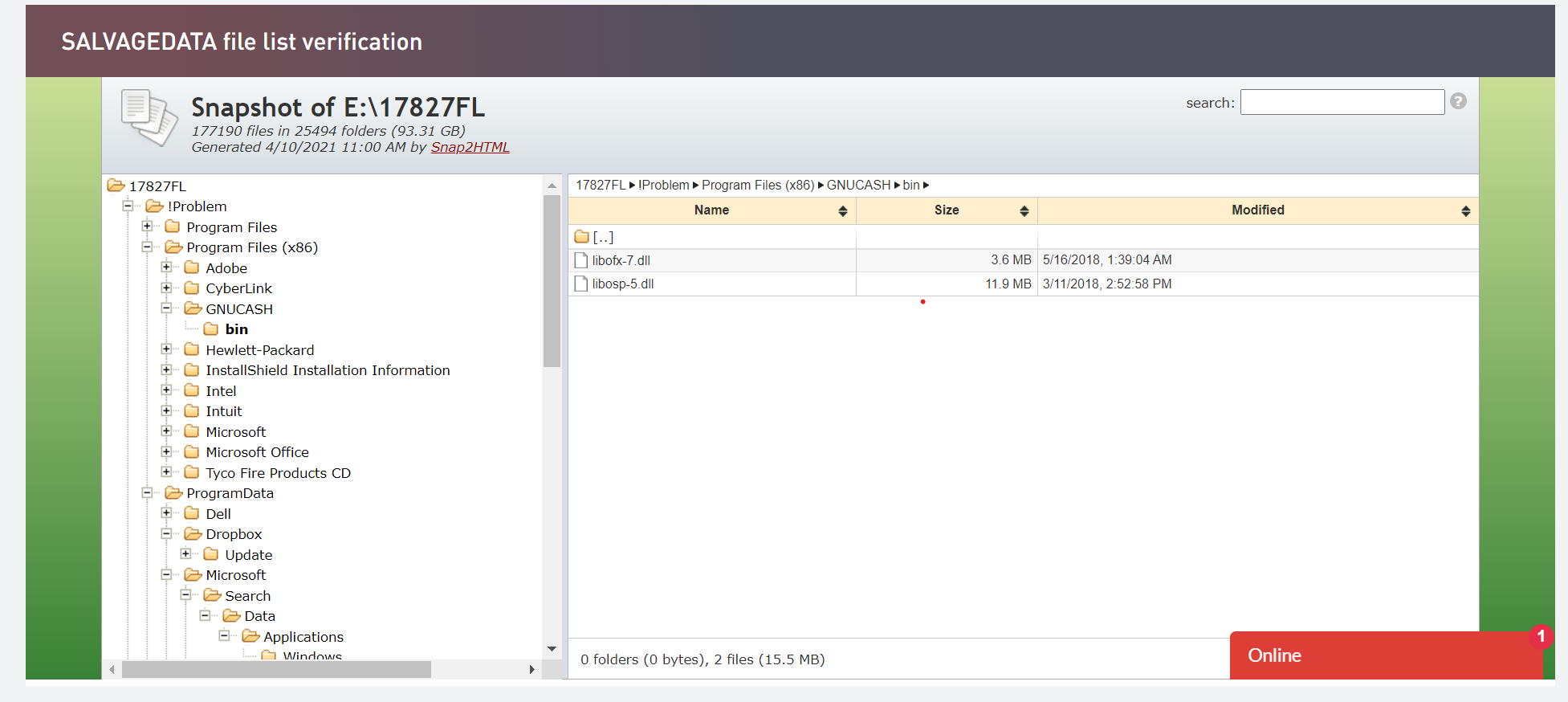
> I took a snippet of the recovered files from my HDD drive that was damaged
> and have attached it, and you can see that the Gnucash folder contains 2
> .dll files. Are these my data files, or could they be inside any other
> folder that was recovered?
>
> Appreciate your help,
>
> Jose
>
>
>
> On Sun, Apr 11, 2021 at 12:51 PM John Ralls <[email protected]> wrote:
>
> >
> >
> > > On Apr 11, 2021, at 9:33 AM, Jose A. Lorido III <[email protected]>
> > wrote:
> > >
> > > To whomever may be able to help,
> > >
> > > I have been using Gnucash for my business as well as my personal
> > accounting
> > > on the HDD drive of my laptop. A few weeks ago, my HDD was damaged and
> > > unfortunately, I had not backed up any of my data for the previous 3
> > years.
> > >
> > > I sent my damaged HDD to SalvageData and they were able to recover a
> > number
> > > of files, some of these belonging to the Gnucash program.
> > >
> > > The question would be to anyone that may be able to help me is:
> > >
> > > 1) Which files/folders contain my data files (what would be the
> > extensions
> > > I should look for)?
> > >
> > > and
> > >
> > > 2) How would I go about downloading them into my new SSD drive on my
> > > laptop, or I could also download them to my desktop which also contains
> > the
> > > Gnucash program?
> > >
> > > Any help or guidance would be greatly appreciated,
> >
> > 1) See https://wiki.gnucash.org/wiki/Backup.
> >
> > Your Desktop is just a folder in your user directory on the new SSD. We
> > often get complaints about clutter from  users who put their GnuCash data
> > file on the desktop so we recommend putting it in dedicated folder in
> their
> > user or documents folder. Mine is cleverly named "Accounts".
> >
> > The data recovery service should give you instructions about how to
> > transfer the recovered files to your computer.
> >
> > Regards,
> > John Ralls
> >
> >
> >
> -------------- next part --------------
> A non-text attachment was scrubbed...
> Name: Screenshot 2021-04-11 130926.png
> Type: image/png
> Size: 179205 bytes
> Desc: not available
> URL: <
> http://lists.gnucash.org/pipermail/gnucash-user/attachments/20210411/fa8e77bb/attachment.png
> >
>
> ------------------------------
>
> Subject: Digest Footer
>
> _______________________________________________
>
> gnucash-user mailing list
> [email protected]
> To update your subscription preferences or to unsubscribe:
> https://lists.gnucash.org/mailman/listinfo/gnucash-user
> If you are using Nabble or Gmane, please see
> https://wiki.gnucash.org/wiki/Mailing_Lists for more information.
> -----
> Please remember to CC this list on all your replies.
> You can do this by using Reply-To-List or Reply-All.
>
>
> ------------------------------
>
> End of gnucash-user Digest, Vol 217, Issue 28
> *********************************************
>

<https://www.avast.com/sig-email?utm_medium=email&utm_source=link&utm_campaign=sig-email&utm_content=webmail&utm_term=icon>
Virus-free.
www.avast.com
<https://www.avast.com/sig-email?utm_medium=email&utm_source=link&utm_campaign=sig-email&utm_content=webmail&utm_term=link>
<#DAB4FAD8-2DD7-40BB-A1B8-4E2AA1F9FDF2>
_______________________________________________
gnucash-user mailing list
[email protected]
To update your subscription preferences or to unsubscribe:
https://lists.gnucash.org/mailman/listinfo/gnucash-user
If you are using Nabble or Gmane, please see
https://wiki.gnucash.org/wiki/Mailing_Lists for more information.
-----
Please remember to CC this list on all your replies.
You can do this by using Reply-To-List or Reply-All.