Hi
Sorry to disagree!
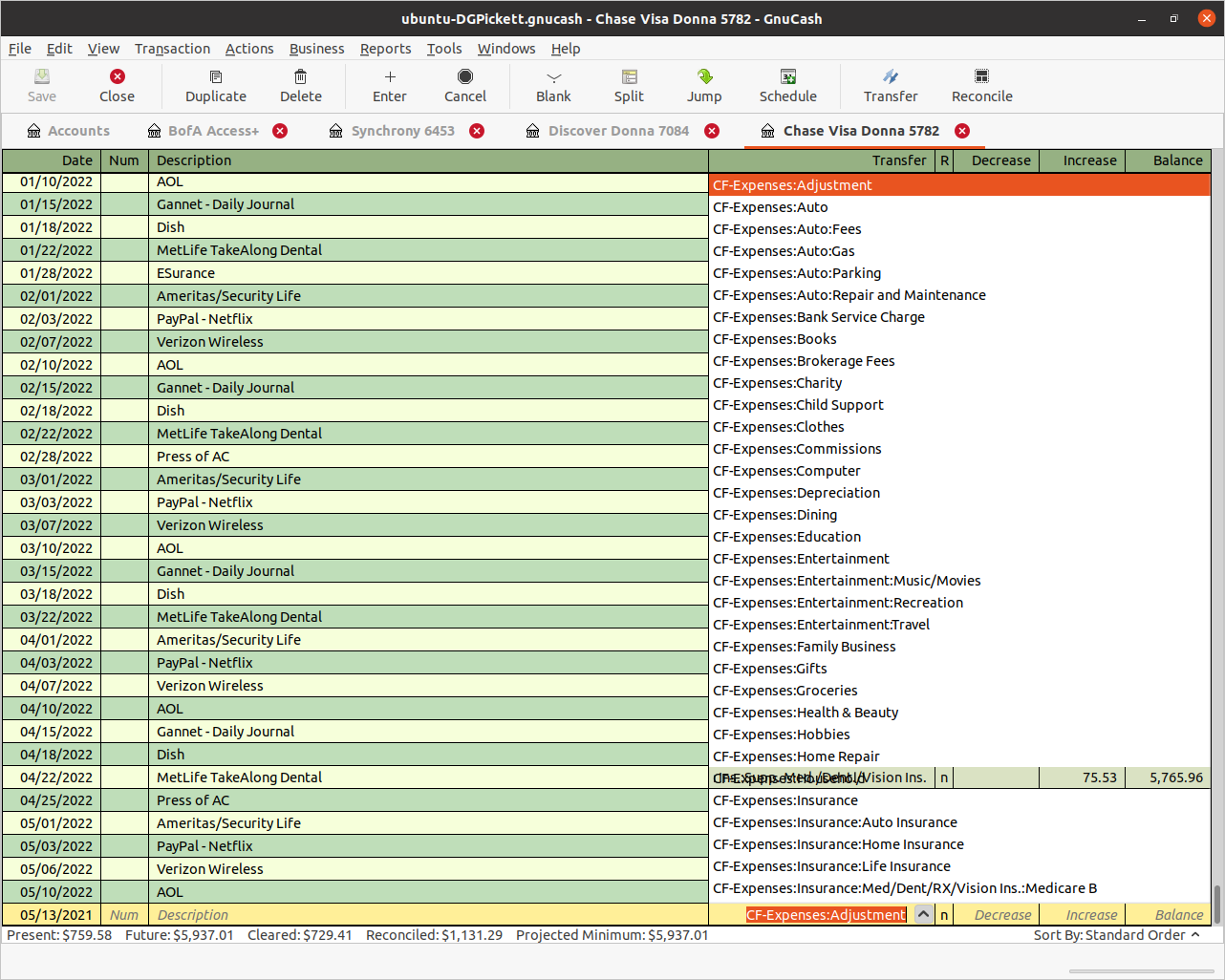
I have been having his problem on Ubuntu 20.10 for some time. Yesterday
evening I tried the workarounds in the bug report with no discernable
effect.
Today I have done the upgrade to 21.04, the effect was still apparent,
the workarounds still had no effect.
Also (and this is probably not a Gnucash problem) Gnome Tweaks behaves
very oddly , uninstalling and reinstalling had no effect.
"Oddly" here means that trying to access the drop down lists on the
Appearance tab does not reveal any other alternatives - it seems to be
stuck on the theme set in Ubuntu Settings. - I'm sure that in the
historic past this was not the case. There are other oddities as well.
Research is required - of me.
Take care
Eric
==========================


On 14/05/2021 11:52, David Carlson wrote:
Thanks for finding work-arounds for cases where there is an issue.

On Fri, May 14, 2021 at 2:06 AM Chris Good <[email protected]> wrote:
Hi David(s),


David Carlson,

Did you see https://bugs.gnucash.org/show_bug.cgi?id=797493#c4 which
mentions themes?

I tested this in Windows 10 and could not duplicate it.


I did duplicate this problem in Ubuntu 20.04 and found a couple of
work-arounds.

Please see

https://bugs.gnucash.org/show_bug.cgi?id=797493#c6


Regards,

Chris Good


*From:* David Carlson <[email protected]>
*Sent:* Friday, 14 May 2021 7:21 AM
*To:* Chris Good <[email protected]>
*Cc:* Gnucash Users <[email protected]>; David <[email protected]>
*Subject:* Re: [GNC] Transparent background on selected Transfer choice


I did not see anything about themes in that bug report
https://bugs.gnucash.org/show_bug.cgi?id=797493 except in a reference to
another bug report where the user admitted to choosing a non-standard
desktop theme.  I did see the problem myself briefly recently but now I
forgot when.  I suspect that I may have seen it on Windows rather than
Linux.  Tht referenced bug report stated that when the user switched to the
Adwaita theme (which, IIRC, is the default theme for several Linux
desktops) the problem disappeared.  Thus IMHO the theme concern does not
apply to 797493


I don't change desktop themes often, if ever or themes for GnuCash, I
leave it as 'out of the box', and I believe if David Pickett did too, then
I think it is a GnuCash bug


On Thu, May 13, 2021 at 10:17 AM Chris Good <[email protected]> wrote:

Message: 4
Date: Thu, 13 May 2021 13:45:04 +0000 (UTC)
From: "David G. Pickett" <[email protected]>
To: "[email protected]" <[email protected]>
Subject: [GNC] Transparent background on selected Transfer choice
Message-ID: <[email protected]>
Content-Type: text/plain; charset="utf-8"

I run GNUCash on Ubuntu LTS Linux, and when I select a transfer choice,
the background under the choice goes transparent, showing the transaction
screen below, see attached; not at all helpful!
-------------- next part --------------
A non-text attachment was scrubbed...
Name: Screenshot from 2021-05-13 09-41-41.png
Type: image/png
Size: 249379 bytes
Desc: not available
URL: <
http://lists.gnucash.org/pipermail/gnucash-user/attachments/20210513/ae179ec6/attachment.png
Hi David,

This looks like https://bugs.gnucash.org/show_bug.cgi?id=797493 which is
a problem with your theme.

Regards, Chris Good
_______________________________________________
gnucash-user mailing list
[email protected]
To update your subscription preferences or to unsubscribe:
https://lists.gnucash.org/mailman/listinfo/gnucash-user
If you are using Nabble or Gmane, please see
https://wiki.gnucash.org/wiki/Mailing_Lists for more information.
-----
Please remember to CC this list on all your replies.
You can do this by using Reply-To-List or Reply-All.


--

David Carlson
_______________________________________________
gnucash-user mailing list
[email protected]
To update your subscription preferences or to unsubscribe:
https://lists.gnucash.org/mailman/listinfo/gnucash-user
If you are using Nabble or Gmane, please see
https://wiki.gnucash.org/wiki/Mailing_Lists for more information.
-----
Please remember to CC this list on all your replies.
You can do this by using Reply-To-List or Reply-All.