First, please follow recommendations when starting a new topic do not
hijack old ones to get the email address,  use some normal method to get
the address.   Also,  give it a real subject,  never use the digest as a
topic.
I speak English as my native tongue and I have a real problem with people
who butcher it so badly to scramble nouns and verbs so that I cannot figure
out what you say is one instead of what?

Try using one noun and one verb per sentence.


On Sat, Sep 3, 2022, 7:25 AM James Baxter via gnucash-user <
[email protected]> wrote:

>  I am James Baxter and I am playing with this and made a mistake with my
> with my checking account, as I found out what my problem was. Not entering
> income the right way.
> So I am looking to start buying stock and also Bonds.When I place the cost
> (say Tesla) of $285.50 (A fake number) the tell it the number of stock I
> want. it goes back to one.
>
> I am not doing this right. Can some one copy the parts or how ever you
> wish.
> ThanksJames Baxteremail. [email protected]
>
>     On Saturday, September 3, 2022 at 07:50:24 AM EDT, <
> [email protected]> wrote:
>
>  Send gnucash-user mailing list submissions to
>     [email protected]
>
> To subscribe or unsubscribe via the World Wide Web, visit
>     https://lists.gnucash.org/mailman/listinfo/gnucash-user
> or, via email, send a message with subject or body 'help' to
>     [email protected]
>
> You can reach the person managing the list at
>     [email protected]
>
> When replying, please edit your Subject line so it is more specific
> than "Re: Contents of gnucash-user digest..."
>
>
> Today's Topics:
>
>   1. Re:  Change Linked Document Path (Geoff Storer)
>
>
> ----------------------------------------------------------------------
>
> Message: 1
> Date: Sat, 3 Sep 2022 21:47:55 +1000
> From: Geoff Storer <[email protected]>
> To: Jim DeLaHunt <[email protected]>
> Cc: Gnucash Users <[email protected]>
> Subject: Re: [GNC] Change Linked Document Path
> Message-ID:
>     <cannwtvie1g+gtphu3wjbaxvyfr5g1iadkbvxnqbfsd-wasl...@mail.gmail.com>
> Content-Type: text/plain; charset="utf-8"
>
> Hi Jim
> Answers to your questions
>
> Q: what exactly do you see that is not working for you? What do you see
> that makes you say, "[GnuCash] looks for the attached document in the
> windows document folder"?
>
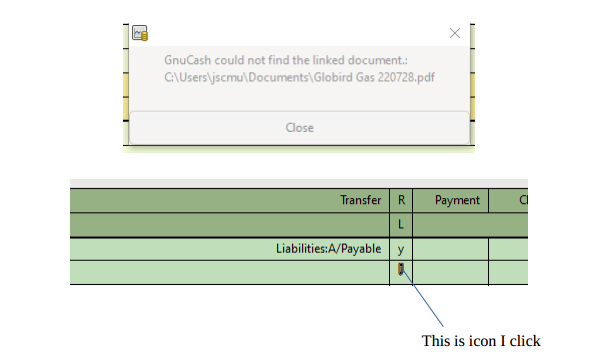
> Ans: Error box pops up with following message
> GnuCash could not find the linked document.:
> C:\Users\jscmu\Documents\Globird Gas 220728.pdf
> See attached screenshot
>
> Q: When you open your GnuCash accounts book, and find a transaction with
> an attached document, what GnuCash operations do you do, in order to
> open or find that document?
>
> Ans: I go to a register for the account from where the payment was made and
> beneath
> the column headed "R" (for reconcile) click on the icon that signifies the
> document is present.
> Also included in attached screenshot
>
> Q: In that transaction, what does GnuCash display as the location of the
> document? (This is important, because the exact spelling will show us if
> the document path is relative or absolute.)
>
> Ans: C:\Users\jscmu\Documents\-document name-
>
> Q: What specifically did you try in GnuCash to point to the correct
> location of the documents? What do you mean by "editing the preferences"?
>
> Ans: In top menu bar selected
> edit/preferences    then selected    General from left hand options panel
> In that screen I then selected "Linked files" from the options displayed to
> the right
> I used the dropdown arrow in this option and navigated to the folder where
> copies of
> my invoices reside. See attached screenshot "Linked files".
>
> Q: What did the preferences say before you made this change?
>
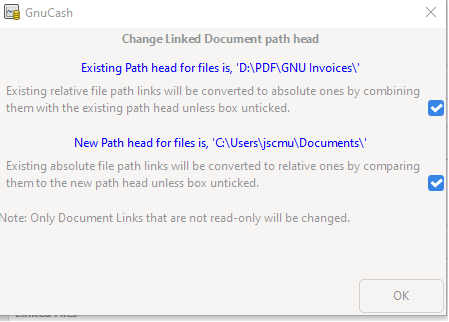
> Ans: Good question. Not exactly sure what it said before I changed it. But
> when I
> now click the "Clear" button (to the right of the dropdown arrow) I see a
> message
> as per screenshot "Change linked Docs".
>
> Q: What do the preferences say now?
>
> Ans: As per "linked files" screenshot
> "Path Head for linked files Relative Path"  with option "GNU Invoices" (the
> name of my
> invoices folder)
>
> Q: What version of GnuCash are you using?
>
> Ans: I am using ver 4.11  Build ID:  4.11 (2022-06-25)
>
> Thanks for taking the time to look at this
>
> Geoff
>
>
>
>
>
>
>
> On Sat, Sep 3, 2022 at 6:46 AM Jim DeLaHunt <[email protected]> wrote:
>
> > Geoff:
> >
> > On 2022-09-01 20:04, Geoff Storer wrote:
> > > Ok, thanks.
> > >
> > > This is my first post!!
> > >
> > > On Fri, Sep 2, 2022 at 8:16 AM Jim DeLaHunt <[email protected]>
> > wrote:
> > >
> > >> Geoff:
> > >>
> > >> One tenet of GnuCash-user email list etiquette is to cc the
> gnucash-user
> > >> email list on all replies. We want this discussion to take place on
> the
> > >> list.
> > >>
> > >> Thus I am replying to you, and cc'ing the list, so that the thread
> stays
> > >> on the list.  I will reply to this message from the email that reaches
> > me
> > >> via the list.
> > >>      ?Jim DeLaHunt
> >
> > Thank you for replying to the list. I will carry on the conversation via
> > a reply to the list.
> >
> > Back in your initial message, you said,
> >
> > >> ...My problem now is that [GnuCash] looks for the attached document in
> > >> the windows document folder on the C Drive. ...
> >
> > Let's dig into that a little bit.
> >
> > Q: what exactly do you see that is not working for you? What do you see
> > that makes you say, "[GnuCash] looks for the attached document in the
> > windows document folder"?
> >
> > Q: When you open your GnuCash accounts book, and find a transaction with
> > an attached document, what GnuCash operations do you do, in order to
> > open or find that document?
> >
> > Q: In that transaction, what does GnuCash display as the location of the
> > document? (This is important, because the exact spelling will show us if
> > the document path is relative or absolute.)
> >
> >
> > >> I have tried editing the preferences in [GnuCash] to point to the
> > correct location of the
> > >> documents on the alternate partition but this doesn't automatically
> > link to the
> > >> document.
> > >>
> > >> ...I did try a feature as per the attached screenshot [of the Change
> > Linked Document path head dialogue] without any success.
> >
> > Q: What specifically did you try in GnuCash to point to the correct
> > location of the documents? What do you mean by "editing the preferences"?
> >
> > Q: What did the preferences say before you made this change?
> >
> > Q: What do the preferences say now?
> >
> > And, because I forgot the first time:
> >
> > Q: What version of GnuCash are you using?  (I suspect it is not 4.9,
> > because I have 4.9 and I do not see a UI like you posted in the
> > screenshot of your earlier message.)
> >
> >
> > >> On 2022-09-01 03:57, Geoff Storer wrote:
> > >>
> > >> Hi Jim
> > >>
> > >> Thanks for coming back to me. Sorry I have taken so long to respond.
> > >>
> > >> In answer to your questions:
> > >>
> > >> Q: Are you familiar with the difference in behaviour between relative
> > file
> > >> paths and absolute file paths?
> > >>
> > >> Ans; No this is not one of my strong points
> > >>
> > >> Q: Are you familiar with the difference in spelling (C:\ prefixes and
> > >> backslashes etc.) between relative file paths and absolute file paths?
> > >>
> > >> Ans:  No
> > >>
> > >> Q:  In your GnuCash Book (bookkeeping file), have you associated files
> > to
> > >> transactions using relative path File Associations, absolute path File
> > >> Associations,  or Location Associations?
> > >>
> > >> Ans: I think the answer here is relative path. What I actually did in
> > GNU
> > >> was:
> > >> Edit / preferences / General / Linked Files and with the drop down
> arrow
> > >> selected the folder location of my invoices
> > >> The reason I say "relative path" is because GNU program details on the
> > >> referenced edit field the comment
> > >> "Path head for Linked Files Relative Paths"
> > >> The location I selected is -  D:\PDF\GNU Invoices
> > >>
> > >> Q:  Were all your attached documents within a single directory on your
> > old
> > >> computer? Do you know the absolute path to that directory?
> > >>
> > >> Ans: Yes all invoices are in the one folder  "D:\PDF\GNU Invoices"
> > (the
> > >> output here I copied directly from my explorer view so I should have
> > that
> > >> correct)
> > >>
> > >> Q:  Are all your attached documents within a single directory on your
> > new
> > >> computer? Do you know the absolute path to that directory?
> > >>
> > >> Ans: The invoices are in the exact location as on the initial install
> of
> > >> GNU.
> > >>          I only re-installed windows on the C:\ partition. The other
> > >> partitions remain exactly as they were
> > >>          The invoices are in "D:\PDF\GNU Invoices"
> > >>
> > >> I hope I have answered all your queries. Let me know if you need any
> > >> further clarification.
> > >>
> > >> Thanks again
> > >>
> > >> Regards
> > >>
> > >> John Murdoch
> > >>
> > >> On Tue, Aug 30, 2022 at 3:46 PM Jim DeLaHunt <[email protected]>
> > >> wrote:
> > >>
> > >>> Hello, John:
> > >>>
> > >>> Your question rings a bell! I did an overhaul on the file
> associations
> > >>> on my transactions a couple of years ago.
> > >>>
> > >>> On 2022-08-29 04:10, john murdoch wrote:
> > >>>> ...My problem now is that [GnuCash] looks for the attached document
> in
> > >>> the
> > >>>> windows document folder on the C Drive. I have tried editing the
> > >>>> preferences in [GnuCash] to point to the correct location of the
> > >>> documents
> > >>>> on the alternate partition but this doesn't automatically link to
> the
> > >>>> document.
> > >>>>
> > >>>>
> > >>>> I can then manually link each document by using  the "manage
> document
> > >>>> link" function on the right click menu in the account field of GNU
> > >>>> cash. That  of course will be quite tedious and I was enquiring if
> > >>>> there is a "global fix" so that all files could be re-linked in one
> > >>>> procedure? Perhaps editing settings or the system registry?
> > >>>>
> > >>>>
> > >>>> I did try a feature as per the attached screenshot [of the Change
> > >>> Linked Document path head dialogue] without any success.
> > >>>
> > >>> Well, the Change Linked Document path head dialogue, which your
> > >>> screenshot showed, is the best tool in GnuCash for this job. However,
> > >>> you have to know a few things to use it well. I'll bet the UI does
> not
> > >>> do a complete job of walking a person through it.
> > >>>
> > >>> To set some groundwork, some questions:
> > >>>
> > >>> Are you familiar with the difference in behaviour between relative
> file
> > >>> paths and absolute file paths?
> > >>>
> > >>> Are you familiar with the difference in spelling (C:\ prefixes and
> > >>> backslashes etc.) between relative file paths and absolute file
> paths?
> > >>>
> > >>> In your GnuCash Book (bookkeeping file), have you associated files to
> > >>> transactions using relative path File Associations, absolute path
> File
> > >>> Associations,  or Location Associations?
> > >>>
> > >>> Were all your attached documents within a single directory on your
> old
> > >>> computer? Do you know the absolute path to that directory?
> > >>>
> > >>> Are all your attached documents within a single directory on your new
> > >>> computer? Do you know the absolute path to that directory?
> > >>>
> > >>> Based on answers to those questions ? and once I run GnuCash to
> refresh
> > >>> my memory about how the Change Linked Document path head dialogue
> > works,
> > >>> and once I translate from macOS to Windows in my head ? I can try to
> > >>> help you further.
> > >>>
> > >>> Best regards,
> > >>>        ?Jim DeLaHunt
> > >>>
> > >>>
> > >>> Are all your attached documents within a single directory on your new
> > >>> computer?
> >
> >
> > Best regards,
> >      ?Jim DeLaHunt
> >
> > _______________________________________________
> > gnucash-user mailing list
> > [email protected]
> > To update your subscription preferences or to unsubscribe:
> > https://lists.gnucash.org/mailman/listinfo/gnucash-user
> > -----
> > Please remember to CC this list on all your replies.
> > You can do this by using Reply-To-List or Reply-All.
> >
> -------------- next part --------------
> A non-text attachment was scrubbed...
> Name: GNU Register.png
> Type: image/png
> Size: 23553 bytes
> Desc: not available
> URL: <
> http://lists.gnucash.org/pipermail/gnucash-user/attachments/20220903/a7a3fc66/attachment.png
> >
> -------------- next part --------------
> A non-text attachment was scrubbed...
> Name: Linked Files.png
> Type: image/png
> Size: 5413 bytes
> Desc: not available
> URL: <
> http://lists.gnucash.org/pipermail/gnucash-user/attachments/20220903/a7a3fc66/attachment-0001.png
> >
> -------------- next part --------------
> A non-text attachment was scrubbed...
> Name: Change Linked Docs.png
> Type: image/png
> Size: 16691 bytes
> Desc: not available
> URL: <
> http://lists.gnucash.org/pipermail/gnucash-user/attachments/20220903/a7a3fc66/attachment-0002.png
> >
>
> ------------------------------
>
> Subject: Digest Footer
>
> _______________________________________________
>
> gnucash-user mailing list
> [email protected]
> To update your subscription preferences or to unsubscribe:
> https://lists.gnucash.org/mailman/listinfo/gnucash-user
> -----
> Please remember to CC this list on all your replies.
> You can do this by using Reply-To-List or Reply-All.
>
>
> ------------------------------
>
> End of gnucash-user Digest, Vol 234, Issue 6
> ********************************************
>
> _______________________________________________
> gnucash-user mailing list
> [email protected]
> To update your subscription preferences or to unsubscribe:
> https://lists.gnucash.org/mailman/listinfo/gnucash-user
> -----
> Please remember to CC this list on all your replies.
> You can do this by using Reply-To-List or Reply-All.
>
_______________________________________________
gnucash-user mailing list
[email protected]
To update your subscription preferences or to unsubscribe:
https://lists.gnucash.org/mailman/listinfo/gnucash-user
-----
Please remember to CC this list on all your replies.
You can do this by using Reply-To-List or Reply-All.