It sounds like you may have a filter in operation. Have a look in
View>Filter By then choose the 'Status' tab and make sure they are all
ticked.
On Wed, 7 Feb 2024 at 18:41, accounting Billing <
[email protected]> wrote:

> I think this is a technical difficulty. Because none of the transactions
> are showing at all.
>
> On Wed, Feb 7, 2024 at 11:02 AM [email protected] <[email protected]>
> wrote:
>
> > You keep entering the second entry in your transaction **into the same
> > account you're in. **
> >
> > Think of it this way, you take $20 out of your right pocket, and then put
> > $20 into your right pocket. Assuming your right pocket started with $20,
> > how much is left after this transaction? ($20)
> >
> > GnuCash is recording *that* transaction, which is what you told it to do.
> >
> > You say you've read the manual, but I'd recommend reviewing 2.2.3 and 5.3
> > in the Guide, and section 6.2 in Help.
> >
> > David T.
> > On Feb 7, 2024, at 5:43 PM, accounting Billing <
> > [email protected]> wrote:
> >>
> >> I did read the manual and understand the double entry. But how come the
> >> software is not recording and showing any transactions?
> >>
> >> If anyone can get a zoom call and help us to set this up. We will donate
> >> and compensate for their time.
> >> My name is Beck, Cell 347-206-1096.
> >>
> >> On Wed, Feb 7, 2024 at 9:38 AM [email protected] <[email protected]
> >
> >> wrote:
> >>
> >>> Also, you need to read the manual to understand double entry accounting
> >>> and its implementation in GnuCash. (Stephen's previous reply to your
> >>> question about Equity applies here as well.)
> >>>
> >>> And GnuCash list etiquette.
> >>>
> >>> David T.
> >>> On Feb 7, 2024, at 5:27 PM, accounting Billing <
> >>> [email protected]> wrote:
> >>>>
> >>>> Also, When i try to record the expenses transactions, It is not
> showing on
> >>>> the dashboard.
> >>>>
> >>>> On Wed, Feb 7, 2024 at 9:16 AM <[email protected]>
> wrote:
> >>>>
> >>>>  Send gnucash-user mailing list submissions to
> >>>>>          [email protected]
> >>>>>
> >>>>>  To subscribe or unsubscribe via the World Wide Web, visit
> >>>>>          https://lists.gnucash.org/mailman/listinfo/gnucash-user
> >>>>>  or, via email, send a message with subject or body 'help' to
> >>>>>          [email protected]
> >>>>>
> >>>>>  You can reach the person managing the list at
> >>>>>          [email protected]
> >>>>>
> >>>>>  When replying, please edit your Subject line so it is more specific
> >>>>>  than "Re: Contents of gnucash-user digest..."
> >>>>>
> >>>>>
> >>>>>  Today's Topics:
> >>>>>
> >>>>>     1. Re:  GNUCash 5.5 (Stan Brown (using GC 4.14))
> >>>>>     2. Re:  Change Printed Invoice (Lester Bennett)
> >>>>>     3. Re:  Change Printed Invoice (Michael or Penny Novack)
> >>>>>     4.  GNUCash 5.5 (accounting Billing)
> >>>>>
> >>>>>
> >>>>> ------------------------------
> >>>>>
> >>>>>
> >>>>>  Message: 1
> >>>>>  Date: Tue, 6 Feb 2024 17:30:43 -0800
> >>>>>  From: "Stan Brown (using GC 4.14)" <[email protected]>
> >>>>>  To: [email protected]
> >>>>>  Subject: Re: [GNC] GNUCash 5.5
> >>>>>  Message-ID: <[email protected]>
> >>>>>  Content-Type: text/plain; charset=UTF-8
> >>>>>
> >>>>>
> >>>>>  On 2024-02-06 16:51, accounting Billing wrote:
> >>>>>
> >>>>>>  From: accounting Billing <[email protected]>
> >>>>>>  Date: Tue, Feb 6, 2024, 3:00?PM
> >>>>>>  Subject: GNUCash 5.5
> >>>>>>  To: <[email protected]>, <[email protected]>, <
> >>>>>>  [email protected]>
> >>>>>>
> >>>>>>  We are willing to use GnuCash for our business accounting, But we
> are
> >>>>>>  facing some issues.
> >>>>>>
> >>>>>>  When I try to add any transactions. It is not showing on the
> Accounts
> >>>>>>  Total numbers.
> >>>>>>
> >>>>>>  When I try to put a transaction on the list, It is not showing on
> the
> >>>>>>
> >>>>>  main
> >>>>>
> >>>>>>  page.
> >>>>>>
> >>>>>
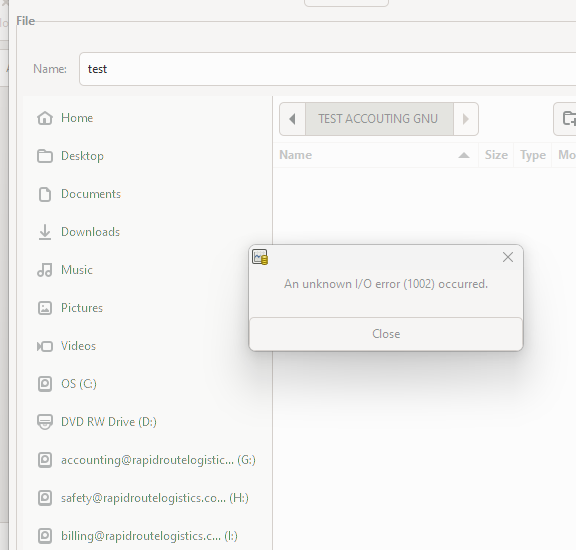
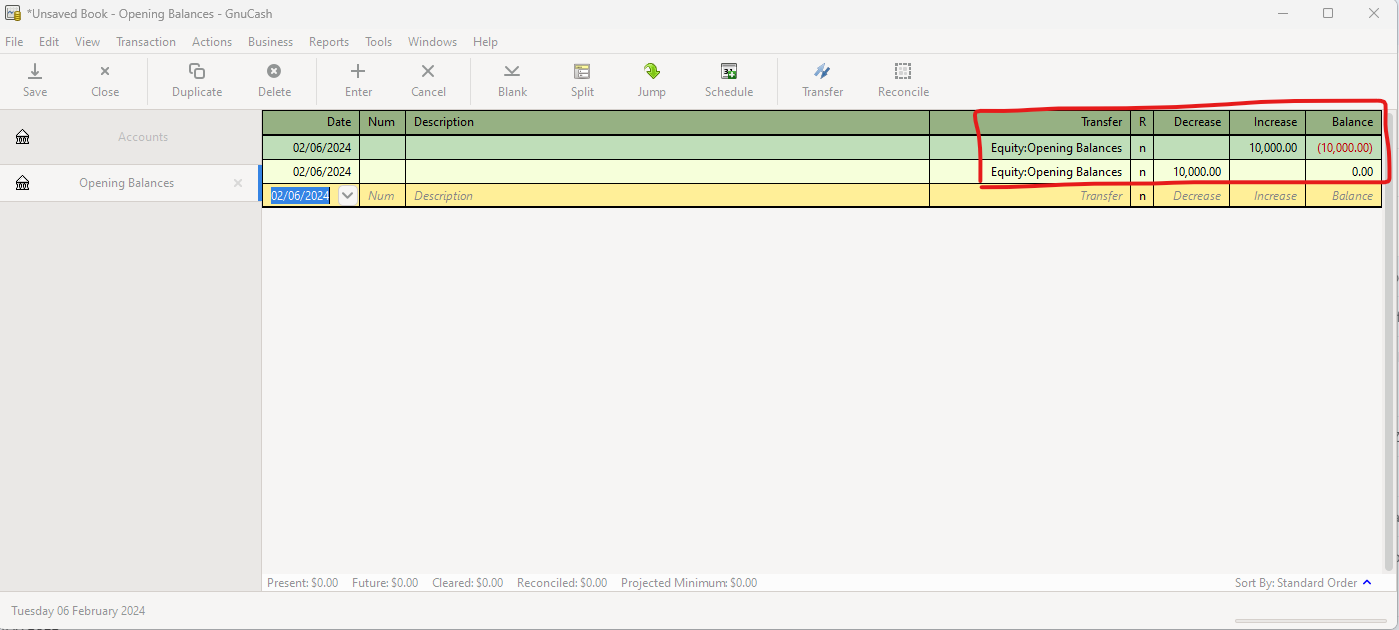
> >>>>>  You debited and credited Equity:Opening Balances for the same
> amount, so
> >>>>>  the net is zero, just as your attachment shows.  I don't understand
> the
> >>>>>  context of the I/O error; possibly the @ signs in your disk names
> are a
> >>>>>  problem.
> >>>>>
> >>>>>  Before you go further, may I strongly, strongly suggest that you
> read
> >>>>>  the Tutorial and Concepts Guide and actually work through the
> examples
> >>>>>  that are relevant to your particular situation.
> >>>>>  <https://www.gnucash.org/viewdoc.phtml?rev=5&lang=C&doc=guide>
> >>>>>
> >>>>>  At bottom, GnuCash is just a computer replacement for keeping books
> of
> >>>>>  account in pen and ink. However, it has its own special ways of
> doing
> >>>>>  things, and if you don't use the techniques as shown in the
> examples,
> >>>>>  results will not be as you expect and you'll get immensely
> frustrated.
> >>>>>
> >>>>>  Stan Brown
> >>>>>  Tehachapi, CA, USA
> >>>>>  https://BrownMath.com
> >>>>>
> >>>>>
> >>>>> ------------------------------
> >>>>>
> >>>>>
> >>>>>  Message: 2
> >>>>>  Date: Wed, 7 Feb 2024 12:47:05 +1000
> >>>>>  From: Lester Bennett <[email protected]>
> >>>>>  To: John Ralls <[email protected]>
> >>>>>  Cc: Gnucash Users <[email protected]>
> >>>>>  Subject: Re: [GNC] Change Printed Invoice
> >>>>>  Message-ID: <[email protected]>
> >>>>>  Content-Type: text/plain; charset=UTF-8; format=flowed
> >>>>>
> >>>>>  Thanks John. I don't know why I didn't see the Custom Title
> options. I
> >>>>>  must have been through the configuration about 5 times. I guess I
> was
> >>>>>  blinkered and just looking for the word "Invoice".
> >>>>>
> >>>>>
> >>>>>  On 7/02/2024 10:27 am, John Ralls wrote:
> >>>>>
> >>>>>>
> >>>>>>
> >>>>>>  On Feb 6, 2024, at 4:01 PM, John Ralls <[email protected]> wrote:
> >>>>>>>
> >>>>>>>  Please remember to copy the list on all replies.
> >>>>>>>
> >>>>>>>  The tab is actually called "Printable Invoice". I've attached a
> >>>>>>>  screenshot.
> >>>>>>
> >>>>>>
> >>>>>>
> >>>>>>  The screenshot apparently got eaten. Another try:
> >>>>>
> >>>>>
> >>>>>
> >>>>>
> >>>>>
> >>>>>
> >>>>>  --
> >>>>>  This email has been checked for viruses by Avast antivirus software.
> >>>>>  www.avast.com
> >>>>>
> >>>>> ------------------------------
> >>>>>
> >>>>>
> >>>>>  Message: 3
> >>>>>  Date: Wed, 7 Feb 2024 08:31:33 -0500
> >>>>>  From: Michael or Penny Novack <[email protected]>
> >>>>>  To: [email protected]
> >>>>>  Subject: Re: [GNC] Change Printed Invoice
> >>>>>  Message-ID: <[email protected]>
> >>>>>  Content-Type: text/plain; charset=UTF-8; format=flowed
> >>>>>
> >>>>>  On 2/6/2024 9:27 AM, Glenn Fowler wrote:
> >>>>>
> >>>>>>  You can edit invoice.scm and replace "Invoice" with "Tax Invoice".
> All
> >>>>>>  invoices after will say "Tax Invoice".
> >>>>>
> >>>>>
> >>>>>  Putting my old senior business analyst hat back on for a moment,
> this is
> >>>>>  presumably NOT what is being requested. I am pretty sure if we ask
> >>>>>  (business analysts ask, do not tell the client what the client
> wants) we
> >>>>>  will find out that the request for is a SELECTION ox, so only
> specific
> >>>>>  invoices would be so titled.
> >>>>>
> >>>>>  But the real point I am trying to make is that at any time a
> >>>>>  jurisdiction can impose requirements, even things like font and font
> >>>>>  size, etc. And what one jurisdiction requires independent of what
> the
> >>>>>  next requires. THAT is why things like this best handled with
> editing
> >>>>>  outside of gnucash. We should ask of the gnucash developers that the
> >>>>>  CONTENT not be lacking for any jurisdiction, not the editing
> details.
> >>>>>
> >>>>>  Michael D Novack
> >>>>>
> >>>>>
> >>>>>
> >>>>> ------------------------------
> >>>>>
> >>>>>
> >>>>>  Message: 4
> >>>>>  Date: Wed, 7 Feb 2024 09:13:31 -0500
> >>>>>  From: accounting Billing <[email protected]>
> >>>>>  To: [email protected]
> >>>>>  Subject: [GNC] GNUCash 5.5
> >>>>>  Message-ID:
> >>>>>          <CAPf0W8eco+VzrH98YC7V=
> >>>>>  [email protected]>
> >>>>>  Content-Type: text/plain; charset="utf-8"
> >>>>>
> >>>>>  Hello,
> >>>>>
> >>>>>  We are willing to use GnuCash for our business accounting, But we
> are
> >>>>>  facing some issues.
> >>>>>
> >>>>>  When I try to add any transactions. It is not showing on the
> Accounts
> >>>>>  Total numbers.
> >>>>>
> >>>>>  Hello there,
> >>>>>
> >>>>>  When I try to put a transaction on the list, It is not showing on
> the main
> >>>>>  page.
> >>>>>
> >>>>>  --
> >>>>>
> >>>>>
> >>>>>
> >>>>>
> >>>>>
> >>>>>  Thank you and Regards,
> >>>>>
> >>>>>
> >>>>>  Accounting
> >>>>>  Office: +1(215)717-7881 x101
> >>>>>  Fax: +1(267)817-7771
> >>>>>  Rapid_Route_Logistics
> >>>>>
> >>>>>
> >>>>>  Disclaimer: This e-mail communication contains confidential (and/or
> >>>>>  legally privileged) information belonging to the sender and is
> >>>>>  intended solely for the designated addressee(s) named herein.
> >>>>>
> >>>>>  The unauthorized use, disclosure or transmission of this e-mail (or
> >>>>>  any information contained herein) is strictly prohibited.
> >>>>>
> >>>>>  Please consider the environment. Don't print this e-mail unless it's
> >>>>>  necessary.
> >>>>>  -------------- next part --------------
> >>>>>  A non-text attachment was scrubbed...
> >>>>>  Name: Screenshot 2024-02-06 145357.png
> >>>>>  Type: image/png
> >>>>>  Size: 33380 bytes
> >>>>>  Desc: not available
> >>>>>  URL: <
> >>>>>
> http://lists.gnucash.org/pipermail/gnucash-user/attachments/20240207/ab5d91ab/attachment.png
> >>>>>
> >>>>>>
> >>>>>>  -------------- next part --------------
> >>>>>  A non-text attachment was scrubbed...
> >>>>>  Name: Screenshot 2024-02-06 145739.png
> >>>>>  Type: image/png
> >>>>>  Size: 35869 bytes
> >>>>>  Desc: not available
> >>>>>  URL: <
> >>>>>
> http://lists.gnucash.org/pipermail/gnucash-user/attachments/20240207/ab5d91ab/attachment-0001.png
> >>>>>
> >>>>>>
> >>>>>>  -------------- next part --------------
> >>>>>  A non-text attachment was scrubbed...
> >>>>>  Name: Screenshot 2024-02-06 145518.png
> >>>>>  Type: image/png
> >>>>>  Size: 40954 bytes
> >>>>>  Desc: not available
> >>>>>  URL: <
> >>>>>
> http://lists.gnucash.org/pipermail/gnucash-user/attachments/20240207/ab5d91ab/attachment-0002.png
> >>>>>
> >>>>>>
> >>>>>>
> >>>>> ------------------------------
> >>>>>
> >>>>>
> >>>>>  Subject: Digest Footer
> >>>>>
> >>>>> ------------------------------
> >>>>>
> >>>>>
> >>>>>  gnucash-user mailing list
> >>>>>  [email protected]
> >>>>>  To update your subscription preferences or to unsubscribe:
> >>>>>  https://lists.gnucash.org/mailman/listinfo/gnucash-user
> >>>>>  -----
> >>>>>  Please remember to CC this list on all your replies.
> >>>>>  You can do this by using Reply-To-List or Reply-All.
> >>>>>
> >>>>>
> >>>>> ------------------------------
> >>>>>
> >>>>>
> >>>>>  End of gnucash-user Digest, Vol 251, Issue 12
> >>>>>  *********************************************
> >>>>
> >>>>
> >>>>
> >>>>
> >>
> >> --
> >>
> >>
> >>
> >>
> >>
> >> * Thank you and Regards,*
> >>
> >>
> >> *Accounting *
> >> *Office: +1(215)717-7881 x101*
> >> *Fax: +1(267)817-7771*
> >> *Rapid_Route_Logistics* <https://rapidroutelogistics.com/>
> >> [image: https://rapidroutelogistics.com/]
> >> <https://rapidroutelogistics.com/>
> >>
> >> Disclaimer: This e-mail communication contains confidential (and/or
> >> legally privileged) information belonging to the sender and is intended
> >> solely for the designated addressee(s) named herein.
> >>
> >> The unauthorized use, disclosure or transmission of this e-mail (or any
> >> information contained herein) is strictly prohibited.
> >>
> >> Please consider the environment. Don't print this e-mail unless it's
> >> necessary.
> >>
> >
>
> --
>
>
>
>
>
> *Thank you and Regards,*
>
>
> *Accounting *
> *Office: +1(215)717-7881 x101*
> *Fax: +1(267)817-7771*
> *Rapid_Route_Logistics* <https://rapidroutelogistics.com/>
> [image: https://rapidroutelogistics.com/] <
> https://rapidroutelogistics.com/>
>
> Disclaimer: This e-mail communication contains confidential (and/or legally
> privileged) information belonging to the sender and is intended solely for
> the designated addressee(s) named herein.
>
> The unauthorized use, disclosure or transmission of this e-mail (or any
> information contained herein) is strictly prohibited.
>
> Please consider the environment. Don't print this e-mail unless it's
> necessary.
> _______________________________________________
> gnucash-user mailing list
> [email protected]
> To update your subscription preferences or to unsubscribe:
> https://lists.gnucash.org/mailman/listinfo/gnucash-user
> -----
> Please remember to CC this list on all your replies.
> You can do this by using Reply-To-List or Reply-All.
>
_______________________________________________
gnucash-user mailing list
[email protected]
To update your subscription preferences or to unsubscribe:
https://lists.gnucash.org/mailman/listinfo/gnucash-user
-----
Please remember to CC this list on all your replies.
You can do this by using Reply-To-List or Reply-All.