Unsubscribe
> On Jan 9, 2025, at 4:36 PM, [email protected] wrote:
>
> Send gnucash-user mailing list submissions to
>    [email protected]
>
> To subscribe or unsubscribe via the World Wide Web, visit
>    https://lists.gnucash.org/mailman/listinfo/gnucash-user
> or, via email, send a message with subject or body 'help' to
>    [email protected]
>
> You can reach the person managing the list at
>    [email protected]
>
> When replying, please edit your Subject line so it is more specific
> than "Re: Contents of gnucash-user digest..."
>
>
> Today's Topics:
>
>   1. Re:  Budget Question and stylesheet question (larry johnston)
>
>
> ----------------------------------------------------------------------
>
> Message: 1
> Date: Thu, 9 Jan 2025 16:33:17 -0800
> From: larry johnston <[email protected]>
> To: David H <[email protected]>, Gnucash Users
>    <[email protected]>
> Subject: Re: [GNC] Budget Question and stylesheet question
> Message-ID:
>    <CAKHgob5oPJZDM_PS+cy5-Sa=m0b2m_pueqqoog1ezskcsuz...@mail.gmail.com>
> Content-Type: text/plain; charset="utf-8"
>
> Hi,
>
> I went back and checked preferences and Accounts was set to Locale but
> showed US$. I changed it to C$ and that did not affect the Budget. I have
> now set it to Locale and $C and the dialog box says it will affect all
> future actions, still no effect on the Budget. I guess I need to check all
> of my accounts now to ensure they are consistent. That is probably a task
> for th weekend.
>
> Larry
>
>> On Thu, Jan 9, 2025 at 4:22?PM larry johnston <[email protected]> wrote:
>>
>> David,
>>
>> Thanks for your insights. When I started my Chart of Accounts, I thought I
>> had set it to C$ but it was in US$ an dI had to go back and change them to
>> C$. Maybe I missed one or two of them. I was not aware of the Locale
>> option. Where would I find it and would it change all of my accounts or do
>> I have to apply it individually?
>>
>> Larry
>>
>> PS I copied the list with this, I hope that is ok with you.
>>
>>> On Thu, Jan 9, 2025 at 12:12?PM David H <[email protected]> wrote:
>>>
>>> Larry,
>>>
>>> What are your Accounts preferences set to for default currency - "Locale"
>>> or did you "Choose" Canadian Dollar?  My accounts are just set to "Locale"
>>> and I don't have your issue....
>>>
>>> Cheers again David H.
>>>
>>>
>>>
>>>> On Fri, 10 Jan 2025 at 06:00, David H <[email protected]> wrote:
>>>
>>>> Larry,
>>>>
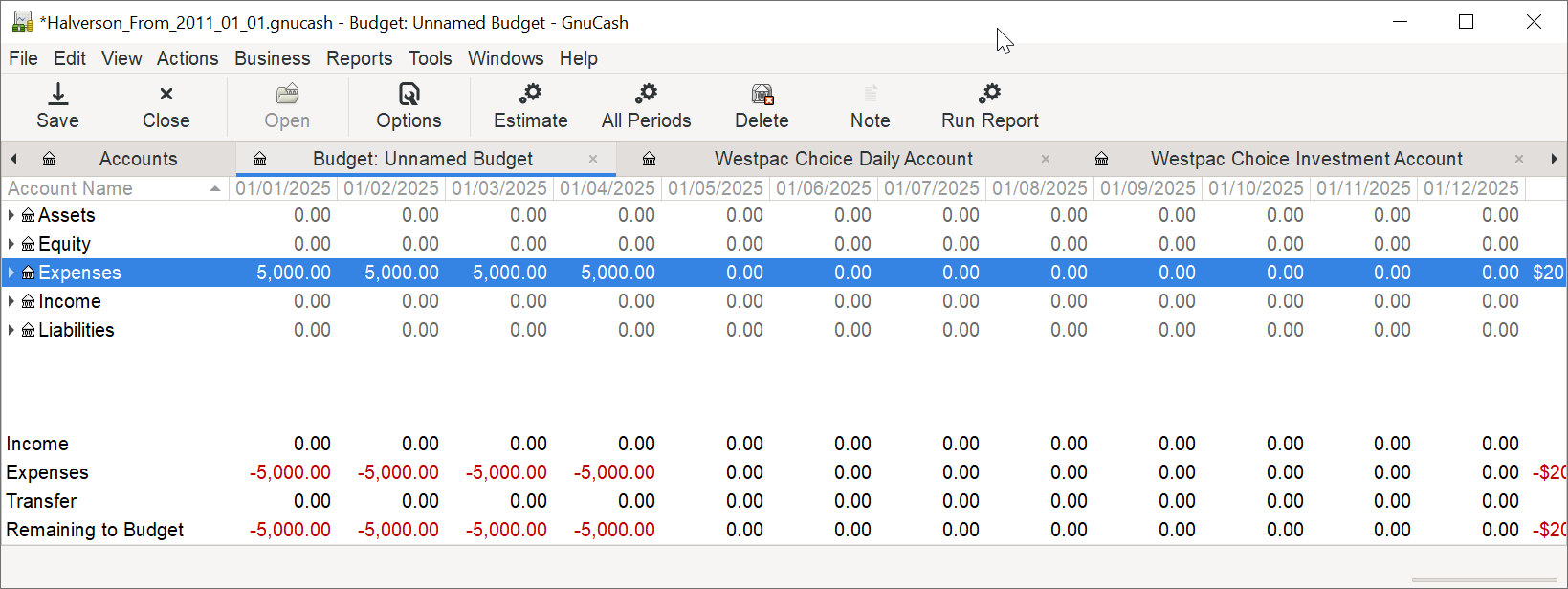
>>>> I don't use Budgets so I'm not at all familiar with their use.  I
>>>> created a new budget in my current file that has about 10 - 15 years of
>>>> txns in it.  I just highlighted the expenses row at top and clicked
>>>> "estimate" and told it to use the previous 12 months figures which
>>>> populated the budget figures at both top and bottom.  I also tried just
>>>> selecting the amount for the first few months on the expenses row and as I
>>>> entered a new monthly figure of $5,000 it updated the figures at bottom
>>>> which I assume is the expected behaviour ?
>>>>
>>>> It's interesting that your Total column is prefixed with "C$" whereas
>>>> totals are just prefixed with "$" - are you mixing currencies in your
>>>> GnuCash file and could this be an issue with budgets ?
>>>>
>>>> This is on Win 10 using GnuCash 5.10. Will also try on Win 11 later
>>>> today.
>>>>
>>>> Cheers David H.
>>>>
>>>> [image: image.png]
>>>>
>>>>
>>>> On Fri, 10 Jan 2025 at 05:12, larry johnston <[email protected]>
>>>> wrote:
>>>>
>>>>> Brad,
>>>>>
>>>>> I am unclear on the potential issues you point to.
>>>>>
>>>>> 1. Manually entered data. There is very little data in the file yet as
>>>>> it
>>>>> is only January (I did not bring forward any data from previous years).
>>>>> Will data entered into accounts affect the budget? I don't think so. I
>>>>> entered my budget manually and it calculated accurately in the rows,
>>>>> with
>>>>> the monthly amounts being totalled to a yearly amount at the right end
>>>>> of
>>>>> the table. However the columns were not filled (populated) at the
>>>>> bottom of
>>>>> each column (Income, Expenses, Transfer and Remaining to Budget). This
>>>>> never happened before in 2.6.15.
>>>>>
>>>>> 2. Version of GnuCash. I started new in the latest version 5.10 in
>>>>> Windows
>>>>> 11.
>>>>>
>>>>> 3. The data file. As noted above the file was started in 5.10, nothing
>>>>> was
>>>>> imported.
>>>>>
>>>>> I suppose this could be a bug, but if it is I would have expected
>>>>> someone
>>>>> else to note it before now. Therefore I think there must be something I
>>>>> missed in setting up the budget that so that it will populate the column
>>>>> (i.e. monthly) totals.
>>>>>
>>>>> Below is a screenshot of my Budget.
>>>>>
>>>>> Any help is appreciated,
>>>>>
>>>>> TIA,
>>>>>
>>>>> Larry
>>>>>
>>>>>
>>>>>
>>>>> [image: image.png]
>>>>>
>>>>> On Thu, Jan 9, 2025 at 1:20?AM Brad Morrison <[email protected]>
>>>>> wrote:
>>>>>
>>>>>> Hi Larry/GnuCash users,
>>>>>>
>>>>>> There may be a few potential issues involved:
>>>>>>
>>>>>> - the data (which you mentioned that you entered manually)
>>>>>>
>>>>>> - the version of GnuCash
>>>>>>
>>>>>> - the data file (which might depend on which version of GnuCash that
>>>>>> data file was started with, which is slightly separate from the data
>>>>>> itself and the version of GnuCash)
>>>>>>
>>>>>> https://wiki.gnucash.org/wiki/Installation#Upgrading &
>>>>>>
>>>>>>
>>>>> https://wiki.gnucash.org/wiki/FAQ#Using_Different_Versions.2C_Up_And_Downgrade
>>>>>> are some resources on what to do when upgrading.
>>>>>>
>>>>>> ---
>>>>>> Thanks,
>>>>>>
>>>>>> Brad - https://www.facebook.com/brad.morrison.12327/ &
>>>>>> https://norcal.social/@BradMorrison
>>>>>>
>>>>>> On 2025-01-08 20:15, larry johnston wrote:
>>>>>>
>>>>>>> Hi,
>>>>>>>
>>>>>>> I did not upgrade, I started new on a new machine. Then I entered
>>>>> all my
>>>>>> data manually. Thus I don't think it isn issue with data integrity. I
>>>>> am
>>>>>> still hoping there is something I haven't done properly or some
>>>>> option I
>>>>>> haven't turned on.
>>>>>>>
>>>>>>> Thanks for reaching out.
>>>>>>>
>>>>>>> Larry
>>>>>>>
>>>>>>> On Wed, Jan 8, 2025 at 2:02?PM Brad Morrison <
>>>>> [email protected]>
>>>>>> wrote:
>>>>>>>
>>>>>>>> Hi Larry & GNUCash users,
>>>>>>>>
>>>>>>>> "I just started using 5.10 on a new computer, Windows 11 and have
>>>>> run
>>>>>>>> into two issues. I was previously running 2.6.15 in Windows 10."
>>>>>>>>
>>>>>>>> https://gnucash.org/download.phtml - the current version of
>>>>> GNUCash is
>>>>>>>> 5.10, but there are some specific steps needed to take to ensure
>>>>> data
>>>>>>>> integrity when upgrading between point versions (2 > 3, 3 > 4, 4 >
>>>>> 5).
>>>>>>>>
>>>>>>>> https://wiki.gnucash.org/wiki/Installation#Upgrading &
>>>>>>>>
>>>>>>
>>>>> https://wiki.gnucash.org/wiki/FAQ#Using_Different_Versions.2C_Up_And_Downgrade
>>>>>>>> are some resources on what to do when upgrading.
>>>>>>>>
>>>>>>>> ---
>>>>>>>> Thanks,
>>>>>>>>
>>>>>>>> Brad - https://www.facebook.com/brad.morrison.12327/ &
>>>>>>>> https://norcal.social/@BradMorrison
>>>>>>>>
>>>>>>>> On 2025-01-08 11:01, larry johnston wrote:
>>>>>>>>
>>>>>>>>> Hi,
>>>>>>>>>
>>>>>>>>> I have gone through a couple years of the list without finding an
>>>>>> answer to
>>>>>>>>> my questions.
>>>>>>>>>
>>>>>>>>> My companion who is running 4.14 on a Windows 11 computer ran
>>>>> into a
>>>>>>>>> similar problem with her budget. her expenses were not populating
>>>>> in
>>>>>> the
>>>>>>>>> monthly totals at the bottom of the budget. It turns out that she
>>>>> had
>>>>>>>>> entered zeros in some of her place holder accounts. Once she
>>>>> cleared
>>>>>> those
>>>>>>>>> lines the monthly totals populated correctly. I can't find any
>>>>> similar
>>>>>>>>> problem in my budget. Any help is appreciated.
>>>>>>>>>
>>>>>>>>> TIA,
>>>>>>>>>
>>>>>>>>> Larry
>>>>>>>>>
>>>>>>>>> On Mon, Jan 6, 2025 at 2:11?AM David H <[email protected]> wrote:
>>>>>>>>>
>>>>>>>>> Hi Larry,
>>>>>>>>>
>>>>>>>>> Can't help you with your budget questions but if you click the
>>>>>>>>> lists.gnucash link at the bottom of the emails it will take you to
>>>>>> here -
>>>>>>>>> https://lists.gnucash.org/mailman/listinfo/gnucash-user which is
>>>>> agood
>>>>>>>>> place to start searching or browsing previous postings.
>>>>>>>>>
>>>>>>>>> Cheers David H.
>>>>>>>>>
>>>>>>>>> On Mon, 6 Jan 2025 at 16:45, larry johnston <
>>>>> [email protected]>
>>>>>> wrote:
>>>>>>>>>
>>>>>>>>> Hi,
>>>>>>>>>
>>>>>>>>> I just started using 5.10 on a new computer, Windows 11 and have
>>>>> run
>>>>>> into
>>>>>>>>> two issues. I was previously running 2.6.15 in Windows 10.
>>>>>>>>>
>>>>>>>>> I set up my budget and everything seems good, except that  the
>>>>> rows at
>>>>>> the
>>>>>>>>> very bottom, Income, Expense, Transfers and Total have not been
>>>>>> populated,
>>>>>>>>> so you can't see how your budget is doing for each period (month).
>>>>>> These
>>>>>>>>> would automatically populate in 2.6.15. Is there some place that I
>>>>>> need to
>>>>>>>>> turn this on?
>>>>>>>>>
>>>>>>>>> In 2.6.15 I was able to make a new stylesheet for my reports that
>>>>> had
>>>>>> grid
>>>>>>>>> lines between the rows and columns. This makes it much easier to
>>>>> read
>>>>>> the
>>>>>>>>> reports. In 5.10 the same steps are just putting bars over some
>>>>> of the
>>>>>>>>> rows.
>>>>>>>>>
>>>>>>>>> It has been a long time since I searched for answers to my
>>>>> questions,
>>>>>> but
>>>>>>>>> I
>>>>>>>>> seem to remember that there is some place where there is a monthly
>>>>>>>>> compilation of the issues discussed here. If I could find it,
>>>>> maybe I
>>>>>>>>> could
>>>>>>>>> limit my questions to the group.
>>>>>>>>>
>>>>>>>>> TIA,
>>>>>>>>>
>>>>>>>>> Larry
>>>>>>>>> _______________________________________________
>>>>>>>>> gnucash-user mailing list
>>>>>>>>> [email protected]
>>>>>>>>> To update your subscription preferences or to unsubscribe:
>>>>>>>>> https://lists.gnucash.org/mailman/listinfo/gnucash-user
>>>>>>>>> -----
>>>>>>>>> Please remember to CC this list on all your replies.
>>>>>>>>> You can do this by using Reply-To-List or Reply-All.
>>>>>>>> _______________________________________________
>>>>>>>> gnucash-user mailing list
>>>>>>>> [email protected]
>>>>>>>> To update your subscription preferences or to unsubscribe:
>>>>>>>> https://lists.gnucash.org/mailman/listinfo/gnucash-user
>>>>>>>> -----
>>>>>>>> Please remember to CC this list on all your replies.
>>>>>>>> You can do this by using Reply-To-List or Reply-All.
>>>>>>>> _______________________________________________
>>>>>>>> gnucash-user mailing list
>>>>>>>> [email protected]
>>>>>>>> To update your subscription preferences or to unsubscribe:
>>>>>>>> https://lists.gnucash.org/mailman/listinfo/gnucash-user
>>>>>>>> -----
>>>>>>>> Please remember to CC this list on all your replies.
>>>>>>>> You can do this by using Reply-To-List or Reply-All.
>>>>>> _______________________________________________
>>>>>> gnucash-user mailing list
>>>>>> [email protected]
>>>>>> To update your subscription preferences or to unsubscribe:
>>>>>> https://lists.gnucash.org/mailman/listinfo/gnucash-user
>>>>>> -----
>>>>>> Please remember to CC this list on all your replies.
>>>>>> You can do this by using Reply-To-List or Reply-All.
>>>>>>
>>>>> _______________________________________________
>>>>> gnucash-user mailing list
>>>>> [email protected]
>>>>> To update your subscription preferences or to unsubscribe:
>>>>> https://lists.gnucash.org/mailman/listinfo/gnucash-user
>>>>> -----
>>>>> Please remember to CC this list on all your replies.
>>>>> You can do this by using Reply-To-List or Reply-All.
>>>>>
>>>>
> -------------- next part --------------
> A non-text attachment was scrubbed...
> Name: image.png
> Type: image/png
> Size: 69012 bytes
> Desc: not available
> URL:
> <http://lists.gnucash.org/pipermail/gnucash-user/attachments/20250109/674bc5ca/attachment.png>
>
> ------------------------------
>
> Subject: Digest Footer
>
> _______________________________________________
>
> gnucash-user mailing list
> [email protected]
> To update your subscription preferences or to unsubscribe:
> https://lists.gnucash.org/mailman/listinfo/gnucash-user
> -----
> Please remember to CC this list on all your replies.
> You can do this by using Reply-To-List or Reply-All.
>
>
> ------------------------------
>
> End of gnucash-user Digest, Vol 262, Issue 24
> *********************************************
_______________________________________________
gnucash-user mailing list
[email protected]
To update your subscription preferences or to unsubscribe:
https://lists.gnucash.org/mailman/listinfo/gnucash-user
-----
Please remember to CC this list on all your replies.
You can do this by using Reply-To-List or Reply-All.