Had 5.13 in a W11 box but was away for a while. Tried last night.
   Failed to start with many things missing. Nuked and downgraded to 5.12
   to get the year-end work going. So when can I go back to 5.13 expecting
   normal operation? And will the correct package be installed by winget
   now?
   Mike B plain olde home user
   On Sun, Dec 7, 2025, 20:57 <[1][email protected]> wrote:
     Send gnucash-user mailing list submissions to
             [2][email protected]
     To subscribe or unsubscribe via the World Wide Web, visit
             [3]https://lists.gnucash.org/mailman/listinfo/gnucash-user
     or, via email, send a message with subject or body 'help' to
             [4][email protected]
     You can reach the person managing the list at
             [5][email protected]
     When replying, please edit your Subject line so it is more specific
     than "Re: Contents of gnucash-user digest..."
     Today's Topics:
        1. Re:  SBD currency (John Ralls)
        2. Re:  gnucash cli (Adrien Monteleone)
        3.  Incorrect Starting Balance in Reconcile Popup (Richard
     Fochtmann)
        4.  Split transaction problem (?ivind Nicolaysen)
        5. Re:  Incorrect Starting Balance in Reconcile Popup
           ([6][email protected])
        6. Re:  Split transaction problem (Jim DeLaHunt)
        7. Re:  SBD currency (Fred Tydeman)
        8.  Help with SQL commands (Fred Tydeman)
        9. Re:  Help with SQL commands (Fred Tydeman)
     ------------------------------------------------------------
     ----------
     Message: 1
     Date: Sun, 7 Dec 2025 10:25:21 -0800
     From: John Ralls <[7][email protected]>
     To: [8][email protected]
     Cc: Gnucash Users <[9][email protected]>
     Subject: Re: [GNC] SBD currency
     Message-ID: <[10][email protected]>
     Content-Type: text/plain;       charset=us-ascii
     On Dec 6, 2025, at 23:46, Fred Tydeman <[11][email protected]>
     wrote:
     >
     > SBD is Solomon Islands Dollar
     >
     > When  I do a command line:
     > gnucash-cli --log gnc.price-quotes=debug --logto=stderr --quotes
     get
     > /lindata/GnuCash/pers/pers.gnucash 2>pers.debug
     >
     > I get:
     > * CURRENCY:SBD Finance::Quote reported failure set no error.
     >
     > I am running Fedora Linux 40, GnuCash 5.12, Finance::Quote: 1.65
     It seems that neither Yahoo! nor Alphavantage quote SBD exchange
     rates.
     Regards,
     John Ralls
     ------------------------------
     Message: 2
     Date: Sun, 7 Dec 2025 12:42:47 -0600
     From: Adrien Monteleone <[12][email protected]>
     To: [13][email protected]
     Subject: Re: [GNC] gnucash cli
     Message-ID: <10h4hr9$1su$[14][email protected]>
     Content-Type: text/plain; charset=UTF-8; format=flowed
     And I would think you could fire off those separate namespace
     retrievals
     via cron (*nix/Mac) or a scheduled task(Win).
     Regards,
     Adrien
     On 12/7/25 3:50 AM, Ruaraidh Sackville Hamilton wrote:
     > I don't know if this thread is still active or if my solution has
     already
     > been proposed, but FWIW my workaround is to categorise securities
     > arbitrarily into namespaces with no more than 25 securities per
     namespace.
     > For example, if you put 25 NYSE securities into namespace NYSEA
     and 25 into
     > NYSEB, then you can run  gnucash-cli --quotes get --namespace
     NYSEA URI one
     > day and gnucash-cli --quotes get --namespace NYSEB URI the next.
     It's been
     > working well for me and has ended years of struggling with the
     changing and
     > unreliable Yahoo JSON.
     ------------------------------
     Message: 3
     Date: Sun, 7 Dec 2025 16:15:31 -0500
     From: Richard Fochtmann <[15][email protected]>
     To: [16][email protected]
     Subject: [GNC] Incorrect Starting Balance in Reconcile Popup
     Message-ID: <[17][email protected]>
     Content-Type: text/plain; charset=UTF-8; format=flowed
     This has happened a number of times.
     I open a Reconcile popup and the date and starting balance are
     incorrect
     and I'm unable to change it nor am I able to finish. There also
     seems to
     be no way to deal with the remainder except to put in a false entry
     so
     that I can finish reconciling. Any help would be appreciated. Thank
     you.
     ------------------------------
     Message: 4
     Date: Sun, 7 Dec 2025 21:31:30 +0000
     From: ?ivind Nicolaysen <[18][email protected]>
     To: "[19][email protected]" <[20][email protected]>
     Subject: [GNC] Split transaction problem
     Message-ID:
             <[21]AMDPR01MB1153202B69B66381961E46A49CFA5A@AMDPR01MB11532.
     eurprd01.prod.exchangelabs.com>
     Content-Type: text/plain; charset="Windows-1252"
     Hi Team,
     I hope this message finds you well. I?m writing to seek your
     assistance regarding a split transaction issue I'm currently
     experiencing. I've encountered a problem when trying to split a
     transaction, and I'm not sure how to resolve it.
     When I attempt to split the transaction, it seems that the amounts
     do not distribute correctly, resulting in an imbalance. I've
     double-checked the entries, but I can't seem to pinpoint where the
     error might be. Has anyone else faced a similar issue, or could you
     offer any guidance on how to troubleshoot or correct this?
     I appreciate your help and look forward to any advice or solutions
     you might have. Thank you in advance for your time and assistance.
     Best regards,
     ?ivind Nicolaysen
     ------------------------------
     Message: 5
     Date: Mon, 08 Dec 2025 08:33:40 +0530
     From: "[22][email protected]" <[23][email protected]>
     To: Richard Fochtmann <[24][email protected]>
     Cc: [25][email protected]
     Subject: Re: [GNC] Incorrect Starting Balance in Reconcile Popup
     Message-ID: <[26][email protected]>
     Content-Type: text/plain; charset=UTF-8
     Under normal circumstances, users can disregard the starting balance
     in reconciliation, so long as the ending balances match.
     With GnuCash, the starting balance in reconciliation is a
     calculation of *all* reconciled transactions in the account-- past,
     present and future-- so if you have any reconciled transactions that
     come after the starting date of your reconciliation, they will throw
     off the starting balance. What matters is that the closing balances
     match.
     My general suggestion for anyone trying to reconciled a long period
     of time, or to correct an error in the past (reconciled) books, is
     first to try reconciling the entire period to the last date
     available, selecting everything that either appears on the last
     statement or predates it. If that works, then your cleanup is done.
     If it doesn't, then cancel out, clear all reconcile transactions
     after the last good reconciliation, and work through statement by
     statement.
     However, your comments that this has happened before and that you've
     had to create balancing entries suggests a problem with either your
     data or your procedures. Perhaps you could provide more detail?
     ?David T. ?
     On Dec 8, 2025, 8:17?AM, at 8:17?AM, Richard Fochtmann via
     gnucash-user <[27][email protected]> wrote:
     >
     ------------------------------
     Message: 6
     Date: Sun, 7 Dec 2025 19:13:23 -0800
     From: Jim DeLaHunt <[28][email protected]>
     To: [29][email protected]
     Subject: Re: [GNC] Split transaction problem
     Message-ID: <[30][email protected]>
     Content-Type: text/plain; charset=UTF-8; format=flowed
     Hello, ?ivind, and welcome to GnuCash!
     On 2025-12-07 13:31, ?ivind Nicolaysen wrote:
     > Hi Team,
     >
     > I hope this message finds you well. I?m writing to seek your
     assistance regarding a split transaction issue I'm currently
     experiencing. I've encountered a problem when trying to split a
     transaction, and I'm not sure how to resolve it.
     >
     > When I attempt to split the transaction, it seems that the amounts
     do not distribute correctly, resulting in an imbalance. I've
     double-checked the entries, but I can't seem to pinpoint where the
     error might be. Has anyone else faced a similar issue, or could you
     offer any guidance on how to troubleshoot or correct this?
     In general, I can say that I use transactions with three or more
     splits
     routinely, and GnuCash always works correctly for me.? If all the
     splits
     in the transaction have the same currency, then GnuCash's behaviour
     is
     very clear: all the credits and all the debits sum up to the same
     total.
     If some of the splits have different currencies than others, then
     GnuCash's behaviour is a little harder to see, because GnuCash
     applies
     exchange rates to convert one currency to another, and the exchange
     rates are less visible.
     Please help us out by giving us more information.
     1. Can you give an example of a transaction where the imbalance
     occurs??
     What sort of account is each split (income, expense, asset,
     liability,
     equity)? What are examples of the amounts involved?
     2. Do the transactions involve a single currency, or multiple
     currencies?
     3. What version of GnuCash are you using, and on what computer OS?
     Best regards,
      ??? ?Jim DeLaHunt, Vancouver, Canada
     ------------------------------
     Message: 7
     Date: Mon, 8 Dec 2025 16:01:53 +1200
     From: Fred Tydeman <[31][email protected]>
     To: John Ralls <[32][email protected]>
     Cc: Gnucash Users <[33][email protected]>
     Subject: Re: [GNC] SBD currency
     Message-ID:
             <CAK1r+o0XC=PKWuTSz0pyYkQ9UNUhx=[34]4i+
     [email protected]>
     Content-Type: text/plain; charset="UTF-8"
     Thanks.
     On Mon, Dec 8, 2025 at 6:27?AM John Ralls <[35][email protected]>
     wrote:
     > On Dec 6, 2025, at 23:46, Fred Tydeman
     <[36][email protected]> wrote:
     > >
     > > SBD is Solomon Islands Dollar
     > >
     > > When  I do a command line:
     > > gnucash-cli --log gnc.price-quotes=debug --logto=stderr --quotes
     get
     > > /lindata/GnuCash/pers/pers.gnucash 2>pers.debug
     > >
     > > I get:
     > > * CURRENCY:SBD Finance::Quote reported failure set no error.
     > >
     > > I am running Fedora Linux 40, GnuCash 5.12, Finance::Quote: 1.65
     >
     > It seems that neither Yahoo! nor Alphavantage quote SBD exchange
     rates.
     >
     > Regards,
     > John Ralls
     >
     >
     >
     ------------------------------
     Message: 8
     Date: Mon, 8 Dec 2025 16:27:17 +1200
     From: Fred Tydeman <[37][email protected]>
     To: Gnucash Users <[38][email protected]>
     Subject: [GNC] Help with SQL commands
     Message-ID:
             <CAK1r+o1yQkEhk0=r7dh+FP=c=LcrELYhOeS7Wna8XZEJXi=[39]s2w@
     mail.gmail.com>
     Content-Type: text/plain; charset="UTF-8"
     I had GnuCash create a SQL database (sqlite3).
     I have three different SQL GUI programs:
       dbeaver-ce, SQLiteStudio, DB_Browser
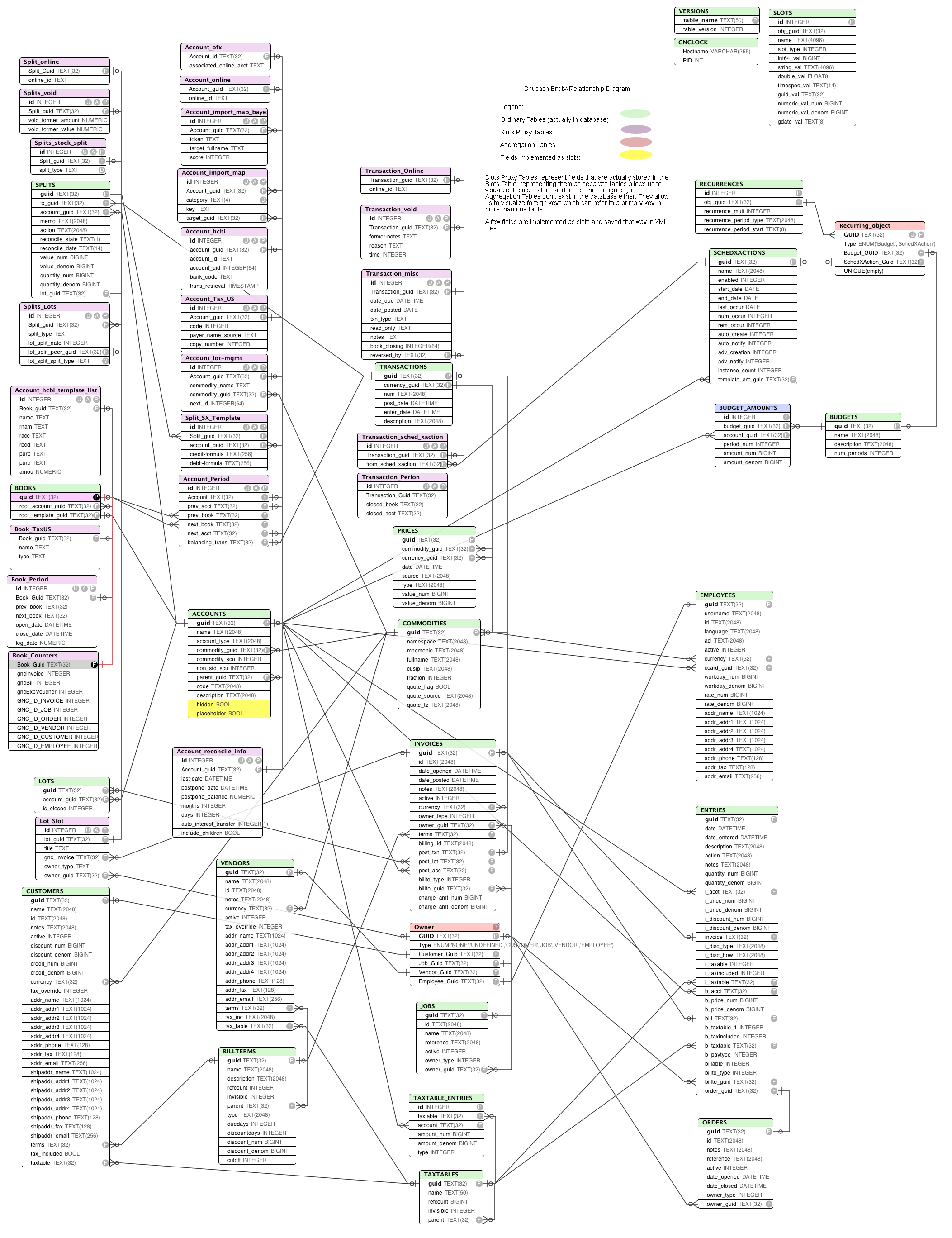
     I have found three online pages about SQL and GnuCash:
       [40]https://wiki.gnucash.org/wiki/SQL
       [41]https://wiki.gnucash.org/wiki/GnuCash_SQL_Examples
       [42]https://wiki.gnucash.org/wiki/images/8/86/Gnucash_erd.png
     I am trying to create SQL queries to find errors in my GnuCash
     setup:
       List of "stocks" no longer owned, but still getting Online Quotes:
       List of "stocks" still owned, but not getting Online Quotes:
       List of "stocks" in more than one Namespace:
       List of "stocks" in more than one Trading account:
     I can figure out some of the table columns that I need,
     but need help creating the full queries.
     I am running on Fedora Linux (35 thru 43) on Intel x86_64 with
     GnuCash 5.12
     and 5.13
     ------------------------------
     Message: 9
     Date: Mon, 8 Dec 2025 16:54:48 +1200
     From: Fred Tydeman <[43][email protected]>
     To: Gnucash Users <[44][email protected]>
     Subject: Re: [GNC] Help with SQL commands
     Message-ID:
             <CAK1r+o3+1B20ZY4=[45]A+WLowkKZpy9MnxfE_
     [email protected]>
     Content-Type: text/plain; charset="UTF-8"
     For finding a "stock" in more than one NameSpace, Google AI came up
     with:
     SELECT
         mnemonic,
         COUNT(DISTINCT namespace) AS namespace_count
     FROM
         commodities
     GROUP BY
         mnemonic
     HAVING
         COUNT(DISTINCT namespace) > 1;
     I have run that in sqlite3 command line and it found several
     duplicates.
     One down, three to go.
     How do I add this to:
     [46]https://wiki.gnucash.org/wiki/GnuCash_SQL_Examples
     On Mon, Dec 8, 2025 at 4:27?PM Fred Tydeman
     <[47][email protected]> wrote:
     > I had GnuCash create a SQL database (sqlite3).
     >
     > I have three different SQL GUI programs:
     >   dbeaver-ce, SQLiteStudio, DB_Browser
     >
     > I have found three online pages about SQL and GnuCash:
     >   [48]https://wiki.gnucash.org/wiki/SQL
     >   [49]https://wiki.gnucash.org/wiki/GnuCash_SQL_Examples
     >   [50]https://wiki.gnucash.org/wiki/images/8/86/Gnucash_erd.png
     >
     > I am trying to create SQL queries to find errors in my GnuCash
     setup:
     >   List of "stocks" no longer owned, but still getting Online
     Quotes:
     >   List of "stocks" still owned, but not getting Online Quotes:
     >   List of "stocks" in more than one Namespace:
     >   List of "stocks" in more than one Trading account:
     >
     > I can figure out some of the table columns that I need,
     > but need help creating the full queries.
     >
     > I am running on Fedora Linux (35 thru 43) on Intel x86_64 with
     GnuCash
     > 5.12 and 5.13
     >
     ------------------------------
     Subject: Digest Footer
     _______________________________________________
     gnucash-user mailing list
     [51][email protected]
     To update your subscription preferences or to unsubscribe:
     [52]https://lists.gnucash.org/mailman/listinfo/gnucash-user
     -----
     Please remember to CC this list on all your replies.
     You can do this by using Reply-To-List or Reply-All.
     ------------------------------
     End of gnucash-user Digest, Vol 273, Issue 22
     *********************************************

References

   1. mailto:[email protected]
   2. mailto:[email protected]
   3. https://lists.gnucash.org/mailman/listinfo/gnucash-user
   4. mailto:[email protected]
   5. mailto:[email protected]
   6. mailto:[email protected]
   7. mailto:[email protected]
   8. mailto:[email protected]
   9. mailto:[email protected]
  10. mailto:[email protected]
  11. mailto:[email protected]
  12. mailto:[email protected]
  13. mailto:[email protected]
  14. mailto:[email protected]
  15. mailto:[email protected]
  16. mailto:[email protected]
  17. mailto:[email protected]
  18. mailto:[email protected]
  19. mailto:[email protected]
  20. mailto:[email protected]
  21.
mailto:amdpr01mb1153202b69b66381961e46a49cf...@amdpr01mb11532.eurprd01.prod.exchangelabs.com
  22. mailto:[email protected]
  23. mailto:[email protected]
  24. mailto:[email protected]
  25. mailto:[email protected]
  26. mailto:[email protected]
  27. mailto:[email protected]
  28. mailto:[email protected]
  29. mailto:[email protected]
  30. mailto:[email protected]
  31. mailto:[email protected]
  32. mailto:[email protected]
  33. mailto:[email protected]
  34. mailto:[email protected]
  35. mailto:[email protected]
  36. mailto:[email protected]
  37. mailto:[email protected]
  38. mailto:[email protected]
  39. mailto:[email protected]
  40. https://wiki.gnucash.org/wiki/SQL
  41. https://wiki.gnucash.org/wiki/GnuCash_SQL_Examples
  42. https://wiki.gnucash.org/wiki/images/8/86/Gnucash_erd.png
  43. mailto:[email protected]
  44. mailto:[email protected]
  45. mailto:[email protected]
  46. https://wiki.gnucash.org/wiki/GnuCash_SQL_Examples
  47. mailto:[email protected]
  48. https://wiki.gnucash.org/wiki/SQL
  49. https://wiki.gnucash.org/wiki/GnuCash_SQL_Examples
  50. https://wiki.gnucash.org/wiki/images/8/86/Gnucash_erd.png
  51. mailto:[email protected]
  52. https://lists.gnucash.org/mailman/listinfo/gnucash-user
_______________________________________________
gnucash-user mailing list
[email protected]
To update your subscription preferences or to unsubscribe:
https://lists.gnucash.org/mailman/listinfo/gnucash-user
-----
Please remember to CC this list on all your replies.
You can do this by using Reply-To-List or Reply-All.