Doh, hit the wrong button. Let's try this again... I'd like to get
more info about your system so I can figure out why you're having this
problem.
Can you answer the question I posted here?
http://groups.google.com/group/Google-Labs-Picasa-for-Linux/msg/be335d4887bc1515

Also, it would be great if you can:

1) Tell me where you mount your external hard drive
2) Send me the output from the "hal-device" command, when your
external hard drive is plugged it

On Oct 27, 1:45 pm, leiz <[EMAIL PROTECTED]> wrote:
> Ok folks, if you're having this problem, please answer this question:
>
> With your external hard drive mounted, in the Tools -> Folder Manager
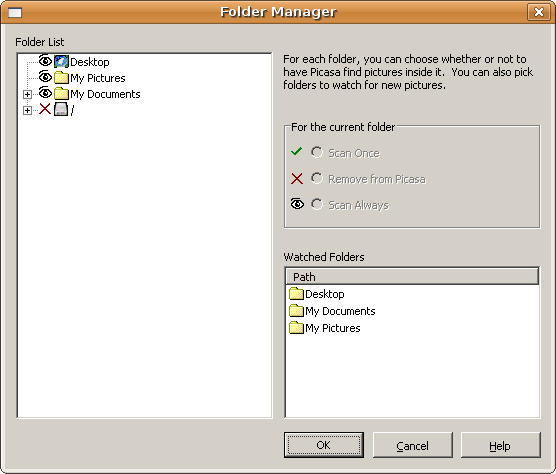
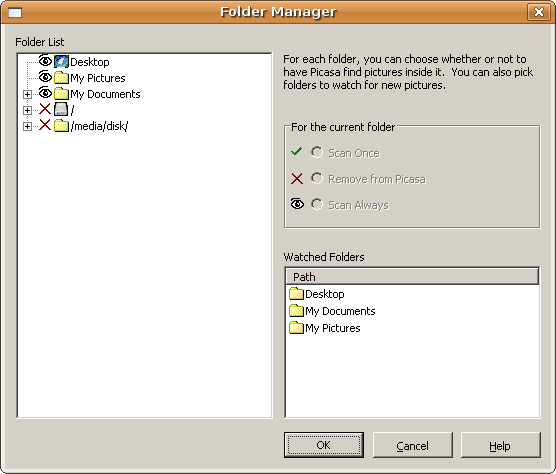
> dialog, if you collapse all the folder listings in the left pane, does
> it look like [A] or [B] ?
>
> [A]http://leiz.org/picasa/folder_manager_1.png
> [B]http://leiz.org/picasa/folder_manager_2.png
>
> that is, if your external hard disk is mounted at /path/to/
> mount_point, does /path/to/mount_point show up as an entry in the
> folder manager, like /media/disk does in [B] ?
>
> On Oct 22, 12:25 pm, leiz <[EMAIL PROTECTED]> wrote:
>
> > Ok, I did the following:
>
> > 1. have the flash drive plugged in, mounted
> > 2. start picasa, create an album: "foobar"
> > 3. add photos from the flash drive to the foobar album (album contains
> > only photos from the flash drive)
> > 4. close picasa, umount the flash drive
> > 5. start picasa (the foobar album is there, with 0 photos)
> > 6. close picasa, start again (the foobar album is there, with 0
> > photos)
> > 7. close picasa.
> > 8. mount flash drive, start picasa (the foobar album contains 3 photos
> > - happened instantly, didn't see the scanner thing come up)
>
> > Xvid Video (2.1 MB, 1 minutes)http://leiz.org/picasa/external_drive2.avi
>
> > On Oct 21, 10:27 pm, jigarshah <[EMAIL PROTECTED]> wrote:
>
> > > Yes but does it rescan every time you plugin your drive ?  Try
> > > following usecase.
> > > 1. Create Album
> > > 2. Add some photos from folders.
> > > 3. Close picasa. Remove / unmount removable.
> > > 4. Start picasa. And see if albums are visible.
> > > 4. Close picasa and start again. Does it still show your albums ?
> > > Close picasa.
> > > 5. mount drive again. And start picasa again. See if your albums are
> > > still there.
>
> > > On Oct 22, 2:23 am, leiz <[EMAIL PROTECTED]> wrote:
>
> > > > Are you guys having this problem in Picasa 3? I tried it out on a
> > > > Ubuntu 8.04 machine, with a 512 MB thumb drive, and it worked for me.
> > > > When I unmounted it from /media/disk, Picasa no longer shows the
> > > > photos. When I mounted it to /media/disk again, Picasa instantly
> > > > remembered where the photos were.
>
> > > > Xvid Video (4.5 MB, 2 minutes)http://leiz.org/picasa/external_drive.avi
>
> > > > On Oct 11, 5:14 am, mjpatey <[EMAIL PROTECTED]> wrote:
>
> > > > > Orion, you are awesome!  If this works, I will be using it all the
> > > > > time.  I've had the same problem for a couple of years, and there is
> > > > > no way to prevent it-- outside of a script like this!  Of course, the
> > > > > Picasa team could add an option to retain the info when a drive is
> > > > > unplugged, but that's a lot to hope for.
>
> > > > > -Mark
>
> > > > > )
>
> > > > > On Oct 4, 4:49 pm, orion <[EMAIL PROTECTED]> wrote:
>
> > > > > > On Aug 30, 6:18 pm, "[EMAIL PROTECTED]"
>
> > > > > > <[EMAIL PROTECTED]> wrote:
> > > > > > > I have a problem in that whenever I add the folder on
> > > > > > > myexternalUSBdriveto Picasa (either watched folders or scan
> > > > > > > once), the next time I
> > > > > > > start Picasa without thedriveinstalled it forgets all the photos.
> > > > > > > This means that when I add thedriveback, I have to re-scan the
> > > > > > > whole
> > > > > > > lot - which takes a long time.
>
> > > > > > > How can I improve this behaviour?
>
> > > > > > I use a USB external hard drive to store my photos (and periodically
> > > > > > back them up to a home server using
> > > > > > rsync). My main concern was not to accidentally launch Picasa
> > > > > > without
> > > > > > having the external drive plugged in (for the same reasons as yours
> > > > > > above)
> > > > > > so I added the following script right after "#   Simple script to
> > > > > > launch Picasa" line in /usr/bin/picasa
>
> > > > > > # start check external drive mount
> > > > > > check_external_drive() {
> > > > > >         if [ ! -d /media/photos/XYZ ]; then
> > > > > >                 zenity --error --text="XYZ external drive not
> > > > > > mounted!"
> > > > > >                 exit 1
> > > > > >         fi}
>
> > > > > > check_external_drive
> > > > > > # end check external drive mount
>
> > > > > > Here XYZ is a folder that I know exists on my external drive. Also,
> > > > > > I
> > > > > > labeled my drive volume as "photos" so that it is mounted at the
> > > > > > same
> > > > > > location ("/media/photos") every time. I am using Picasa 3 (with
> > > > > > wine)
> > > > > > on Ubuntu 8.04.
>
> > > > > > Hope this is of use.
--~--~---------~--~----~------------~-------~--~----~
You received this message because you are subscribed to the Google Groups
"Google-Labs-Picasa-for-Linux" group.
To post to this group, send email to
[email protected]
To unsubscribe from this group, send email to [EMAIL PROTECTED]
For more options, visit this group at
http://groups.google.com/group/Google-Labs-Picasa-for-Linux?hl=en
-~----------~----~----~----~------~----~------~--~---