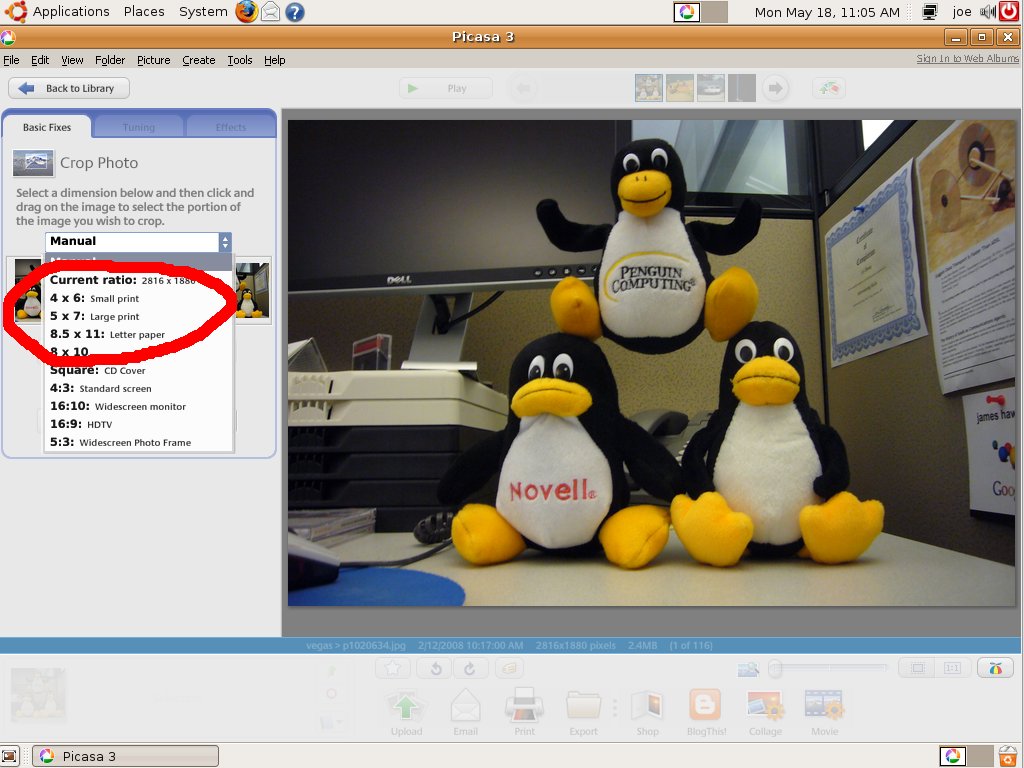
Same thing for me.
Ubuntu 9.04 in French (clean installation)
Pisasa 3.0.0 build 57.4402,0 for Linux
Edward a écrit :
> When I click the drop down I get:
> Manual
> Current ratio: 8 x 5
> 5 x 8
> 9 x 13: Small print
> 10 x 15: Large print
> 13 x 18
> 20 x 25
> A4: Full page
> Square: CD Cover
> 4:3: Standard screen
> 16:10 Widescreen monitor
> 16:9: HDTV
> 5:3: Widescreen Photo Frame
>
>
> On May 18, 1:08 pm, leiz <[email protected]> wrote:
>
>> Umm, it's in the drop down.
>>
>> http://leiz.org/picasa/2009_05/crop.jpg
>>
>> On May 17, 2:50 pm, Edward <[email protected]> wrote:
>>
>>
>>> Is there a way to get 4x6 and 5x7 to show up as options in the crop
>>> drop-down?
>>>
>
> >
>
>


--~--~---------~--~----~------------~-------~--~----~
You received this message because you are subscribed to the Google Groups
"Google-Labs-Picasa-for-Linux" group.
To post to this group, send email to
[email protected]
To unsubscribe from this group, send email to
[email protected]
For more options, visit this group at
http://groups.google.com/group/Google-Labs-Picasa-for-Linux?hl=en
-~----------~----~----~----~------~----~------~--~---