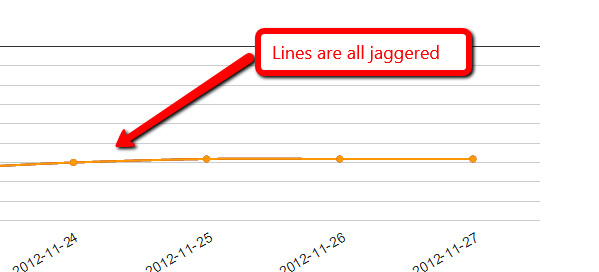
It's just as bad for you, even when the lines are separated?  Can you
screenshot it?
On Tuesday, November 27, 2012 3:08:33 PM UTC-5, Patrick McCarthy wrote:
>
> Really appreciate the work you re doing here.  Thanks.  Bizarrely the
> output of the fiddle is also not sharp.  This has nothing to do with flash
> or anything like that./  I wouldn't help for me to reinstall some component
> or something?
>
> On Tuesday, 27 November 2012 17:50:19 UTC, asgallant wrote:
>>
>> Ok, I put it up in a jsfiddle and played around a bit.  It looks like
>> this is an artifact of less than perfect anti-aliasing in the browser,
>> exacerbated by the fact that your 3 lines all exactly overlay one another.
>>  If you separate out the lines, you can still see the effect if you look
>> for it, but it's nowhere near as pronounced.  See here:
>> http://jsfiddle.net/asgallant/rDWu5/
>>
>> Also, you have an errant comma problem in your code that will cause IE to
>> bomb if you try to run that (notes in the fiddle).
>>
>> On Tuesday, November 27, 2012 12:12:35 PM UTC-5, Patrick McCarthy wrote:
>>>
>>> Just rebooted the machine in case.  Still happening and here is the
>>> source code:
>>>
>>> <script type="text/javascript"> google.load("visualization", "1",
>>> {packages:["corechart"]}); google.setOnLoadCallback(drawChart); function
>>> drawChart() { var data = google.visualization.arrayToDataTable([ ['Date',
>>> 'http://www.vi.net/dedicated-servers/','
>>> http://www.vi.net/dedicated-servers/','
>>> http://www.vi.net/dedicated-servers/'], ['2012-11-22', 68, 68, 68,
>>> ],['2012-11-23', 70, 70, 70, ],['2012-11-24', 67, 67, 67, ],['2012-11-25',
>>> 65, 65, 65, ],['2012-11-26', 65, 65, 65, ],['2012-11-27', 65, 65, 65, ],
>>> ]);  var options = { title: 'Keyword Ranking Data', backgroundColor:
>>> {strokeWidth:2,stroke:'#DDD'}, chartArea:
>>> {top:60,padding:100,width:'80%', height:'50%'}, pointSize: 5, hAxis:
>>> {baseline:1,showTextEvery:1,direction:1,slantedText:true}, vAxis:
>>> {gridlines: {count:10},
>>> format:'#',direction:-1,minValue:1,maxValue:100,viewWindowMode:'pretty',textPosition:'out'},
>>>
>>> legend: {position:'bottom'}, curveType: 'function' };  var chart = new
>>> google.visualization.LineChart(document.getElementById('chart_div'));
>>> chart.draw(data,
>>> options); } </script>
>>> On Tuesday, 27 November 2012 17:05:07 UTC, Patrick McCarthy wrote:
>>>>
>>>> It happens in all my browsers.  Chrome, IE and Firefox...
>>>>
>>>> On Tuesday, 27 November 2012 16:58:18 UTC, asgallant wrote:
>>>>>
>>>>> What browser are you seeing this in?  I can't replicate it with any of
>>>>> my charts.
>>>>>
>>>>> On Tuesday, November 27, 2012 8:33:00 AM UTC-5, Patrick McCarthy wrote:
>>>>>>
>>>>>>
>>>>>> <https://lh3.googleusercontent.com/-1ra82_k7f3o/ULTBARhhLyI/AAAAAAAAAF4/oErb2LyJmd8/s1600/Untitled-2.jpg>
>>>>>> The line on my charts have suddenly gone all jaggered.  Any ideas?
>>>>>>
>>>>>> On Wednesday, 4 February 2009 00:38:57 UTC, RodgerWilko! wrote:
>>>>>>>
>>>>>>> Hi,
>>>>>>>
>>>>>>> Is it possible to draw a Smooth Line Chart.
>>>>>>>
>>>>>>> To give an example, the following chart
>>>>>>> http://code.google.com/apis/ajax/playground/#line_chart
>>>>>>> is very rigid around the points.
>>>>>>>
>>>>>>> As apposed to something like this
>>>>>>>
>>>>>>> http://www.domain.com.au/public/ChartHousePrice.aspx?Type=House&Suburb=Sydney&PostCode=2000
>>>>>>>
>>>>>>>
>>>>>>> I realise we could add lots of points around the main point to try
>>>>>>> and
>>>>>>> make it not soo 'sharp' but I think it would be better to have the
>>>>>>> functionality in the charts.
>>>>>>>
>>>>>>> If it's not available, is there a place to request functionality
>>>>>>> like
>>>>>>> this?
>>>>>>>
>>>>>>> Thanks,
>>>>>>>
>>>>>>> RodgerWilko!
>>>>>>
>>>>>>

--
You received this message because you are subscribed to the Google Groups
"Google Visualization API" group.
To view this discussion on the web visit
https://groups.google.com/d/msg/google-visualization-api/-/ksXbPF3PlO8J.
To post to this group, send email to [email protected].
To unsubscribe from this group, send email to
[email protected].
For more options, visit this group at
http://groups.google.com/group/google-visualization-api?hl=en.