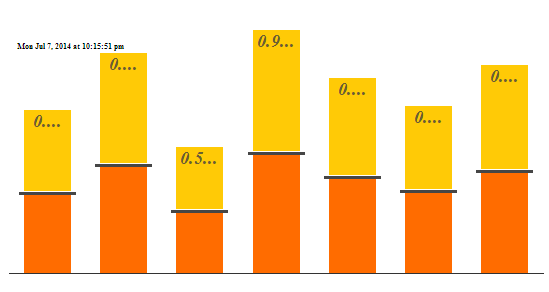
I'm creating a stacked column chart. Per business requirements I need to
have a horizontal line between certain stacked chart elements. To my
knowledge this isn't supported by the API so instead I'm writing custom
JavaScript to achieved this. Using custom JavaScript I am able to traverse
the DOM and manually insert SVG elements that represents the lines. When I
inspect the DOM elements using the browser, the SVG elements for the line
are in the DOM as expected. However the lines are not visible via the web
browser itself.
If I save the raw HTML for the chart to a static file, the lines show
correctly. (See screenshot below.) My question is, why does this work when
I'm using a static HTML file, but not when I have it running with Google
charts? Is there something associated with Google charts JavaScript that is
suppressing the lines?


<https://lh3.googleusercontent.com/-WutQumJrqgI/U8RtShOQt6I/AAAAAAAACt4/Mcot7ersuA8/s1600/Example.PNG>


--
You received this message because you are subscribed to the Google Groups
"Google Visualization API" group.
To unsubscribe from this group and stop receiving emails from it, send an email
to [email protected].
To post to this group, send email to [email protected].
Visit this group at http://groups.google.com/group/google-visualization-api.
For more options, visit https://groups.google.com/d/optout.