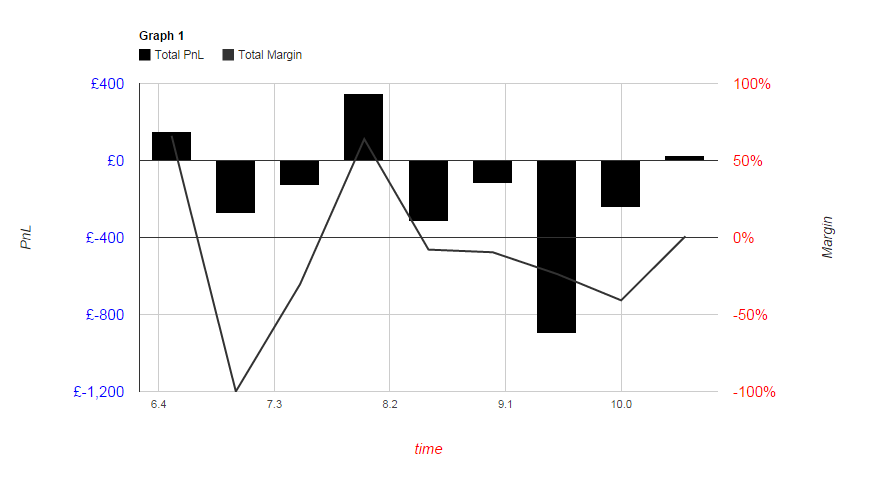
If having the baseline always be in the center of the chart is acceptable
(even when there are no data points below it), there is an easy solution to
this problem: get the min/max for each series and set the minValue/maxValue
options to the negative of the opposite value: this will ensure that the
actual min/max that the chart uses to determine the axis range is
symmetrical around 0, and thus both axes should share a baseline at the
center of the chart.
var axis0Range = data.getColumnRange(1);
var axis1Range = data.getColumnRange(2);

in the vAxes option:

vAxes:{
    0:{
        title:'PnL',
        titleTextStyle: {fontSize:14},
        textStyle:{color: 'blue',fontSize:15},
        format:'£###,###,###',
        // swap the min/max and multiply by -1
        minValue: axis0Range.max * -1,
        maxValue: axis0Range.min * -1
    },
    1:{
        title:'Margin',
        titleTextStyle: {fontSize:14},
        textStyle:{color: 'red',fontSize:15},
        format:'#.###%',
        // swap the min/max and multiply by -1
        minValue: axis1Range.max * -1,
        maxValue: axis1Range.min * -1
    }
}


On Wednesday, October 8, 2014 1:38:59 PM UTC-4, [email protected] wrote:
>
> I have a Google Combination Chart where I am using two y axes.
>
> At present, the baselines for each axis are at a different level.
>
> I wish to ensure that the baselines for each axis are at the same level.
>
> The code I am currently using to display my graph is shown below:
>
>
> <html>
>     <head>
>         <script type="text/javascript" src="https://www.google.com/jsapi";
> ></script>
>         <script>
>
>  google.load("visualization", "1", {packages:["corechart"]});
>  google.setOnLoadCallback(drawChart);
>  function drawChart() {
>
>
>  var data = new google.visualization.DataTable();
>
>
>  data.addColumn('number', 'Sales');
>  data.addColumn('number', 'Total PnL');
>  data.addColumn('number', 'Total Margin');
>
>
>  data.addRows([  [6.5,150.6,0.6604],
>                             [7.0,-275,-1],
>                             [7.5,-128.45000,-0.30368],
>                             [8.0,345.5,0.63904761],
>                             [8.5,-316.56000,-0.07868],
>                             [9.0,-118.26000,-0.09587],
>                             [9.5,-899.0699,-0.236790],
>                             [10.0,-242.6800,-0.40805],
>                             [10.5,28.1700,0.00786]  ]);
>
>
>
>  var options = {
>  title: 'Graph 1',
>  tooltip: {textStyle: {fontSize:14}},
>  titleTextStyle:{fontSize:12},
>  hAxis: {title: 'time', titleTextStyle: {color: 'red',fontSize:15},
> textStyle: {fontSize:11,fontStyle:'bold'}},
>  legend: {maxLines:5,textStyle: {fontSize: 11.5}},
>  seriesType: "bars",
>  series: {
>  0: {type: "bar",targetAxisIndex:0,color:'#000000'},
>  1: {type: "line",targetAxisIndex:1,color:'#333333'},
>  },
>  vAxes:{
>  0:{title:'PnL',titleTextStyle: {fontSize:14},textStyle:{color: 'blue',
> fontSize:15},format:'£###,###,###'},
>  1:{title:'Margin',titleTextStyle: {fontSize:14},textStyle:{color: 'red',
> fontSize:15},format:'#.###%'}
>  }
>  };
>
>
>   var chart = new google.visualization.ComboChart(document.getElementById(
> 'graphdiv'));
>   chart.draw(data, options);
>  }
>
>
>  </script>
>     </head>
>     <body>
>         <div id='graphdiv' style='width: 900px; height: 500px;'></div>
>     </body>
>     </html>
>
>
> This produces the following graph:
>
>
> <https://lh3.googleusercontent.com/-piVNlnBYCO8/VDV2hSVoDXI/AAAAAAAAAAM/O7JVCmQgrY4/s1600/stackoverflowgraph.png>
>
>
>
>
>
>
>
>
>
>
>
>
>
>
>
>
>
>
>
>
>
>
>
>
>
>
>
>
>
>
>
>
>
>
> I am aware that making use of the minValue and maxValue properties of each
> of the vAxes could be one way of dealing with this situation. But I am not
> sure how exactly I might do so.
>
> Also, are there any future plans to make this a simple matter of adding
>
> baseline-equal:true
>
> to the vAxes options?
>
> I apologise if this is the incorrect forum in which to ask about this
> issue.
>

--
You received this message because you are subscribed to the Google Groups
"Google Visualization API" group.
To unsubscribe from this group and stop receiving emails from it, send an email
to [email protected].
To post to this group, send email to [email protected].
Visit this group at http://groups.google.com/group/google-visualization-api.
For more options, visit https://groups.google.com/d/optout.