Hi there,

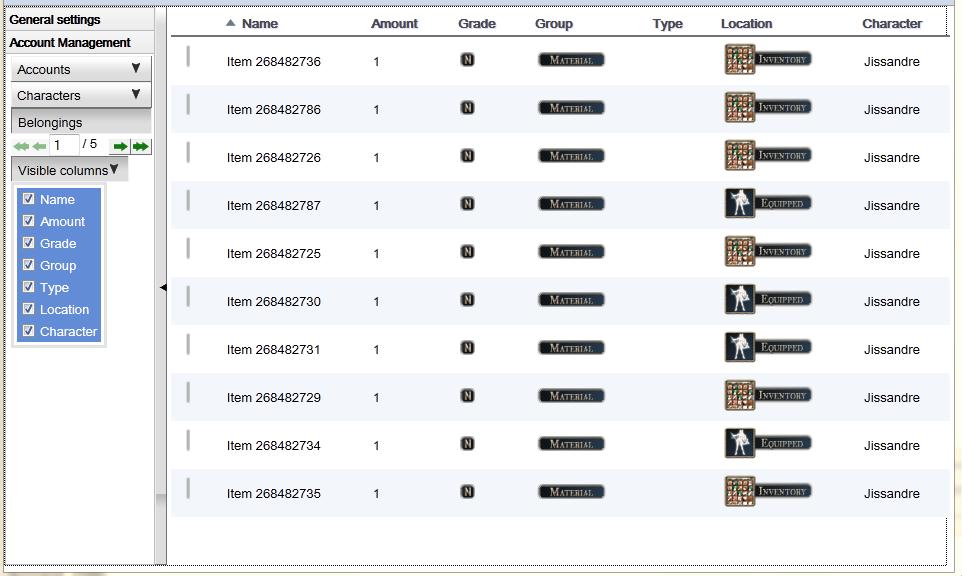
I'm using a cellTable to display items from a character. The table
header consists of various columns such as "Image", "Name", "Amount",
"Type" and "Character".
Then I made a custom widget that acts like a dropdown listbox - using
a toggle button and a celltable. It contains all the rows that can be
hidden by checking/unchecking the checkboxes.
See here for a screenshot: http://www.abload.de/img/odrop_v2_00036u4r.jpg

While I managed to hide the rows upon checking/unchecking that
checkbox in the dropdown menu, I can't seem to make the column headers
disappear.
I hide a cell in a row by getting the column index and writing
something like this:

cellTable.getRowElement(i).getCells().getItem(cellTable.getColumnIndex((Column<ItemDTO,
 ?
>) event.getColumn())).addClassName("hiddenCell");

.hiddenCell is defined in my css file and just contains "display:
none;".
It works well on the cells, but how do I approach the column header
cells? I'd like to be able to hide them too.

I've read something about overwriting the render-method or the
getCellStylesName() method of the column, but the latter doesn't work
for me (the method get's called when the rows appear - not on checking/
unchecking and I don't know what event to fire) and I don't know much
about the former.

Please help me find a way to assign a style to the header cell - or
maybe a whole new (better?) way of hiding a whole column? (I'd like
for the column to stay in tact so if I retry my data it gets pushed
into the hidden columns as well - I just want to be able to display
some of the columns and hide other columns)

Thank you in advance!
Igor.

--
You received this message because you are subscribed to the Google Groups
"Google Web Toolkit" group.
To post to this group, send email to [email protected].
To unsubscribe from this group, send email to
[email protected].
For more options, visit this group at
http://groups.google.com/group/google-web-toolkit?hl=en.