If anybody comes across this and needs a fix, I execute this in the onload
of the widget containing the tab layout panel
tabPanel.getElement().getFirstChildElement().getStyle().setProperty("top","-10000ex");

Not pretty, but necessary it seems.

On Friday, 30 November 2012 12:57:57 UTC, johnrellis wrote:
>
> Really does seem to me that this is a bug??  Does anyone agree/disagree?
>
> On Wednesday, 28 November 2012 09:28:39 UTC, johnrellis wrote:
>>
>> Hi Jens,
>>
>> Thanks for the explanation.
>>
>> The TabLayoutPanel is in a dialog that is draggable around the screen so
>> depending on where you drag it, it puts an invisible cover on what is
>> underneath the div.  So if I drag the dialog to just under a button group,
>> I am unable to click some of the buttons that are under the invisible div.
>>
>> It looks like all other tab panels are unsuitable for use in standards
>> mode.  It looks like my only option is TabLayoutPanel and GWT has no Tab
>> set implementation that is suitable for use inside a widget like this. Is
>> this the case?
>>
>> Many Thanks!!!
>> John
>>
>> On Tuesday, 27 November 2012 19:11:01 UTC, Jens wrote:
>>>
>>> The div you are seeing is used by GWT's LayoutImpl class to calculate
>>> the number of pixels for a given unit (like em, ex, pct, px,... ), so you
>>> can't get rid of it (see:
>>> http://code.google.com/p/google-web-toolkit/source/browse/trunk/user/src/com/google/gwt/layout/client/LayoutImpl.java#109
>>> )
>>>
>>> Why do you need a button outside of your dialog to be clickable? Or were
>>> you just concerned about a div you can't interpret and the button issue was
>>> just an example?
>>>
>>> -- J
>>>
>>>
>>> Am Dienstag, 27. November 2012 19:47:47 UTC+1 schrieb johnrellis:
>>>>
>>>> Hi,
>>>>
>>>> I was hoping someone could help me with a very strange issue.  We have
>>>> a TabLayoutPanel sitting inside a VerticalPanel.  This in turn is in a
>>>> dialog.
>>>>
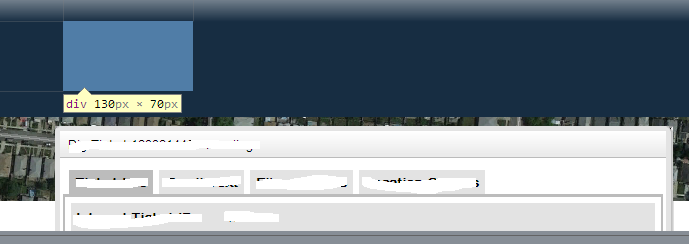
>>>> There is a strange div floating above the dialog as shown in the
>>>> picture below :
>>>>
>>>>
>>>> <https://lh4.googleusercontent.com/-X96Ns1Qgde0/ULUJ8d1lR8I/AAAAAAAAALE/WTTYGPPUe2k/s1600/floating+div.png>
>>>>
>>>>
>>>> The div is invisible, I used the web tools to highlight it.  If it is
>>>> over a button however, it prevents clicks etc.
>>>>
>>>> I can inspect the element and see if is part of the TabLayoutPanel as
>>>> shown in the picture below :
>>>>
>>>>
>>>> <https://lh4.googleusercontent.com/-AUC61jq8I08/ULUH92OPzJI/AAAAAAAAAK8/RaT2gHo6cY0/s1600/IMG_27112012_172504.png>
>>>> Does anybody have any idea what this is and how I can get rid of it?
>>>>
>>>> The browser is running in standards mode and the RootLayoutPanel is
>>>> being used.
>>>>
>>>> Many thanks!
>>>> John
>>>>
>>>

--
You received this message because you are subscribed to the Google Groups
"Google Web Toolkit" group.
To view this discussion on the web visit
https://groups.google.com/d/msg/google-web-toolkit/-/qGxPLVkuk_4J.
To post to this group, send email to [email protected].
To unsubscribe from this group, send email to
[email protected].
For more options, visit this group at
http://groups.google.com/group/google-web-toolkit?hl=en.