I finished porting GWT Elemental to JavaFx's WebView. I call it
ElementalFx. The code is sitting in the "elementalfx" branch of my clone of
the GWT git repository:
  https://github.com/my2iu/gwt

With ElementalFx, you can use GWT Elemental to make desktop apps. You can
use the same UI code for both the desktop and for the web. It can be
helpful in use cases like

1) You need to write a web-version and a PC/Mac/Linux-version of an app,
and you don't want to write the UI code twice
2) You want to write a UI widget and share it between a HTML5 web page and
a desktop application
3) You have an existing Swing or SWT application, and you want to migrate
it to HTML5 by gradually replacing components and dialogs with HTML5
versions
4) You need to write a desktop application, but you don't want to waste
your time learning a niche desktop UI framework when you could just use
HTML5 for everything
5) You have some legacy Java UI programmers, and you want to upgrade their
skills to include HTML5 in a gradual manner
6) You want to debug and test a GWT Elemental application without using
SuperDevMode or DevMode

In the future, I would like to port Elemental to Android and iOS too, then
you could reuse your UI code across web, mobile, and desktop. I don't have
the cycles to take that on in the near future though. My initial look at
the Android WebView suggested that it didn't export the right interface
needed to support something like Elemental, so doing the port would involve
creating a custom WebView that can be embedded in apps, which is a lot of
work.

Just thought some of you might be interested,
Ming

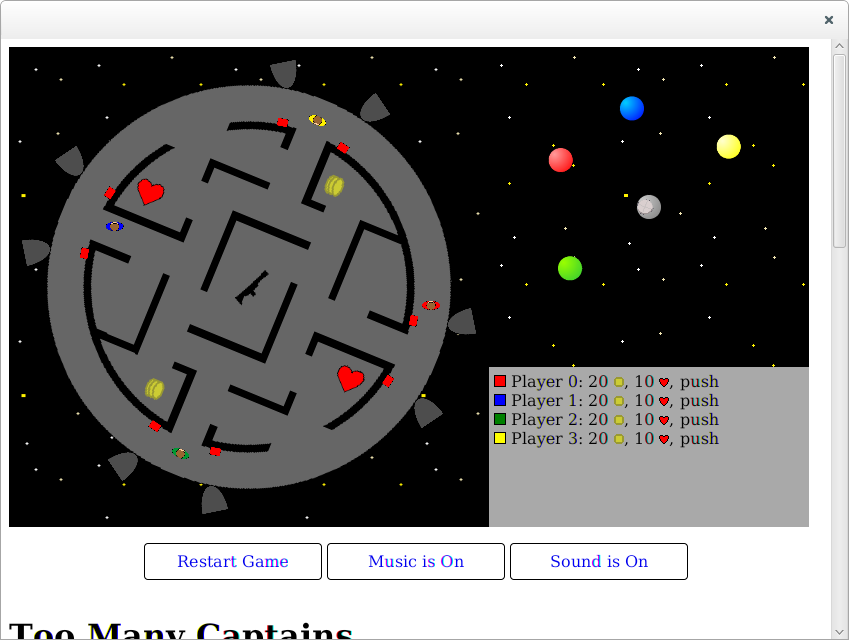
p.s. As a demonstration of it working, I took a game I wrote for a game jam
in Elemental and adapted it to run in ElementalFx. Here's a screenshot of
it running in Linux:

  http://www.jinq.org/elementalfx-screen.png

The game uses 2 Canvas elements, several DIVs that are updated using
innerHTML, JSON processing, a timer, and keyboard events.

In order to get things to work, I had to do these things:

1) Using XMLHttpRequest would cause the JVM to crash (I think it's a bug in
JavaFx). Since this was now a desktop Java program, it was fairly easy just
to replace that code with something that used real Java instead

2) All my sound effects using HTML5 Audio caused
IllegalThreadStateException errors. I imagine JavaFx probably doesn't
properly support audio in its WebView or something.

3) The original code used Browser.getWindow() and Browser.getDocument() a
lot to get at the window and document objects. This doesn't make sense in
ElementalFx because the Java code does not run in the context of a web
page. In fact, a desktop Java application can have multiple WebViews with
multiple windows and documents. I had to change my code to pass in the
window/document to use when doing UI stuff

4) I had to remove the script tag that would run the compiled GWT JS code
from the HTML. Instead, my Java code would just run itself after it had
loaded the HTML.

5) I needed to write my own bootstrap code to start the application. Here
is what it looks like:

@GwtIncompatible
public class FxMain extends Application
{
  public static void main(String[] args)
  {
    launch(args);
  }

  @Override
  public void start(Stage stage) throws Exception {
    // Create the WebView
    VBox region = new VBox();
    WebView webView = new WebView();
    final WebEngine engine = webView.getEngine();
    region.getChildren().add(webView);

    Scene scene = new Scene(region);
    stage.setScene(scene);
    stage.show();

    // Redirect the alert handler to send output to stderr
    engine.setOnAlert(new EventHandler<WebEvent<String>>() {
      @Override
      public void handle(WebEvent<String> msg) {
        System.err.println(msg.getData());
      }});

    // Start up the Gwt module when the page has finished loading. Grab the
window
    // and document objects and stash them somewhere for use later.
    engine.getLoadWorker().stateProperty().addListener(
        new ChangeListener<Worker.State>() {
          @Override
          public void changed(ObservableValue<? extends State> ov,
              State oldState, State newState) {
            if (newState == Worker.State.SUCCEEDED) {
              Module.win =
(Window)GwtFxBridge.wrapJs(engine.executeScript("window"));
              Module.doc = Module.win.getDocument();
              new Module().onModuleLoad();
            }
          }
        });

    // Load the main Gwt application web page
    engine.load(new File("index.html").toURI().toURL().toExternalForm());
  }
}

--
You received this message because you are subscribed to the Google Groups
"Google Web Toolkit" group.
To unsubscribe from this group and stop receiving emails from it, send an email
to [email protected].
To post to this group, send email to [email protected].
Visit this group at http://groups.google.com/group/google-web-toolkit.
For more options, visit https://groups.google.com/d/optout.