Hello List,

I am trying to generate PNG files of a few different maps using r.colors,
d.rast, and the PNG driver.
The images I get from this process end up being colored slightly differently
than when the equivalent images are generated in QGIS.  It is far more
convenient to use the PNG driver right in GRASS (because I can set a script
running and print out many images at once), but I prefer the color results I
get with QGIS.

In GRASS, I am using

r.colors map=ForestChange rules=colorTable.file
d.mon start=PNG
d.rast map=ForestChange
d.mon stop=PNG

with the rules file (colorTable.file) as follows using the rgb values for
each level:
-15 255 0       0
-0.5 255 240 180
0 white
0.5 180 230 130
15 0 70 0

(the idea with this particular rules file is to generate deforestation /
reforestation maps where zero change is shown as white, with beige-red
representing increasing levels of deforestation, and light green - dark
green representing increasing levels of reforestation).

Then, I take the same raster file (ForestChange), load it in QGIS, and set
its colormap according to what I think are the same rules:
http://i1020.photobucket.com/albums/af326/timothyholland/QGIScolorTable.jpg

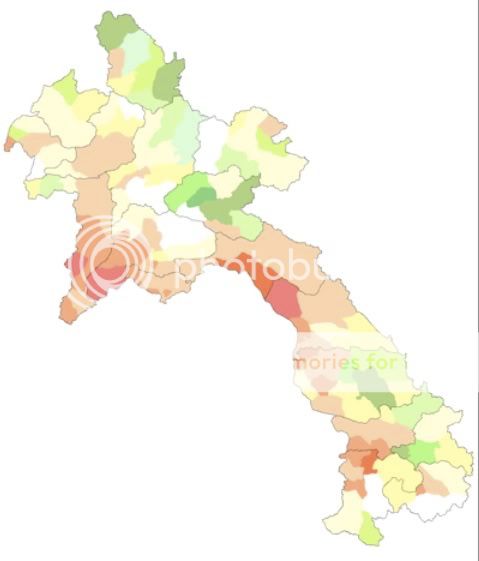
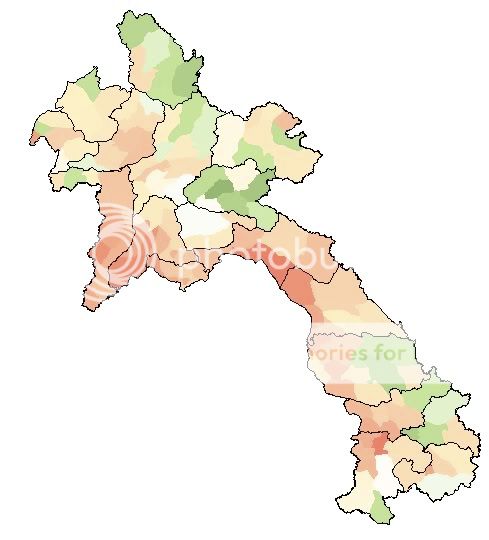
The two resulting files don't look the same, however.  The GRASS PNG output
has a far more yellow-ish tone.  I think the QGIS one is quite a bit nicer.
GRASS:
http://i1020.photobucket.com/albums/af326/timothyholland/GRASS_PNG_map.jpg
QGIS: http://i1020.photobucket.com/albums/af326/timothyholland/QGISmap.jpg.
I have tried the various flags in the r.colors module (-g / Logarithmic
scaling; -e / Histogram equalization; and the default), but all seem to
return a similar result to the image which is given here).

As a test, I also took a landsat composite image that I had generated using
r.composite.  In this case, the color table was set by r.composite without
any input from me, so I was really expecting the same output.  However,
again, the QGIS output has much more natural-seeming colors.  GRASS:
http://i1020.photobucket.com/albums/af326/timothyholland/HLB_brovey_GRASS.jpg
QGIS:
http://i1020.photobucket.com/albums/af326/timothyholland/HLB_brovey_QGIS.jpg.

Does anyone know if there is a way to better approximate the QGIS color
results using GRASS directly?  According to the QGIS GUI, color
interpolation (for the forest maps, at least) is linear, which should be the
most straightforward interpolation, shouldn't it?

Thanks for any help / advice anyone can provide.

Best,
Tim

--
View this message in context:
http://n2.nabble.com/r-colors-generates-different-colors-than-QGIS-plugin-when-same-rules-used-tp3558680p3558680.html
Sent from the Grass - Users mailing list archive at Nabble.com.
_______________________________________________
grass-user mailing list
[email protected]
http://lists.osgeo.org/mailman/listinfo/grass-user