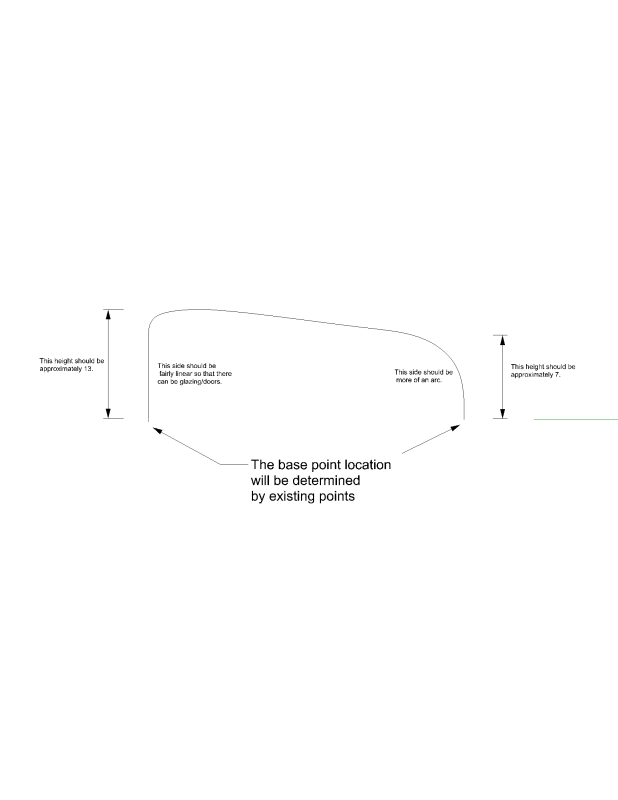
Of course. Here is an image describing my parameters:

http://i3.photobucket.com/albums/y88/loac1/curve.png
Drawing a curve like this seems like such a simple thing to do,
however I cannot seem to figure it out other than:

1. drawing a line between the two original points on the ground plane
2. drawing points along that line
3. generate a series going from 13 - 7, and using that to move the
points in the z direction
4. then drawing a curve through those points

The problem with this approach is that the curvature of the line will
be uniform, so I won't get one side flat and the other more curved.

So is there a way to change the degree of a curve along its length?

Or is there a better way to do this?

Thanks.

On Apr 9, 10:26 am, David Rutten <[email protected]> wrote:
> Hi Justin,
>
> you cannot generate it parameterically unless it is driven by
> parameters. What are they?
>
> --
> David Rutten
> [email protected]
> Robert McNeel & Associates
>
> On Apr 9, 6:12 pm, Justin <[email protected]> wrote:
>
> > Here is what I am trying to do:
>
> >http://grasshopper3d.googlegroups.com/web/Untitled%20(2).jpg?gsc=BLlY...
>
> > But instead of just drawing the curve, I want to generate it
> > parametrically. The curve is basically going to be the section of a
> > building.
>
> > I figured out how to generate an arc in the z direction, or a more
> > linear line, but I can't figure out how to get a 'weird' curve like
> > this.
>
> > Thanks for your help.