Izidor, you're trying to bribe me with flattery ;-) Thanks for the
compliment, but I cannot accept: I am far from the being responsible for
all of GTG's awesomeness just by myself... And btw, sorry if I didn't
answer sooner, I've been pretty busy with my work and other stuff last week.
So, about your mail now. First, I'd like to redefine what you want a bit,
but without assuming a particular solution. If I get it right, you need a
specific view displaying only actionable task which allows you to identify
and select some of those tasks in order to plan your next day(s) of work.
Therefore, you need to see all tasks that are relevant for the extent of
the period currently being planned. (this is interesting, btw, I'll take
note of this for GTG's redesign)

Since most of those needs are already satisfied by the work view, you
suggest to use it. But there is one issue: the work view only shows tasks
relevant for the current day (and more precisely, for the current day after
6am). In that perspective, a solution to your issue is indeed to be able to
change the extent of the displayed period.

As a general comment, I think it would actually be better to explore other
solutions than this one. Indeed, I think your use case shows a relevant
design limitation of GTG, but your solution is mostly a workaround for this
limitation rather than a true design-level fix. For instance, it would
probable be better to overhaul smart tags with more configurable view
settings (keywords, dates, etc.) However, since I don't have a clear
solution to offer for this issue and this is a significant design work,
it's probably better to leave this issue for the redesign effort and go for
simplicity here by adopting your solution.

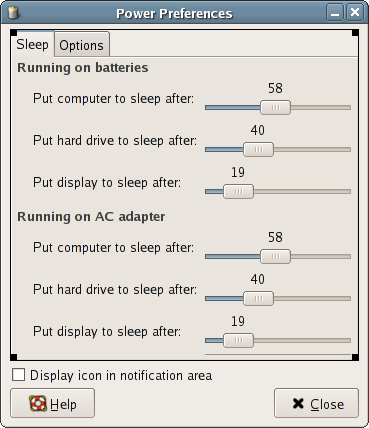
That being said, I'm afraid I'm not a fan a fan of a "tune precisely when
your day start" widget. I think it mostly fits specific use cases like
yours and it's overly precise, it reminds me some early GNOME strangeness
like this one:
https://mail.gnome.org/archives/utopia-list/2005-April/pngy5EluJqXfR.png(58
minutes? seriously? why not 58.74 minutes??)

I could accept a setting widget with simple and clear options like this,
however (in a dropdown):

In Work View, show tasks starting:

   - today only
   - today and tomorrow
   - today and in the next 7 days

*Hint: work days start at 6am*

Option 1 gives you the current implementation, option 2 gives you a peek of
tomorrow tasks, and option 3 gives you a peek of the week to come. That
allows someone to plan things since you get to see some tasks ahead. This
solution also avoid another issue with your solution, which is that the
Work View has a different use (focus/planning) depending on the time of the
day, and changes automatically from one to another without notice to the
user or explicit request. That can be quite confusing for people (who
generally already have a hard time getting what the WV is all about).

If what you want is more control than that, then I suggest you implement
this as a plugin. (it's harsh, I know. I'm sorry but it's *really*
important to me that the core features and options of GTG stay clear and
simple, ala gedit)

Bertrand

On Mon, Jul 2, 2012 at 9:14 PM, Izidor Matušov <[email protected]>wrote:

> I am still waiting mainly for Bertrand's opinion. He's *the* guy who made
> GTG's UI awesome.
>
>
> On 07/02/2012 08:09 PM, Nimit Shah wrote:
>
>>      what did you finally decide?
>>
>> On Wed, Jun 27, 2012 at 3:16 PM, Nimit Shah <[email protected]
>> <mailto:[email protected]>**> wrote:
>>
>>     Bug #561092 is related to start time of a day as well. We can keep
>>     an option for that in preferences.
>>        Regarding the interval of the day I think we should keep the text
>>     box. I find that more comfortable. Also, we can give negative
>>     numbers easily in a text box. While in a scale, we need to make it
>>     larger. We don't know how long the user will want the interval to be
>>     so we need to keep option from -01 to 23 or so.
>>
>>     Nimit Shah,
>>     B Tech 3rd year,
>>     Computer Engineering Department,
>>     SVNIT Surat
>>     Secretary ACM-NIT Surat
>>     www.dude-says.blogspot.com
>> <http://www.dude-says.**blogspot.com<http://www.dude-says.blogspot.com>
>> >
>>
>>
>>
>>
>>     On Wed, Jun 27, 2012 at 1:00 PM, Izidor Matušov
>>     <[email protected]
>> <mailto:izidor.matusov@gmail.**com<[email protected]>>>
>> wrote:
>>
>>         Hi,
>>
>>         I am experimenting with my personal GTG workflow. I would like
>>         to really leverage WorkView feature: I choose under 20 tasks I
>>         can work on then work on one of them. Tasks are often hidden
>>         because of the start date, e.g. "Go to a party" is shown in
>>         WorkView only on that given date.
>>
>>         The current implementation assumes the fact that a new day
>>         starts at 6am. If you work late during midnight, you would get
>>         many new tasks in the middle of your "work day". We should have
>>         an option for changing that.
>>
>>         I think that the day could begin even a day earlier for my use
>> case:
>>
>>         I work from early morning and rest in the evening. Before I go
>>         to bed, I would like to do planning for the next day. After 9pm,
>>         GTG would show in WorkView also tasks which start tomorrow.
>>         Which
>>         I would like to have an option to edit when the day starts. How
>>         big the interval could be?
>>           1) 00:00 day before - 23:00 today
>>           2) 12:00 day before - 23:00 today
>>           3) 12:00 day before - 12:00 today
>>
>>         I would go with options 1 or 2.
>>
>>         I am not sure which widget to use for setting this option. From
>>         top of my head, we can have a text field with the format XX:XX
>>         and if the user wants to start day before, put a minus before,
>>         e.g. 12:00 (today), -21:00 (day before) It sounds like a big
>>         hack to me.
>>
>>         Another option is to use a scale with a label like it is in
>>         Hamster's dialog for activity reminder.
>> http://i.imgur.com/6pjuO.png
>>
>>         How should be the start of the day setup? Which widget to use?
>>
>>         Izidor
>>
>>         ______________________________**___________________
>>         Mailing list:
>> https://launchpad.net/~gtg-__**contributors<https://launchpad.net/%7Egtg-__contributors>
>>
>> <https://launchpad.net/~gtg-**contributors<https://launchpad.net/%7Egtg-contributors>
>> >
>>         Post to     :
>> gtg-contributors@lists.__launc**hpad.net<http://launchpad.net>
>>
>> <mailto:gtg-contributors@**lists.launchpad.net<[email protected]>
>> >
>>         Unsubscribe :
>> https://launchpad.net/~gtg-__**contributors<https://launchpad.net/%7Egtg-__contributors>
>>
>> <https://launchpad.net/~gtg-**contributors<https://launchpad.net/%7Egtg-contributors>
>> >
>>         More help   :
>> https://help.launchpad.net/__**ListHelp<https://help.launchpad.net/__ListHelp>
>>
>> <https://help.launchpad.net/**ListHelp<https://help.launchpad.net/ListHelp>
>> >
>>
>>
>>
>>
>
>


--
Bertrand Rousseau
_______________________________________________
Mailing list: https://launchpad.net/~gtg-contributors
Post to     : [email protected]
Unsubscribe : https://launchpad.net/~gtg-contributors
More help   : https://help.launchpad.net/ListHelp