I'm sorry, what is "Goo::Canvas"? I can't find it in the "GTK+ Reference
Manual"
On 8/13/08, zentara <[EMAIL PROTECTED]> wrote:
>
> On Tue, 12 Aug 2008 22:27:28 +0800
> "Lazy Fox" <[EMAIL PROTECTED]> wrote:
>
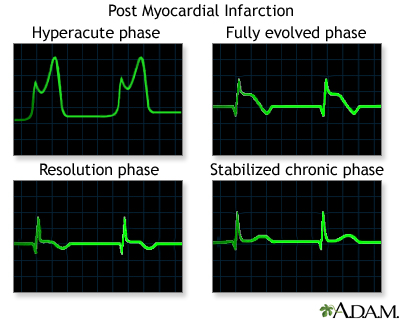
> > I want to draw a loopback-able dynamic curve, just like the following
> >picture:
> >http://www.nlm.nih.gov/medlineplus/ency/images/ency/fullsize/18030.jpg
> >
> >The curve is keeping going, from left to right. When reach the right
> border,
> >it will loopback to the left border, and do this again and again.
> >
> >But, when the curve loopback to the left border, the existent drawing will
> >not
> >be erased immediately. Instead, the older drawing will be erased step by
> >step,
> >where the new curve is drawing.
> >
> >Considering the efficiency. In this case, which widget should I draw on?
> >How can I erase the image step by step,
> >not erase all of it? Which function should I use?
>
> I apologize to the c experts for this Perl, :-), but it's so easy for
> me to prototype in Perl. Here is an example of what you can do on
> the Goo::Canvas.
>
> I simulated the beat pulse with a weird sine wave, but it should show you
> how nice it could work. The axis are a bit extra, but I already had this
> example, to show how to invert the y axis direction to get a standard
> cartesian
> plot, i.e. y increases going up.
> I also took the liberty of making a recursive sub call for this demo, but
> it
> should'nt be hard to feed in real data.  Of course, c will be faster, but
> it's up to you to port it, if you like it.
>
> #!/usr/bin/perl -w
> use strict;
> use warnings;
> use Goo::Canvas;
> use Gtk2 '-init';
> use Glib qw(TRUE FALSE);
> use Gtk2::Gdk::Keysyms;
>
> my $scale = 1;
>
> my $window = Gtk2::Window->new('toplevel');
> $window->signal_connect('delete_event' => sub { Gtk2->main_quit; });
> $window->set_size_request(800, 600);
>
> my $swin = Gtk2::ScrolledWindow->new;
> $swin->set_shadow_type('in');
> $window->add($swin);
>
> my ($cwidth,$cheight)= (1200,1200);
> my $canvas = Goo::Canvas->new();
> $canvas->set_size_request(800, 650);
> $canvas->set_bounds(0, 0, $cwidth, $cheight);
> my $black = Gtk2::Gdk::Color->new (0x0000,0x0000,0x0000);
> my $white = Gtk2::Gdk::Color->new (0xFFFF,0xFFFF,0xFFFF);
> $canvas->modify_base('normal',$white );
> $swin->add($canvas);
>
> my $root = $canvas->get_root_item();
>
> my ($margin_x,$margin_y) = (100,100);
>
> my $g = Goo::Canvas::Group->new($root);
> $g->scale(1,-1); #reverse direction of y axis, so graphing will be normal
> cartesian
> $g->translate(0 + $margin_x, -1200 + $margin_y); #notice translations are
> reversed
> $canvas->scroll_to(0,$cheight);
>
> # add a background rect filling $g, so button press will be detected
> # otherwise $g will be invisible to button-press-event
> my $rect = Goo::Canvas::Rect->new(
>    $g, 0, 0, $cwidth,$cheight,
>    'line-width' => 1,
>    'stroke-color' => 'white', #invisible on white bg
>    'fill-color' => 'white',   # must be filled for mouse event sensitivity
>    );
>
> # some key help
> my $markup = "<span font_family ='Arial '
>               foreground = '#000000'
>               size = '12000'
>               weight = 'ultralight'> Keys: 'Z' zoom in,   'z' zoom out,
> 's' save a PDF </span>";
>
> my $text = Goo::Canvas::Text->new(
>             $g,
>             $markup,
>             -80 , 80 , -1,
>             'w',
>             'use markup' => 1,
>            );
>
>            $text->scale(1,-1);
>
>
>
>
> $g->signal_connect('button-press-event',
>                      \&on_g_button_press);
>
> $canvas->signal_connect_after('key_press_event', \&on_key_press);
> $canvas->can_focus(TRUE);
> $canvas->grab_focus($root);
>
> &set_axis();
> &plot();
>
> $window->show_all();
>
> Gtk2->main;
>
> sub set_axis{
>
> # x axis
> my $xline = Goo::Canvas::Polyline->new(
>         $g, TRUE,
>         [0,0,900,0],
>         'stroke-color' => 'black',
>        'line-width' => 3,
>    );
>
> #label
>      my $markup = "<span font_family ='Arial '
>               foreground = '#000000'
>               size = '18000'
>               weight = 'bold'> X axis Label </span>";
>
>           my $text = Goo::Canvas::Text->new(
>             $g,
>             $markup,
>             450 , 80 , -1,
>             'center',
>             'use markup' => 1,
>            );
>
>            $text->scale(1,-1);
>
>
>
> for my $x (0..900){
>
>       if ($x % 100 == 0){
>          my $xtick = Goo::Canvas::Polyline->new(
>             $g, TRUE,
>             [$x,0,$x,-25],
>             'stroke-color' => 'black',
>             'line-width' => 3,
>        );
>
>          $markup = "<span font_family ='Arial '
>               foreground = '#0000ff'
>               size = '10000'
>               weight = 'light'> $x </span>";
>
>            $text = Goo::Canvas::Text->new(
>             $g,
>             $markup,
>             $x-1 , 10 , 1,
>             'north-east',
>             'use markup' => 1,
>             'wrap' => 'char');
>
>            $text->scale(1,-1);
>
>
>
>          }elsif ($x % 10 == 0){
>
>           my $xtick = Goo::Canvas::Polyline->new(
>               $g, TRUE,
>               [$x,0,$x,-15],
>               'stroke-color' => 'red',
>               'line-width' => 1,
>            );
>
>         my $markup = "<span font_family ='Arial '
>               foreground = '#ff0000'
>               size = '8000'
>               weight = 'ultralight'> $x </span>";
>
>           my $text = Goo::Canvas::Text->new(
>             $g,
>             $markup,
>             $x-1 , 6 , 1,
>             'north-east',
>             'use markup' => 1,
>             'wrap' => 'char');
>
>            $text->scale(1,-1);
>
>        }
> }
>
> # y axis
> my $yline = Goo::Canvas::Polyline->new(
>         $g, TRUE,
>         [0,0,0,900],
>         'stroke-color' => 'black',
>        'line-width' => 3,
>    );
>
>
> #label
>       $markup = "<span font_family ='Arial '
>               foreground = '#000000'
>               size = '18000'
>               weight = 'bold'> Y axis Label </span>";
>
>           $text = Goo::Canvas::Text->new(
>             $g,
>             $markup,
>             -70 ,-450 , -1,
>             'center',
>             'use markup' => 1,
>             );
>
>            $text->scale(1,-1);
>            $text->rotate(-90,-70,-450);
>
>
> for my $y (0..900){
>
>       if ($y % 100 == 0){
>          my $ytick = Goo::Canvas::Polyline->new(
>             $g, TRUE,
>             [0,$y,-25,$y],
>             'stroke-color' => 'black',
>             'line-width' => 3,
>        );
>
>          $markup = "<span font_family ='Arial '
>               foreground = '#0000ff'
>               size = '10000'
>               weight = 'light'> $y </span>";
>
>            $text = Goo::Canvas::Text->new(
>             $g,
>             $markup,
>             -25 , -$y -8 , -1,
>             'north-east',
>             'use markup' => 1,
>             );
>
>            $text->scale(1,-1);
>
>
>
>          }elsif ($y % 10 == 0){
>
>           my $ytick = Goo::Canvas::Polyline->new(
>               $g, TRUE,
>               [0,$y,-15,$y],
>               'stroke-color' => 'red',
>               'line-width' => 1,
>            );
>
>         my $markup = "<span font_family ='Arial '
>               foreground = '#ff0000'
>               size = '8000'
>               weight = 'ultralight'> $y </span>";
>
>           my $text = Goo::Canvas::Text->new(
>             $g,
>             $markup,
>             -16 , -$y - 6 , -1,
>             'north-east',
>             'use markup' => 1,
>             );
>
>            $text->scale(1,-1);
>
>        }
> }
>
>
> }
>
> sub plot{
>
>    my $points_ref = [0,300,0,300];
>
>    my $points = Goo::Canvas::Points->new( $points_ref  ); #need 2 points
> min
>
>    my $poly = Goo::Canvas::Polyline->new(
>        $g, FALSE,
>         undef, # points need to be set after creation
>        'stroke-color' => 'green',
>        'line-width' => 2,
>       );
>
>   #setting after line creation, sets the 'points' property by name
>   $poly->set(points => $points);
>
>
> my $x = 0; my $y = 0;
>
>   Glib::Timeout->add (100, sub {
>         $x+= 10;
>         $y =  300 + rand 100*sin( $x / 500);
>
>            if( $x > 301 ){
>
>                my $num = $g->find_child ($poly);
>                $g->remove_child($num);
>                &plot();
>               return FALSE;
>            }
>
>
>            push @$points_ref, $x, $y;
>            $points = Goo::Canvas::Points->new( $points_ref  ); #need 2
> points min
>            $poly->set(points => $points);
>            return TRUE;
>        });
>
> }
>
> sub on_g_button_press {
>     #print "@_\n";
>     my ( $group, $widget, $event ) = @_;
>     print $widget ,' ',$event->type, '  ','button',' ',$event->button,"\n";
>     my ($x,$y) = ($event->x,$event->y);
>      print "$x  $y\n";
>    return 0;
> }
>
> sub on_key_press {
>    # print "@_\n";
>     my ( $canvas, $event ) = @_;
>    # print $event->type,"\n";
>
>    if ( $event->keyval == $Gtk2::Gdk::Keysyms{Z} ) {
>        $scale += .1;
>        $canvas->set_scale($scale);
>        $canvas->scroll_to(0,$cheight);
>    }
>
>    if ( $event->keyval == $Gtk2::Gdk::Keysyms{z} ) {
>        $scale -= .1;
>        $canvas->set_scale($scale);
>        $canvas->set_scale($scale);
>        $canvas->scroll_to(0,$cheight);
>    }
>
>    if ( $event->keyval == $Gtk2::Gdk::Keysyms{s} ) {
>        write_pdf($canvas);
>    }
>
> #    print "key was ", chr( $event->keyval ), "\n";
>
>    return 0;
> }
>
>
> sub write_pdf {
>    #print "@_\n";
>    my $canvas = shift;
>    print "Write PDF...\n";
>
>    my $scale = $canvas->get_scale;
>    print "scale->$scale\n";
>
>    my $surface = Cairo::PdfSurface->create("$0-$scale.pdf",
>                    $scale*$cwidth, $scale*$cheight);
>
>    my $cr = Cairo::Context->create($surface);
>
>    # needed to save scaled version
>    $cr->scale($scale, $scale);
>
>    $canvas->render($cr, undef, 1);
>    $cr->show_page;
>    print "done\n";
>    return TRUE;
> }
>
> __END__
>
>
>
>
> zentara
>
>
>
> --
> I'm not really a human, but I play one on earth.
> http://zentara.net/Remember_How_Lucky_You_Are.html
>


--
----------------------------------------------
┏━━━━━━━━━━━━━━━━━━━━━━━━┓
┃菩提本无树,明镜亦非台。本来无一物,何处惹尘埃。┃
┗━━━━━━━━━━━━━━━━━━━━━━━━┛
_______________________________________________
gtk-list mailing list
[email protected]
http://mail.gnome.org/mailman/listinfo/gtk-list