Kalo samsung knp bawaannya gw mau mlototin yopie mulu yah cong?
wakakakakkkkkkkkk
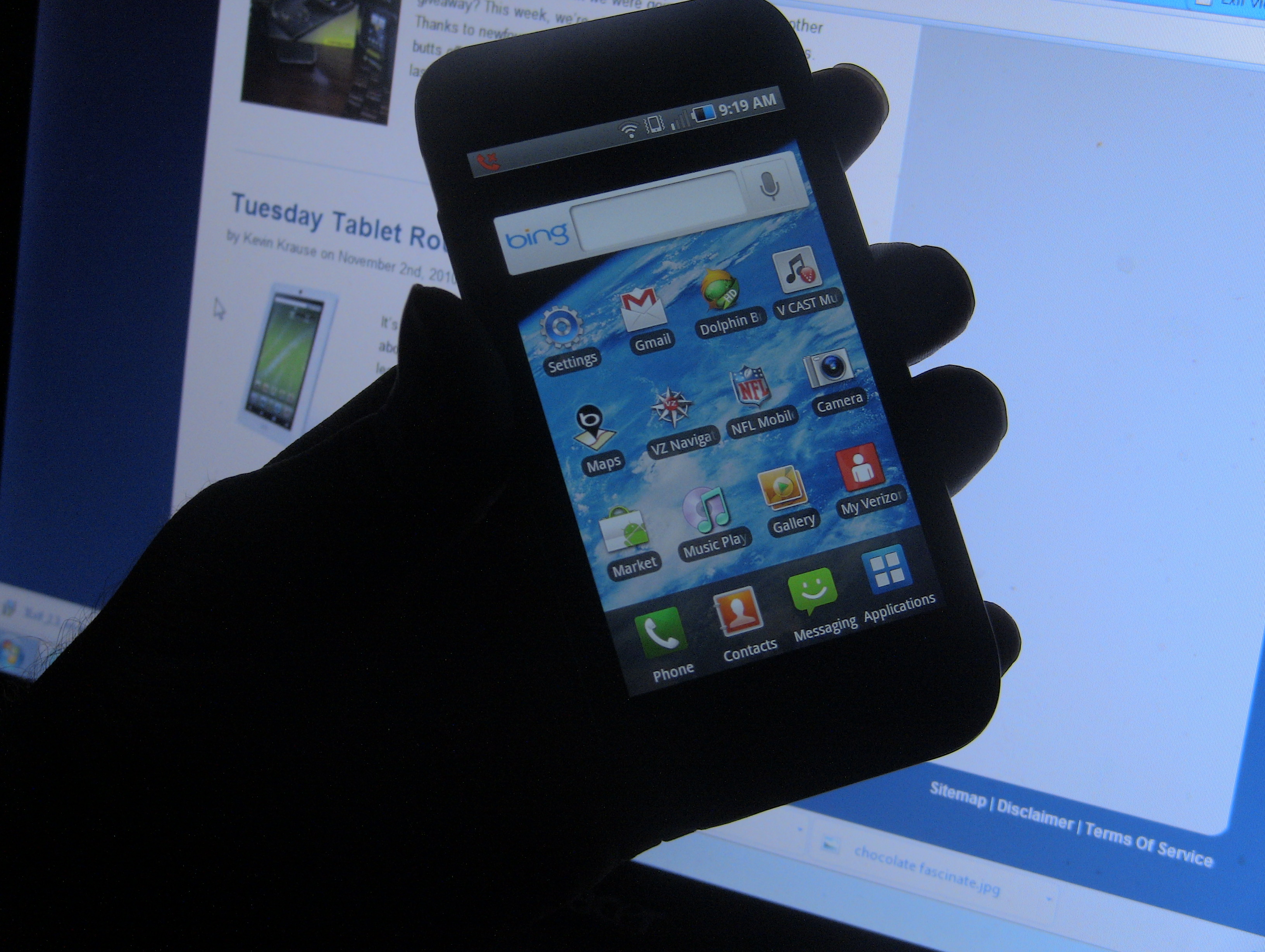
sent from my Samsung Galaxy Tab On Nov 4, 2010 9:10 AM, "riswan christianto" <[email protected]> wrote: > Time to upgrade dok! This is Samsung! > > Feel the power of upgrading device every week wkwkwkwkwk > @jakontil > [email protected] > sent from a SurePad® > > -----Original Message----- > From: Sari-K <[email protected]> > Sender: [email protected] > Date: Wed, 3 Nov 2010 23:43:03 > To: <[email protected]> > Reply-To: [email protected] > Subject: Re: [id-android] WTI Samsung Fascinate Really Fascinating? > > Bedanya ama samsung galaxy s apa ya sir? > sol > > Regards, > Sari K > > gt: [email protected] > Sent from my android device > @Central Jakarta > > On 3 Nov 2010 23:20, "Riswanc Christianto" <[email protected]> wrote: > > [image: This image has no alt text] > > Every major US carrier has gotten the Samsung Galaxy S in some shape or > form, but how does Verizon’s specific angle differ from the rest of the > pack? Most of these experiences are only unique in terms of software (with > the one exception to the Samsung Epic 4G on Sprint with its keyboard). > Knowing that the Galaxy S is already a fantastic phone, how does Verizon’s > Samsung Fascinate hold up to everyone else’s? Let’s find out! > Hardware > > The Samsung Fascinate doesn’t differ much from other Galaxy S phones, but > this was my first time using one so my opinions aren’t of someone who’s used > it before. Right away, one of the biggest things users will notice about the > Samsung Fascinate is how light it feels in the hand. It feels great in the > pocket and you might even sometimes forget that it’s there. (Which could be > a good or bad thing, depending on who you are.) It’s also one of the > slimmest devices I’ve ever used that packs as big of a punch as it does. I’m > a guy with large hands and it’s not often that I care about a device being > too big or too small, but being able to palm this 4-inch handset with ease > is welcome. I think it’d be a mistake to call this phone cheap-feeling as > most have, though, as a more accurate description would be to call it > fragile. > > I don’t make a habit out of dropping phones so I didn’t do any durability > testing, but I can see where someone might be a bit nervous if it ever > happens. I did manage to produce a small crack on the right side of our > review unit somehow, though, which concerns me considering this phone has > not seen any impact. Sitting in my pocket with keys or other small items did > prove to be fatal to the very scratchable battery door and it’s easy for the > chrome-looking sides to get knicked and scraped. What’s most important to > note, however, is that the screen did not take a beating despite how the > rest of it stands up. We know all of the Galaxy S devices have been using > Gorilla Glass, so I’m not surprised. > > [image: fascinate > ding]<http://phandroid.com/wp-content/uploads/2010/11/fascinate-ding.JPG> > > You’d expect capacitive buttons on a cell phone to “just work” these days, > but it’s not the case with the Samsung Fascinate. It hasn’t been a > completely nerve-wrecking experience using them, but I do get a bit annoyed > when I press the Home and Back buttons and I’m met with some sort of > resistance. It’s weird because the Menu and Search buttons give me no issue > whatsoever. I usually don’t need to press the buttons more than twice, but > that’s one more press that I shouldn’t have to deal with. > > I still can’t get over the fact that there is no external notification > system outside of sound and vibration. A simple LED light would’ve been > highly appreciated. I love being able to glance over at my phone to see if > I’ve missed something without having to pick it up, but the Galaxy S does > not facilitate this in any way. Sure, there’s an application in the market > that utilizes the Super AMOLED display for this very function, but I’d like > something a bit more clean and official. > > Thankfully, that 4-inch WVGA Super AMOLED display comes in handy for more > than just notifications. This is – by far – one of the best screens I’ve > used on a cell phone yet. (No, I have not yet used an iPhone 4 or the new > iPod Touch. I don’t plan on touching one for a very long time.) Everything > is as crisp as you’d want it to be for gaming, videos, and browsing the web. > Unlike an LCD screen, the display doesn’t get hot when using it for long > periods of time. > > [image: fascinate]< http://phandroid.com/wp-content/uploads/2010/11/fascinate.JPG> > > Something else that doesn’t get hot is the battery. The 1500mAh battery used > in the Galaxy S is enough to keep you going for a full day as the phone > consumes power very efficiently. I haven’t done any stress tests, but I’ve > always taken the phone out of my pocket confident that the battery wouldn’t > take much of a beating. For your average user, the amount of time you get > out of this phone on a full charge should be more than satisfactory. > > Everything else is as you’d expect on a Galaxy S phone. 1GHz Samsung > Hummingbird processor for a smooth application and gaming experience, 512 MB > of RAM to help that right along, 2GB of internal storage, and it comes with > a 16GB microSD card. The 5-megapixel autofocus camera – coupled with a lone > LED flash – is one of the best I’ve used on a phone, but we’ll discuss more > about that a bit later on. > Software > > The software on the Samsung Fascinate is just like the software on any other > Galaxy S phone, but with a few perks, of course. The biggest perk of them > all has to be the inclusion of Bing as the phone’s default search engine. A > lot of people are against this, but over time, I’ve come to just accept it. > I don’t necessarily like Bing, but the results it returns don’t absolutely > suck compared to Google. As far as the Bing application itself, I actually > prefer the mostly-native setup. You don’t get hit with any browser business > until after you’re ready to click on a result. I would’ve appreciated being > able to easily change the default engine, but I understand that Verizon has > a business to run and this is an unfortunate side effect of that. To be > fair, Verizon’s stated that we should be able to install the Voice Search > application once Android 2.2 is released for the phone in order to get > Google back in our lives. The only problem is that we have no clue when > Android 2.2 will be released. > > With that said, this is still Android 2.1 with a nice coat of TouchWiz 3.0. > I personally have never used a phone with this version of TouchWiz so > consider this a quick mini review of it. I’m not sure if I need my eyes > rechecked (I just got new glasses.) but I can’t see what’s so bad about it. > I’ve heard a lot of people detest it from the moment they got their phones, > but I think it’s one of the most beautiful implementations of Android yet > (outside of my favorite: good ol’ stock.) The music and media experience is > head and shoulders above any device out now, the launcher is lightweight and > fast (though this could just be due to the fact that the phone packs a very > nice processor and GPU), and the colors don’t make my eyes bleed. > > [image: IMG_1164]< http://phandroid.com/wp-content/uploads/2010/11/IMG_1164.JPG> > > A lot feel that this phone is too iPhone-looking, software wise, but that’s > only apparent when you open up the app launcher. Everything else is quite > Android-ish and unique to Samsung. One thing I love is the bouncy effect you > get when hitting the top or bottom of a list. It’s nothing that adds > substance, but a little eye candy never hurt anyone. > > The device comes pre-installed with some games, but they are only trial > versions. Need for Speed Shift and Tetris are two such that you can enjoy, > but be expected to pay for them after a short while. Thankfully, these games > can be uninstalled (sort of.) I say “sort of” because Need For Speed: Shift > takes up a ridiculous 100 MB of data after downloading the trial. > Unfortunately, you can’t get rid of the placeholder for the app, so you’re > going to be met with a lot of useless icons if you’d rather not have them. > Some of these apps include CityID, Amazon Kindle, Skype, ThinkFree, > Blockbuster, and more. > > Most of this isn’t a knock on Samsung, of course. And I’m not saying Verizon > doesn’t have the right to treat their devices how they want, but this > complete 180-degree turn they’ve taken from the original Motorola Droid up > until now will throw a lot of people off, and it might even be enough to > turn some away. Anything else I can say about the software would be > regurgitated information and opinion, so take a look at Kevin’s Samsung > Galaxy S review > <http://phandroid.com/2010/07/19/samsung-galaxy-s-review/>if you want > someone else’s take on TouchWiz. > Camera, Media, Odds, Ends > > There’s a lot to love about the media experience on Android. From playing > your music using Digital SRS 5.1 enhancements to DivX videos, Samsung’s > really one of the first manufacturers to provide a well-rounded media > experience that won’t immediately have you itching for your iPod or any > other personal media player. I was especially impressed with the fact that > you’re given the ability to customize equalizer settings for whatever music > you’re listening to (even if you do need to use headphones to take full > advantage.) A visualizer was also a welcome inclusion, but the selection of > styles is meager. > > It actually kind of angers me that not all of their Galaxy S devices come > with this media player (see: Samsung Epic 4G), but those of you on Verizon > won’t have to worry about that. (The biggest thing I like are the lockscreen > controls.) Perhaps the only quirk I didn’t enjoy was the fact that my music > would automatically pause while entering certain apps. The selection of apps > seemed random and should not have interrupted my experience. I would be more > understanding if I went into a video application or if I launched a game, > but launching Verizon’s account management app shouldn’t completely cut my > audio off. Whether or not this is a bug, we can’t say, but we’re hoping > Samsung rights that wrong in a future software upgrade. > > Moving on to camera performance, I was very pleased with the snapshots taken > with this thing in natural daylight. Pictures came out crisp and the lens > captured every bit of color as accurately as I could hope for from a phone. > Switching between different shooting modes and changing the healthy > selection of settings was easy enough that I didn’t have to think about it. > > Here are a few sample shots from my visits to New York and San Francisco > taken with the Samsung Fascinate (note: the pictures may be compressed due > to the fact that they were first uploaded to Facebook. My microSD card with > the original files was lost by one Rob Jackson): > > [image: times square > fascinate]< http://phandroid.com/wp-content/uploads/2010/11/times-square-fascinate.jpg> > > [image: mickey fascinate]< http://phandroid.com/wp-content/uploads/2010/11/mickey-fascinate.jpg> > > [image: pizza fascinate]< http://phandroid.com/wp-content/uploads/2010/11/pizza-fascinate.jpg> > > [image: chocolate > fascinate]< http://phandroid.com/wp-content/uploads/2010/11/chocolate-fascinate.jpg> > > Here’s a moving shot. Even though I like the blur effect, I would’ve liked > the scenery to be more clear: > > [image: 2010-10-09 > 12.04.36]< http://phandroid.com/wp-content/uploads/2010/11/2010-10-09-12.04.36.jpg> > > Lowlight performance wasn’t as stunning, but that’s to be expected. The > Fascinate – unlike some other versions of the Galaxy S – does include an LED > flash to help make these situations manageable. I was still left wanting > more, but there’s not much more you can squeeze out of a phone without > slapping a Xenon flash inside. > > [image: lowlight > fascinate]< http://phandroid.com/wp-content/uploads/2010/11/lowlight-fascinate.jpg> > > [image: lowlight fascinate > 2]< http://phandroid.com/wp-content/uploads/2010/11/lowlight-fascinate-2.jpg> > > Shooting video brought about a similar experience in daytime and lowlight > situations. The picture is crisp and really makes you appreciate the high > quality sensor Samsung’s used. There’s a noticeable difference between video > recorded with HTC phones and those recorded with Galaxy S phones. I wasn’t > able to recover the sample video I took, but our friends at PocketNow > provide a great sample that is reminiscent of my own daylight recording > tests: > > One oddity that annoyed me was the fact that a couple of my USB cables > weren’t working with the device. I have two extra cables – one from > RadioShack and one from MonoPrice – and while both charged the phone ok, > neither would allow me to go into disk drive mode when plugged into a > computer. I also had this problem with the newly-launched Samsung Mesmerize > – US Cellular’s Galaxy S. (But it’s worthy to note that it can be described > as a Fascinate without the bloatware and a different logo.) I’m sure there > is a logical explanation for this, but it’s the first time it’s happened for > me out of the many Android handsets I’ve used. If I wanted to transfer data > to my computer, I needed to use the Samsung cable provided with the phone. > That wasn’t so bad, but if you ever find yourself in a situation where you > forgot your cable and need to borrow a friend’s, or if your Samsung-issued > cable ever breaks, then it’s something to think about. It may or may not be > a widespread issue, but I have no way of telling. > > It’s a Galaxy S phone just like on any other carrier. But it doesn’t need to > to set itself apart from the others because Samsung’s done a fine job of > getting most things right. (As much as I want to, I won’t get into the GPS > snafu.) I didn’t particularly like the set of apps preloaded onto it, but it > can be easily ignored (and permanently removed if you’re willing to root > your device.) If there’s anything pulling you in from any of the other > Galaxy S phones and you can’t leave Verizon, then the Fascinate should be > absolutely fine. > > > http://phandroid.com/2010/11/03/samsung-fascinate-review/ > > > > Sent with MobileRSS for > iPhone< http://itunes.apple.com/app/mobilerss-pro-google-rss-news/id325594202?mt=8> > > > @jakontil > > Sent from my iPhone > > -- > =============== > "Indonesian Android Community [id-android]" > > PING'S mobile™ > Email: [email protected] Ph. (021) 96087100 > --------------------- > Yopie Ratjoen > Email: [email protected] Ph. 08977726681 > -------------------- > Gila original > Email: [email protected] Ph. (031) 91555898 > -------------------- > > -- > =============== > "Indonesian Android Community [id-android]" > > PING'S mobile™ > Email: [email protected] Ph. (021) 96087100 > --------------------- > Yopie Ratjoen > Email: [email protected] Ph. 08977726681 > -------------------- > Gila original > Email: [email protected] Ph. (031) 91555898 > -------------------- > > -- > =============== > "Indonesian Android Community [id-android]" > > PING'S mobile™ > Email: [email protected] Ph. (021) 96087100 > --------------------- > Yopie Ratjoen > Email: [email protected] Ph. 08977726681 > -------------------- > Gila original > Email: [email protected] Ph. (031) 91555898 > -------------------- -- =============== "Indonesian Android Community [id-android]" PING'S mobile™ Email: [email protected] Ph. (021) 96087100 --------------------- Yopie Ratjoen Email: [email protected] Ph. 08977726681 -------------------- Gila original Email: [email protected] Ph. (031) 91555898 --------------------