Ada yg uda pakai? Review donk...

Regards
Budiman
One x, 0.7 sec
On May 1, 2012 2:14 PM, "Edwin F" <[email protected]> wrote:

> MIUI 4 for HTC One
> X<http://www.theandroidsoul.com/wp-content/uploads/2012/04/One-X-MIUI-ROM.jpg?9d7bd4>
>
> It seems the real custom development on the HTC One X has now begun in
> full force. Two major custom ROMs have come out for it in a short span of
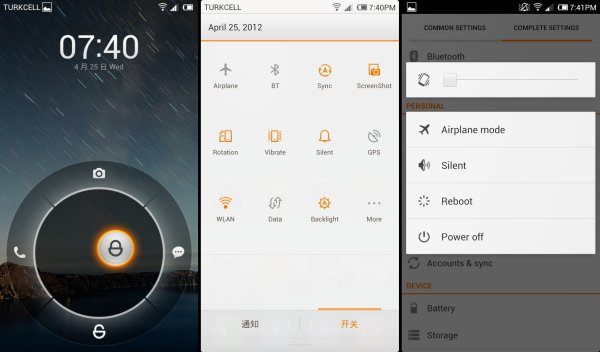
> time. MIUI 4 is now available for the One X, bringing you its unique UI
> (which would look beautiful on the Super LCD2 screen on the One X) and
> features such as an intuitive status bar, inbuilt themes support with
> thousands of fan made themes available, improved performance, and more.
>
> The ROM is in the beta stages, but almost everything works so it’s
> perfectly suitable for everyday use. There might be a few Chinese text here
> and there in the ROM as it has been translated to English, but expect that
> to be fixed in future releases.
>
> Read on to find out how you can install MIUI ROM on your HTC One X.
>
> *Compatibility*
>
> *This guide is applicable only for HTC One X. DO NOT try this on any
> other device.*
>
> *Warning!*
>
> *The methods and procedures discussed here are considered risky and you
> should not attempt anything if you don’t know completely what it is. If any
> damage occurs to your device, we won’t be held liable.*
> ROM Info
>
>    - *Developer* →
> Leventc<http://miuiandroid.com/community/members/leventc.29407/>
>
> How to Install MIUI ROM on HTC One X
>
>    1. This procedure will wipe all your apps, data and settings (but it
>    will NOT touch your SD cards, so don’t worry about those). Backup your Apps
>    and important data — bookmarks, contacts, SMS, APNs (internet settings),
>    etc. This Android backup
> guide<http://www.theandroidsoul.com/best-android-apps-for-backup-and-restore/>
>  would
>    help you.
>    *Important!* Don’t forget to at least make a backup of your
>    APN settings, which you can restore later if your data connection does not
>    work after installing the ROM. Use the backup guide to find out how.
>    2. Unlock the bootloader on your HTC One X by following the guide → *
>    here<http://www.theandroidsoul.com/how-to-unlock-htc-one-x-bootloader/>
>    *.
>    3. Install ClockWorkMod (CWM) recovery by following the guide →
> *here<http://www.theandroidsoul.com/how-to-install-official-clockworkmod-cwm-recovery-on-one-x/>
>    *.
>    4. Install the HTC Sync software to install the proper drivers for the
>    phone. Download it *here<http://www.htc.com/www/help/htc-one-x/#download>
>     *and install it on your computer.
>    *Skip this step if you have HTC Sync/drivers installed on your
>    computer already*.
>    5. Download the latest version of the ROM from the *official
>    development
> page<http://miuiandroid.com/community/threads/rom-aroma-miui-for-htc-one-x-based-on-official-beta.16365/>
>    .*
>    6. Copy the two zip file downloaded in step 5 to the SD card on the
>    phone.
>    7. Extract the file *boot.img *from inside the ROM’s zip file that you
>    downloaded in step 5 using Winzip <http://www.winzip.com/downwz.htm>or a
> similar software.
>    8. Download fastboot.
>    *Download Link <http://www.mediafire.com/?709z6ajsrx459ew>*  |
>     Filename: *Fastboot.zip*
>    9. Extract the *Fastboot.zip *file to the C:\ drive on your computer
>    to get a folder named *Fastboot* with four files inside it.
>    10. Copy the *boot.img* file extracted in step 7 to the Fastboot
>    folder on C drive. You should have 5 files in the Fastboot folder now.
>    11. Switch off the phone. Enter fastboot mode. For that, boot into
>    the bootloader mode first by holding the *Volume Down *button and then
>    pressing *power key*. Then, select fastboot mode from there using the
>    volume buttons to navigate and power button to select. Then connect your
>    phone to the computer once you are in fastboot mode.
>    12. Open Command Prompt on your computer from Start » All Programs »
>    Accessories.
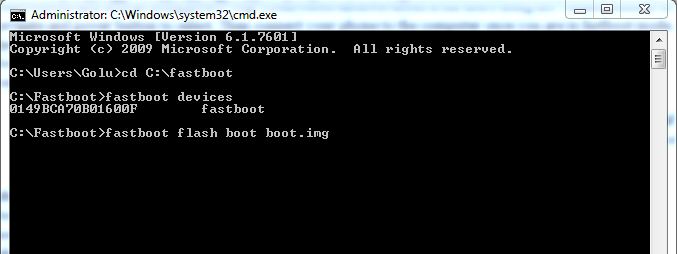
>    13. Now, type the following commands in command prompt to flash the
>    kernel, pressing Enter after each command (Check the screenshot after step
>    13.3 for reference).
>       1. cd c:\Fastboot
>       2. fastboot devices *(this is to ensure the phone gets detected. A
>       string of numbers and letters should appear if the phone is properly
>       detected, as shown in screenshot below. Else, make sure you have
>       the phone drivers properly installed*)
>       3. fastboot flash boot boot.img
>
> <http://www.theandroidsoul.com/wp-content/uploads/2012/04/CM9_oneX_CMD.jpg?9d7bd4>
>    14. After the kernel is flashed, you’ll get a finished/OKAY message
>    in command prompt.
>    15. Disconnect your phone from the PC.
>    16. Now, on your phone select *HBOOT* using the *Power button*. And
>    then select *RECOVERY* to boot into recovery mode.
>    *Use volume buttons to scroll up and down and the power button to
>    select options in bootloader menu and recovery.*
>    17. From the main recovery menu, select *install zip from sdcard*,
>    then select *choose zip from sdcard*. Scroll to the ROM file on the SD
>    card and select it. Confirm installation by selecting *Yes
>    – Install _____.zip* on the next screen.
>    18. After a few seconds, Aroma Installer will show up. Make your
>    choices, then after the installation is complete, select *Finish.*
>    19. Then, select *go back* then select *reboot system now* to
>    reboot the phone and boot up into MIUI ROM.
>    20. Once MIUI boots up:
>       1. Change the language to English, then reboot the phone.
>       2. After the phone reboots, go into *Settings » Language and Input,
>       *and select the *HTC Sense Input *as default input method as the
>       default keyboard force closes when you try to use it.
>
> MIUI ROM is now installed on your HTC One X. Visit the official
> development page for more information and the latest updates on the ROM.
>
> --
> "Indonesian Android Community" Join: http://forum.android.or.id
>
> ===============
> Download Aplikasi Kompas versi Digital dan Keren
> https://play.google.com/store/apps/details?id=com.kompas.android.kec
> --------------------------
> Follow Official Twitter Indosat:
> http://twitter.com/indosatmania
> ---------------------
> Lex-ON http://www.Lex-ON.com - Plaza Semanggi
> E-mail: [email protected] Tlp: 021-70952539
> ---------------------
> GSM-AKU http://www.gsmaku.com - BEC Bandung
> E-mail: [email protected] Hp: 0881-1515151
> ---------------------
> EceranShop http://eceranshop.com - BEC Bandung
> E-mail: [email protected] Hp: 0815-56599888
> ===============
>
> Aturan Umum dan Jualan/Kloteran ID-Android http://goo.gl/arJ5x
>

--
"Indonesian Android Community"  Join: http://forum.android.or.id

===============
Download Aplikasi Kompas  versi Digital dan Keren
https://play.google.com/store/apps/details?id=com.kompas.android.kec
--------------------------
Follow Official Twitter Indosat:
http://twitter.com/indosatmania
---------------------
Lex-ON  http://www.Lex-ON.com - Plaza Semanggi
E-mail: [email protected]  Tlp: 021-70952539
---------------------
GSM-AKU  http://www.gsmaku.com - BEC Bandung
E-mail: [email protected]  Hp: 0881-1515151
---------------------
EceranShop  http://eceranshop.com - BEC  Bandung
E-mail: [email protected]  Hp: 0815-56599888
===============

Aturan Umum dan Jualan/Kloteran ID-Android  http://goo.gl/arJ5x