> On Mar 20, 2017, at 8:36 AM, Julia Brinckloe <[email protected]> wrote:
>
> http://tidbits.com/article/14437
>
> Scroll down to keychain password. Hope it helps.
Just a tip: if you do have to go the Single User route, the instructions there
are incomplete:

        • Reboot into Single User mode by restarting the Mac and holding
Command-S while the system comes back up. Numerous lines of status messages
will scroll by.

        • Once you have a command-line prompt, enter this command to mount the
root Mac OS X drive as writable, so you can make changes to the filesystem:

mount -uw /

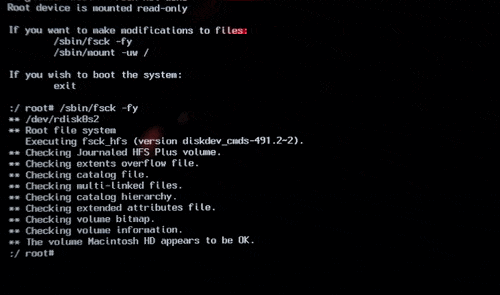
You really want to do a ‘fsck  -fy' command first. Fortunately OS X tells you
that when you boot into single user mode.

<http://www.everythingmacintosh.com/wp-content/uploads/2011/10/single_user_mode_fschk.gif>

I repeat the fsck command until it reports that no changes were made to the
file system before I mount the volume for read/write access. 99.999% of the
time this means running it only once or twice. If it comes up reporting errors
on the second run, there’s likely something wrong with the disk.

Navigating single user mode is a useful tool; you can use it to ‘break into’ a
Mac you don’t have a password for, just do the above, then delete the file
/var/db/.AppleSetupDone and reboot. The Mac now thinks that it’s never been set
up and walks you through creating an admin account. All the other users,
applications, setup, etc are retained.

I do this with new laptops where I work: I set up the mac with our standard IT
support local account, install all the required apps, printers, VPN, etc, then
delete that file and hand it to the end user. They can set up the account name
they want and password, so we never have to write those down ;-)

--
Bruce Johnson
University of Arizona
College of Pharmacy
Information Technology Group

Institutions do not have opinions, merely customs

--
You received this message because you are a member of the iMac Group, a group
for those using Apple iMacs and eMacs.
The list FAQ is at http://lowendmac.com/imac/list.shtml and our netiquette
guide is at http://www.lowendmac.com/lists/netiquette.shtml
To post to this group, send email to [email protected]
To leave this group, send email to [email protected]
For more options, visit this group at http://groups.google.com/group/imaclist

---
You received this message because you are subscribed to the Google Groups "iMac
Group" group.
To unsubscribe from this group and stop receiving emails from it, send an email
to [email protected].
For more options, visit https://groups.google.com/d/optout.