Hello!

First, to follow up on the issue of uploading order of huge changes spanning
multiple
changesets. I submitted a JOSM enhancement request asking to look into it. Other
tools are capable to reorder objects in changesets to make them more readable to
humans. And it should be doable to implement similar behavior in JOSM: [1].
Apparently JOSM developers consider current uploading strategy good enough.
So we will continue using the tools we currently have with logic they offer now.
We can also try to "upload more often", see below.
Now I want to present you a reworked scheme of data processing with regard to
this import. I give links to two small OSM data samples for your inspection
and feedback below.

=== Overview of the process

1. Split import raster file in even smaller pieces of about 5×5 km size.
Processing
smaller pieces (previously a unit of work was chosen to be a county which can be
very huge) among others allow for faster loading into JOSM, smaller individual
changeset sizes, lower risk to deal with huge multipolygons. They also create
some new challenges but they can be discussed later.

2. Create a raster mask layer to import raster data to mask out areas where
   data conflicts are sure to happen or very likely to happen. Note that this
   stage is done only once for the whole country: the resulting raster mask
   layer is later split into smaller tiles to match import data tiles.
   How it is done:
   2.1 Download current vector OSM data from Geofabrik in form on SHP files
   2.2 Open it in QGIS
   2.2 Choose area layers that have features we want to have in the mask layer:
       buildings, landuse (and possibly pois).
       To have shared boundaries between existing water and new landuse ways,
       water shapes are not included into the mask, as the import does not
       bring new water ways, and all intersections between new landcover and
       existing water should be addressed at conflation (see below).
   2.3 Query for all tag variations and choose those that we do not want to
       mask land cover, namely "military" and "natural_reserve", possibly
others.
       Delete such features from mask layers.
   2.4 Merge these layers into a single layer and export it as GeoTIFF raster
       having same projection, resolution and boundaries as the input data.
       Now both raster files can be compared pixel by pixel.
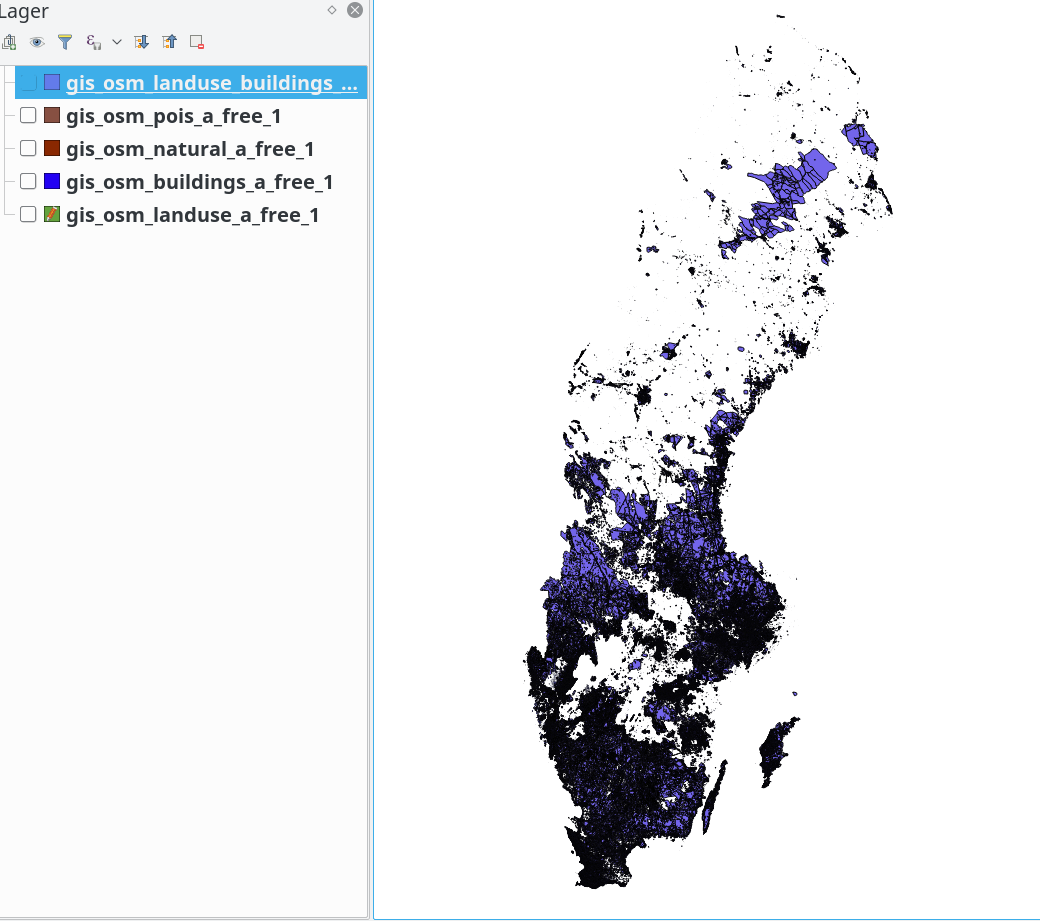
   2.5 An overview of how the mask layer looks like:
https://atakua.org/p/nmd/sweden-mask-layer-overview.png.
       White areas are what we are after (if they are not water, of course).

3. Apply the mask layer to individual tiles of import data.
   This is done by `gdal_polygonize.py` from GDAL library.
   All pixels that have non-empty value in the mask layer are considered to be
   null in the input layer, which will prevent the vectorizing process to draw
   vectors through such areas.

4. Tag and filter resulting vector data with scripts. Details are given in
   the import plan. Compared with earlier iterations of the process,
   smaller pieces of vector  data are vectorized separately of each other.
   Compared with earlier process, areas with already present OSM data were
   already marked as missing, resulting in modification in the conflation
   process.

Data processing pipeline up to this point is depicted on the following diagram.

+----------------------+       +-----------------------------+
|                      |       |                             |
| NMD-raster image     |       | Geofabrik export data in SHP|
| (new data to import) |       | (data already in OSM)       |
+------------------+---+       +--------+--------------------+
                   |                    |
                   |                    |
                   |                    | gdal_rasterize
                   |                    |
                   |           +--------v-------------------+
                   |           |                            |
                   |           | OSM raster tile in TIFF    |
                   |           |                            |
                   |           +--------+-------------------+
                   |                    |
                   |                    | negate_raster.py
                   |                    |
                   |           +--------v--------------------+
                   |           |                             |
                   |           | Mask tile (empty/not empty) |
                   |           |                             |
                   |           +-+---------------------------+
                   |             |
                   v             v
                 gdal_vectorize -mask
                          +
                          |
                          |
                +---------v------------+
                |                      |
                | Vector data in GML   |
                |                      |
                +---------+------------+
                          |
                          | nmd-gml-to-osm.py
                          |
                +---------v------------+
+-------------------------------+
                |                      |        |
|
                | Vector data in OSM   |        | JOSM loaded actual data layer
|
                |                      |        |
|
                +---------+------------+
+------------------+------------+
                          |                                        |
                          +-----> Open in JOSM, merge layers, <----+
                                  fix warnings and problems
                                            +
                                            v
                                    +-------+----+
                                    |            |
                                    | Changeset  |
                                    |            |
                                    +------------+


It is possible in principle to manually refine the resulting changeset up to the
point when it is good enough to be uploaded. However, we have to create a new
JOSM plugin/tool that can snap nodes of new ways to existing ways nodes. This is
needed to aid with merging closely placed new and old ways on the boundaries
of the mask layer, as it is the real bulk of remaining job. A need for such
plugin is showcased below.

=== Example data

To showcase this approach two tiles of import data are provided that underwent
the
flow just described. Both tiles are about 9×12 km and are taken from two
locations
in Katrineholm county. Links to the files: [2], [3].

The files have prefixes in their names that encode tile position, and suffixes
describing their role.

* 0233-Katrineholms_XXX_XXX.tif - source raster data to be imported
* 0233-mask_XXX_XXX.tif - raster mask generated from the latest Geofabrik export
* 0233-Katrineholms_XXX_XXX-osm-export.osm - layer downloaded from the OSM via
JOSM.
  You can download it yourself in your editor by usual means.
* 0233-Katrineholms_XXX_XXX-masked.osm - vectorized import data to be meant for
  uploading.
* 0233-Katrineholms_XXX_XXX-merged-result.osm - combination of previous two
  layers, the main file for your inspection and comments.
* 0233-Katrineholms_XXX_XXX-nomask.osm - a reference file showing how import
  data would look like if no masking was applied to it. You can ignore it.

Note how the `-masked.osm` and `-osm-export.osm` have mutually exclusive
coverage
of the same tile. Where there is data in one layer, there is a hole in another,
and vice versa. Notice also that for the tile 001_001,
`-masked.osm` and `-nomask.osm` are almost identical to each other because
there is no previously added conflicting data (the mask TIF is tiny),
while for 009_001 the `-masked.osm` layer is very small,
precisely because that tile is almost completely mapped by hand.

I will now talk about the `-merged-result.osm` files.
Please note that *no manual editing was done* to them. This is to showcase
the "vanilla" state of data right after scripts finished. It shows typical
remaining data quality issues that require manual/tool-assisted resolution by an
uploader working on a tile.

=== Known issues and call to action

One would expect certain classes of data quality problems in the import data
at this stage, which would need attention of an uploader.
Below I list, in no particular order, classes of problems known to me and
outline expected ways to address them.

1. Overlapping adjacent land use areas, such as forest slipping into water.
   They are fixed by the uploader using the upcoming "Snap to" tool.
   Situations unsolved by such a tool are due to too much of a difference
between a
   previously mapped lake and a newly added forest. They are often an indication
   that either previously mapped water boundary is rather roughly outlined, or
   that there is an error in the import data.
   It is the goal of this import to have less than 1 "slipping" node per 1000
   of correctly snapped nodes on shared shore/forest lines. This should be
   considered an acceptable signal to noise ratio for a rather minor error
which,
   when rare, is trivial to interpret and fix when visually discovered by an
   uploader or future mappers.

2. Self-intersecting new ways, inner ways peeking out of outer ways, overlapping
   new ways. These are caused in part by differences in coordinates
   precision used by external tools (11 digits after the dot) and OSM (7
digits).
   Such issues are automatically detected by JOSM validator and will be
   addressed by individual uploaders. None of them should be present in a final
   changeset.

3. New islands in lakes not being part of that lake relation. Should be a rare
   case for very small islets not previously mapped.
   Strictly speaking it does not adhere to lake mapping recommendations
   ("make a multipolygon with all islands as inner ways"). I do not consider
   it to be a huge problem in practice, as it is rare in practice (not many
islets
   are left unmapped). Having an islet mapped as a patch of forest inside a lake
   has non-ambiguous meaning for a future mapper.

4. New ways along roads, railroads and similarly shaped linear man-made objects
   may look "jagged", and contain extra nodes. In certain situations this
   might be considered as acceptable, e.g. a cutline under a power line in a
forest
   never has straight borders as the forest tries to conquer back some
territory.
   In most cases it has to be corrected, e.g. when a farmland goes along a
motorway.
   Such cases are to be assessed by individual uploaders and should be fixed
using
   "Simplify Way" tool (recommended threshold value: 20), other filters or
manually.

5. Tiny polygons of about 3-16 nodes appearing at the borders of larger areas.
   Some of them make sense if you look at aerial imagery, but most are just
   annoying noise. They can be filtered by `filter-osm.py` script or other
   automatic means before editing or uploading. Many of them cause JOSM
   validator warnings and as such cannot slip unnoticed.

6. Duplicated nodes (different classes detected by JOSM). This is partly an
   artefact of data conversion script, party coordinates precision loss issue.
   It is automatically fixable inside JOSM with one button press and as such is
   not worth paying too much attention to.

My call to action for this mailing list is to inspect the two OSM files I
provided
for any other classes of inconsistencies that I overlooked. It makes sense to
think of quality issues in classes as something happening systematically, not
just "I think this particular way should be curved a little to the left".
Something that repeats over and over can create a lot of trouble when scaled to
a size of the full import. Looking forward to your feedback on them.

References:

1. https://josm.openstreetmap.de/ticket/17664
2. https://atakua.org/p/nmd/showcase-masked/001_001.tar.bz2
3. https://atakua.org/p/nmd/showcase-masked/009_001.tar.bz2


С наилучшими пожеланиями,
Григорий Речистов.
Med vänliga hälsningar,
Grigory Rechistov
With best regards,
Grigory Rechistov
_______________________________________________
Imports mailing list
[email protected]
https://lists.openstreetmap.org/listinfo/imports