Dear colleagues,

Collaborative efforts in the BCOP TF have led to the following document,
detailing how to troubleshoot IPv6 connectivity.
The author(s) have asked us to forward this to the IPv6 Working Group for
review, with the intend of publishing this as RIPE Document.

To clarify the procedure, any document, when there is consensus within the
working group can receive a number and be published as part of the RIPE
Document series. As it does not specify any RIPE policy or changes existing
policy, we are comfortable in not invoking the formal PDP for this.

Please review this document and leave any comments regarding the contents on
this list. Also we would like to receive some feedback wether you think this
document should be published as a RIPE Document.

Please leave your initial comments before Monday 7 November COB, we will carve
out some time  in the RIPE 69 agenda to talk about this and to decide on the
workflow.

Regards,

Marco Hogewoning
co-chair of the IPv6 Working Group
{\rtf1\ansi\ansicpg1252\cocoartf1265\cocoasubrtf210
{\fonttbl\f0\fnil\fcharset0 TrebuchetMS;\f1\fswiss\fcharset0 ArialMT;\f2\froman\fcharset0 TimesNewRomanPSMT;
}
{\colortbl;\red255\green255\blue255;\red17\green85\blue204;\red51\green51\blue51;}
{\*\listtable{\list\listtemplateid1\listhybrid{\listlevel\levelnfc23\levelnfcn23\leveljc0\leveljcn0\levelfollow0\levelstartat1\levelspace360\levelindent0{\*\levelmarker \{disc\}}{\leveltext\leveltemplateid1\'01\uc0\u8226 ;}{\levelnumbers;}\fi-360\li720\lin720 }{\listname ;}\listid1}
{\list\listtemplateid2\listhybrid{\listlevel\levelnfc0\levelnfcn0\leveljc0\leveljcn0\levelfollow0\levelstartat1\levelspace360\levelindent0{\*\levelmarker \{decimal\}.}{\leveltext\leveltemplateid101\'02\'00.;}{\levelnumbers\'01;}\fi-360\li720\lin720 }{\listname ;}\listid2}
{\list\listtemplateid3\listhybrid{\listlevel\levelnfc23\levelnfcn23\leveljc0\leveljcn0\levelfollow0\levelstartat1\levelspace360\levelindent0{\*\levelmarker \{disc\}}{\leveltext\leveltemplateid201\'01\uc0\u8226 ;}{\levelnumbers;}\fi-360\li720\lin720 }{\listlevel\levelnfc23\levelnfcn23\leveljc0\leveljcn0\levelfollow0\levelstartat1\levelspace360\levelindent0{\*\levelmarker \{disc\}}{\leveltext\leveltemplateid202\'01\uc0\u8226 ;}{\levelnumbers;}\fi-360\li1440\lin1440 }{\listlevel\levelnfc23\levelnfcn23\leveljc0\leveljcn0\levelfollow0\levelstartat1\levelspace360\levelindent0{\*\levelmarker \{disc\}}{\leveltext\leveltemplateid203\'01\uc0\u8226 ;}{\levelnumbers;}\fi-360\li2160\lin2160 }{\listlevel\levelnfc23\levelnfcn23\leveljc0\leveljcn0\levelfollow0\levelstartat1\levelspace360\levelindent0{\*\levelmarker \{disc\}}{\leveltext\leveltemplateid204\'01\uc0\u8226 ;}{\levelnumbers;}\fi-360\li2880\lin2880 }{\listlevel\levelnfc23\levelnfcn23\leveljc0\leveljcn0\levelfollow0\levelstartat1\levelspace360\levelindent0{\*\levelmarker \{disc\}}{\leveltext\leveltemplateid205\'01\uc0\u8226 ;}{\levelnumbers;}\fi-360\li3600\lin3600 }{\listname ;}\listid3}
{\list\listtemplateid4\listhybrid{\listlevel\levelnfc0\levelnfcn0\leveljc0\leveljcn0\levelfollow0\levelstartat1\levelspace360\levelindent0{\*\levelmarker \{decimal\}.}{\leveltext\leveltemplateid301\'02\'00.;}{\levelnumbers\'01;}\fi-360\li720\lin720 }{\listname ;}\listid4}
{\list\listtemplateid5\listhybrid{\listlevel\levelnfc0\levelnfcn0\leveljc0\leveljcn0\levelfollow0\levelstartat1\levelspace360\levelindent0{\*\levelmarker \{decimal\}.}{\leveltext\leveltemplateid401\'02\'00.;}{\levelnumbers\'01;}\fi-360\li720\lin720 }{\listname ;}\listid5}
{\list\listtemplateid6\listhybrid{\listlevel\levelnfc23\levelnfcn23\leveljc0\leveljcn0\levelfollow0\levelstartat1\levelspace360\levelindent0{\*\levelmarker \{disc\}}{\leveltext\leveltemplateid501\'01\uc0\u8226 ;}{\levelnumbers;}\fi-360\li720\lin720 }{\listname ;}\listid6}
{\list\listtemplateid7\listhybrid{\listlevel\levelnfc23\levelnfcn23\leveljc0\leveljcn0\levelfollow0\levelstartat1\levelspace360\levelindent0{\*\levelmarker \{disc\}}{\leveltext\leveltemplateid601\'01\uc0\u8226 ;}{\levelnumbers;}\fi-360\li720\lin720 }{\listname ;}\listid7}
{\list\listtemplateid8\listhybrid{\listlevel\levelnfc23\levelnfcn23\leveljc0\leveljcn0\levelfollow0\levelstartat1\levelspace360\levelindent0{\*\levelmarker \{disc\}}{\leveltext\leveltemplateid701\'01\uc0\u8226 ;}{\levelnumbers;}\fi-360\li720\lin720 }{\listname ;}\listid8}
{\list\listtemplateid9\listhybrid{\listlevel\levelnfc23\levelnfcn23\leveljc0\leveljcn0\levelfollow0\levelstartat1\levelspace360\levelindent0{\*\levelmarker \{disc\}}{\leveltext\leveltemplateid801\'01\uc0\u8226 ;}{\levelnumbers;}\fi-360\li720\lin720 }{\listname ;}\listid9}}
{\*\listoverridetable{\listoverride\listid1\listoverridecount0\ls1}{\listoverride\listid2\listoverridecount0\ls2}{\listoverride\listid3\listoverridecount0\ls3}{\listoverride\listid4\listoverridecount0\ls4}{\listoverride\listid5\listoverridecount0\ls5}{\listoverride\listid6\listoverridecount0\ls6}{\listoverride\listid7\listoverridecount0\ls7}{\listoverride\listid8\listoverridecount0\ls8}{\listoverride\listid9\listoverridecount0\ls9}}
\vieww12540\viewh12960\viewkind1
\deftab720
\pard\pardeftab720\ri0\sl276\slmult1

\f0\fs40 \cf0 IPv6 Troubleshooting for Residential ISP Helpdesks
\fs42  \
\pard\pardeftab720\ri0\sl276\slmult1

\fs36 \cf0 (Using test-ipv6.com)\
\pard\pardeftab720\ri0\sl276\slmult1

\f1\fs22 \cf0 \
Draft v.01\
\
Contributors and authors: Lee Howard, John Jason Brzozowski, David Freedman, Jason Fesler, Tim Chown, Sander Steffann, Chris Grundemann, Jen Linkova, Chris Tuska, Daniel Breuer, Jan \'8eor\'9e\
\
\pard\pardeftab720\ri0\sl276\slmult1

\fs20 \cf0 Email address where ideas, comments and suggestions should be sent: {\field{\*\fldinst{HYPERLINK "mailto:[email protected]"}}{\fldrslt \ul [email protected]}} \
\pard\pardeftab720\ri0\sl276\slmult1

\fs22 \cf0 \
Issues tracker: {\field{\*\fldinst{HYPERLINK "https://git.steffann.nl/go6/ipv6-troubleshooting-for-helpdesks/issues"}}{\fldrslt \ul https://git.steffann.nl/go6/ipv6-troubleshooting-for-helpdesks/issues}} \
\
\pard\pardeftab720\li360\ri0\sl276\slmult1
{\field{\*\fldinst{HYPERLINK "%5Cl%20%22h.13zadl9vbg2d%22"}}{\fldrslt \cf2 \ul \ulc2 1. What is a BCOP?}}\cf2 \ul \ulc2 \
\pard\pardeftab720\li360\ri0\sl276\slmult1
{\field{\*\fldinst{HYPERLINK "%5Cl%20%22h.yqgt8gxmm03u%22"}}{\fldrslt \cf2 \ulc2 2. Summary}}\
\pard\pardeftab720\li360\ri0\sl276\slmult1
{\field{\*\fldinst{HYPERLINK "%5Cl%20%22h.4lvbj9j1qpvk%22"}}{\fldrslt \cf2 \ulc2 3. Background / History}}\
\pard\pardeftab720\li360\ri0\sl276\slmult1
{\field{\*\fldinst{HYPERLINK "%5Cl%20%22h.gq7g7f3fzocs%22"}}{\fldrslt \cf2 \ulc2 4. Using This Document - Note for Helpdesk Managers}}\
\pard\pardeftab720\li360\ri0\sl276\slmult1
{\field{\*\fldinst{HYPERLINK "%5Cl%20%22h.iybp7ryo6sbu%22"}}{\fldrslt \cf2 \ulc2 5. IPv6 Troubleshooting}}\
\pard\pardeftab720\li720\ri0\sl276\slmult1
{\field{\*\fldinst{HYPERLINK "%5Cl%20%22h.vie732pqhhr1%22"}}{\fldrslt \cf2 \ulc2 5.1 Basic IPv6 Test}}\
\pard\pardeftab720\li720\ri0\sl276\slmult1
{\field{\*\fldinst{HYPERLINK "%5Cl%20%22h.e7ktwzfqb159%22"}}{\fldrslt \cf2 \ulc2 5.2 Test Connectivity}}\
\pard\pardeftab720\li720\ri0\sl276\slmult1
{\field{\*\fldinst{HYPERLINK "%5Cl%20%22h.10tzzhz9hmu%22"}}{\fldrslt \cf2 \ulc2 5.3 Test DNS}}\
\pard\pardeftab720\li720\ri0\sl276\slmult1
{\field{\*\fldinst{HYPERLINK "%5Cl%20%22h.xwo6807ae0kd%22"}}{\fldrslt \cf2 \ulc2 5.4 Check Home Router}}\
\pard\pardeftab720\li720\ri0\sl276\slmult1
{\field{\*\fldinst{HYPERLINK "%5Cl%20%22h.vb12dfbp5tk8%22"}}{\fldrslt \cf2 \ulc2 5.5 Escalate}}\
\pard\pardeftab720\li360\ri0\sl276\slmult1
{\field{\*\fldinst{HYPERLINK "%5Cl%20%22h.nn4zklrea0re%22"}}{\fldrslt \cf2 \ulc2 6.  Explanation of Help Desk Codes on http://isp.test-ipv6.com}}\
\pard\pardeftab720\li720\ri0\sl276\slmult1
{\field{\*\fldinst{HYPERLINK "%5Cl%20%22h.wx8kin5pp7p3%22"}}{\fldrslt \cf2 \ulc2 112 - IPv4, plus Broken IPv6}}\
\pard\pardeftab720\li720\ri0\sl276\slmult1
{\field{\*\fldinst{HYPERLINK "%5Cl%20%22h.emy65i2r18qr%22"}}{\fldrslt \cf2 \ulc2 4 - IPv4 only}}\
\pard\pardeftab720\li720\ri0\sl276\slmult1
{\field{\*\fldinst{HYPERLINK "%5Cl%20%22h.i5wripsh0w5l%22"}}{\fldrslt \cf2 \ulc2 4t - IPv4 plus Teredo}}\
\pard\pardeftab720\li720\ri0\sl276\slmult1
{\field{\*\fldinst{HYPERLINK "%5Cl%20%22h.bwwmh6u1w6vp%22"}}{\fldrslt \cf2 \ulc2 46 - IPv4 + IPv6}}\
\pard\pardeftab720\li720\ri0\sl276\slmult1
{\field{\*\fldinst{HYPERLINK "%5Cl%20%22h.4lk5hidbd81j%22"}}{\fldrslt \cf2 \ulc2 46t - Dual Stack, Possible Tunnel}}\
\pard\pardeftab720\li720\ri0\sl276\slmult1
{\field{\*\fldinst{HYPERLINK "%5Cl%20%22h.grwtmr5rvj5z%22"}}{\fldrslt \cf2 \ulc2 624 - 6to4}}\
\pard\pardeftab720\li720\ri0\sl276\slmult1
{\field{\*\fldinst{HYPERLINK "%5Cl%20%22h.pc0ztojbnkpl%22"}}{\fldrslt \cf2 \ulc2 64 - NAT64}}\
\pard\pardeftab720\li720\ri0\sl276\slmult1
{\field{\*\fldinst{HYPERLINK "%5Cl%20%22h.iutj63advux0%22"}}{\fldrslt \cf2 \ulc2 64t - NAT64, possible tunnel}}\
\pard\pardeftab720\li720\ri0\sl276\slmult1
{\field{\*\fldinst{HYPERLINK "%5Cl%20%22h.olg7j7riejkf%22"}}{\fldrslt \cf2 \ulc2 \'93slow\'94}}\
\pard\pardeftab720\li720\ri0\sl276\slmult1
{\field{\*\fldinst{HYPERLINK "%5Cl%20%22h.5mmr00uv7e61%22"}}{\fldrslt \cf2 \ulc2 \'93mtu\'94 - \'93Possible MTU issues\'94 Warning}}\
\pard\pardeftab720\li720\ri0\sl276\slmult1
{\field{\*\fldinst{HYPERLINK "%5Cl%20%22h.9948wtyfwo41%22"}}{\fldrslt \cf2 \ulc2 \'93Site(s) with failed connectivity\'94 Warning}}\
\pard\pardeftab720\li360\ri0\sl276\slmult1
{\field{\*\fldinst{HYPERLINK "%5Cl%20%22h.4m9dm91tmsvr%22"}}{\fldrslt \cf2 \ulc2 7. IPv6 training for helpdesk}}\
\pard\pardeftab720\li360\ri0\sl276\slmult1
{\field{\*\fldinst{HYPERLINK "%5Cl%20%22h.p2qxebmkcbvk%22"}}{\fldrslt \cf2 \ulc2 8. Conclusion}}\
\pard\pardeftab720\li360\ri0\sl276\slmult1
{\field{\*\fldinst{HYPERLINK "%5Cl%20%22h.gnp3rracxfp3%22"}}{\fldrslt \cf2 \ulc2 9. Operator\'92s specifics}}\
\pard\pardeftab720\li360\ri0\sl276\slmult1
{\field{\*\fldinst{HYPERLINK "%5Cl%20%22h.mosqd6gs26xp%22"}}{\fldrslt \cf2 \ulc2 Appendix A: Acknowledgements}}\
\pard\pardeftab720\li360\ri0\sl276\slmult1
{\field{\*\fldinst{HYPERLINK "%5Cl%20%22h.1ketn3j0ghcv%22"}}{\fldrslt \cf2 \ulc2 Appendix B. Basic troubleshooting flowchart}}\
\pard\pardeftab720\li360\ri0\sl276\slmult1
{\field{\*\fldinst{HYPERLINK "%5Cl%20%22h.icr6ih6skmgo%22"}}{\fldrslt \cf2 \ulc2 Appendix C. Collecting Data for Escalation}}\
\pard\pardeftab720\ri0\sl262\slmult1\sb240\sa120

\f0\b\fs26 \cf0 \ulnone 1. What is a BCOP?\
\pard\pardeftab720\ri0\sl276\slmult1

\f1\b0\fs22 \cf0 A BCOP document describes best current operational practice on a particular topic, as agreed by subject matter experts and periodically reviewed by the community.\
\pard\pardeftab720\ri0\sl262\slmult1\sb240\sa120

\f0\b\fs26 \cf0 2. Summary\
\pard\pardeftab720\ri0\sl276\slmult1

\f1\b0\fs22 \cf0 This BCOP provides a basic and generic foundation for any user-centric helpdesk that deals with IPv6 residential ISP customer connectivity. The focus is on techniques and solutions for the most common IPv6 user connectivity issues. While the focus of this document is residential ISP networks, enterprise IT helpdesks and other front line support personnel may find useful information in this BCOP.\
\
Note that this document is also of value to ISPs who have not yet deployed IPv6, as their customers might be experiencing connectivity issues caused by inadvertent (or intentional) use of IPv6 transition technologies such as Tunnel Brokers, 6to4 or Teredo. The Connectivity Test tool described below will automatically detect the use of such tools, and report them to your helpdesk technicians.\
\pard\pardeftab720\ri0\sl262\slmult1\sb240\sa120

\f0\b\fs26 \cf0 3. Background / History\
\pard\pardeftab720\ri0\sl276\slmult1

\f1\b0\fs22 \cf0 Many network operators who deal directly with end users are concerned about deploying IPv6. One complaint often sounds something like: "We deployed IPv6 in our network and all our services, but will not roll it out to our residential customers, because our helpdesk knows nothing about it so we can't do it."\
\
The issue would be solved in many cases if the operations folk were to have a very simple and generic document (template) where the lowest common denominator of procedures and troubleshooting tips would be documented - so they would just add their specifics and hand their tailored document over to the helpdesk manager, saying "Hey, we implemented IPv6 and here are a few basic things that your people need to understand and know".\
\pard\pardeftab720\ri0\sl262\slmult1\sb240\sa120

\b \cf0 While this document cannot encompass all possible problems, it should provide a solid first step for front-line support personnel.\
\pard\pardeftab720\ri0\sl276\slmult1\sb200

\f0\fs26 \cf0 4. Using This Document - Note for Helpdesk Managers\
\pard\pardeftab720\ri0\sl276\slmult1

\b0\fs22 \cf0 This document is intended to be a template that can be altered and supplemented with all the necessary individual company specifics such that each company can build the most suitable policy and procedures it can follow when an IPv6 issue is detected. \
\
\pard\pardeftab720\ri0\sl276\slmult1

\f1 \cf0 This document relies heavily on the IPv6 Connectivity Test tool at {\field{\*\fldinst{HYPERLINK "http://www.test-ipv6.com"}}{\fldrslt \ul http://isp.test-ipv6.com}}, written by Jason Fesler. ISPs should strongly consider running a local mirror of the site, so they can provide their own support for it.  In those cases, replace the text \'93isp.test-ipv6.com\'94 with \'93test-ipv6.example.net/isp\'94 or wherever you host your copy of the site, or use both to provide internal and external connection comparisons.   Further, an ISP may be able to further customise the test tool to leverage their own OSS systems, such that, for example, customer-specific details are reported by the tool. (The reuse agreement for the tool allows local customisation.)\
\
Several cases rely on checking settings on the home router. The helpdesk technician will need to be familiar with router configurations on the devices their customers may use, or refer to vendor documentation.  Also, the technician may need to determine whether the IPv6 address space used by the customer is allocated from the company (it may not be if, for example, the customer is using a Tunnel Broker), so you will need to supply your helpdesk technicians with a list of valid IPv6 prefixes used by your residential service. \
\
Not all issues can be solved by the guidance provided in this document and, based on the helpdesk structure, an instruction to escalate an issue may occur at different times.\
\pard\pardeftab720\ri0\sl262\slmult1\sb240\sa120

\f0\b\fs26 \cf0 5. IPv6 Troubleshooting\
\pard\pardeftab720\ri0\sl276\slmult1

\f1\b0\fs22 \cf0 While supporting a new technology such as IPv6 may appear daunting, in practice most connectivity problems are NOT IPv6 related at all. Indeed, calls related to IPv6 are very rare. \
\
\pard\pardeftab720\ri0\sl276\slmult1\sb160

\f0\b\fs24 \cf0 5.1 Basic IPv6 Test\
\pard\pardeftab720\ri0\sl276\slmult1

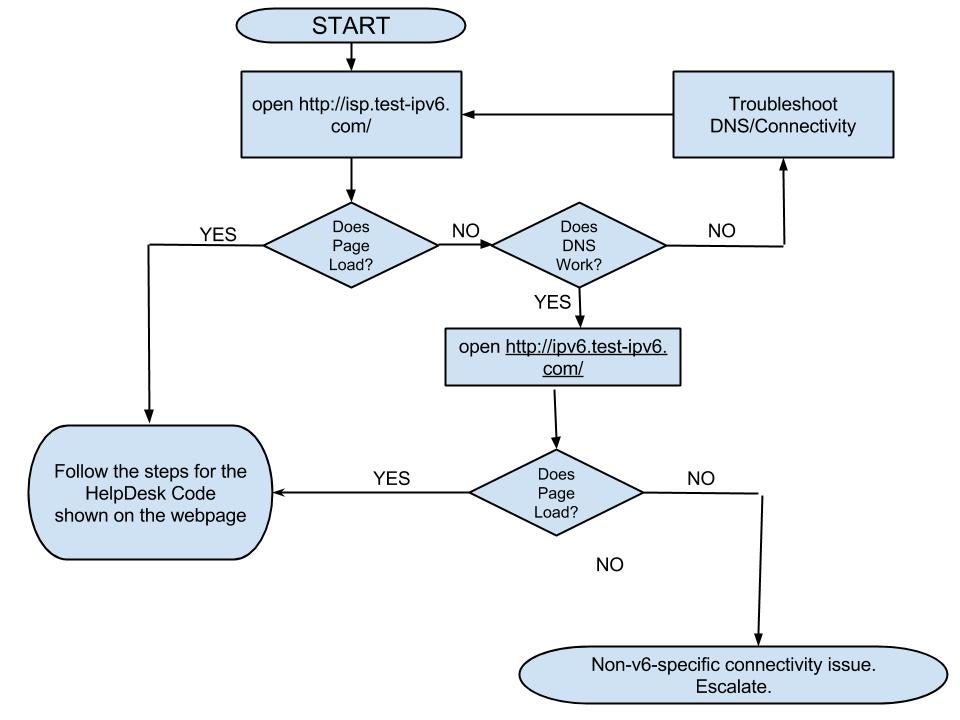
\f1\b0\fs22 \cf0 Have the user visit {\field{\*\fldinst{HYPERLINK "http://isp.test-ipv6.com"}}{\fldrslt \ul http://isp.test-ipv6.com}}. If they can't reach it, IPv4 is not working; test connectivity as usual.  If they can, use the reference in Section 6 to interpret the results.\
\
\
\pard\pardeftab720\ri0\sl276\slmult1\sb160

\f0\b\fs24 \cf0 5.2 Test Connectivity\
\pard\pardeftab720\ri0\sl276\slmult1

\f1\b0\fs22 \cf0 If the user cannot reach the site at all, have the user visit IPv6-only version of the Connectivity Test site at {\field{\*\fldinst{HYPERLINK "http://ipv6.testv6.com/helpdesk"}}{\fldrslt \ul http://ipv6.testv6.com/helpdesk}}. If the site is reachable - refer to the corresponding section of this document to interpret the results and follow the troubleshooting steps defined there. If the user can reach neither http://isp.test-ipv6.com nor  http://ipv6.testv6.com/helpdesk, follow standard procedures and scripts to determine whether there\'92s a physical connectivity problem or another standard complication. If the site is available to the user, continue using this document.\
\
\pard\pardeftab720\ri0\sl276\slmult1\sb160

\f0\b\fs24 \cf0 5.3 Test DNS\
\pard\pardeftab720\ri0\sl276\slmult1

\f1\b0\fs22 \cf0 If IPv4 is working but the page is unavailable, check DNS.  Verify if server  name can be resolved to an address:\
\
open a terminal window and run the following command:\
\
\pard\tx360\tx720\pardeftab720\li720\fi-360\ri0\sl276\slmult1
\ls1\ilvl0\cf0 \uc0\u9679 	MacOS/Linux/other Unix system: \'93dig isp.test-ipv6.com +short\'94\
\uc0\u9679 	Windows:\'94nslookup isp.test-ipv6.com\'94\
\pard\pardeftab720\ri0\sl276\slmult1
\ls1\ilvl0\cf0 If this command does not show any IPv4 addresses, the problem is not IPv6-related. Troubleshoot the DNS server issue first and return to this document if user is still experiencing issues after DNS problem has been solved.\
\pard\pardeftab720\ri0\sl276\slmult1\sb160
\ls1\ilvl0
\f0\b\fs24 \cf0 5.4 Check Home Router\
\pard\pardeftab720\ri0\sl276\slmult1
\ls1\ilvl0
\f1\b0\fs22 \cf0 If there is a home router, first determine if IPv6 is configured on the WAN.\
\pard\tx360\tx720\pardeftab720\li720\fi-360\ri0\sl276\slmult1
\ls2\ilvl0\cf0 1.	Check the configuration of the home router: if an IPv6 address is visible on the WAN port (e.g., 2001:db8:1234:abcd::83/64), but not on the LAN port, troubleshoot with vendor documentation.\
\pard\pardeftab720\li2160\fi-360\ri0\sl276\slmult1
\ls2\ilvl0\cf0 \
\pard\pardeftab720\li720\fi-360\ri0\sl276\slmult1
\ls2\ilvl0\cf0 2.
\f2\fs14
\f1\fs22 If the home router has a working WAN connection make sure that the automatic provisioning on the LAN is correct. Ensure that an IPv6 prefix was delegated to the home router and assigned to LAN interface(s).\
\pard\pardeftab720\li2160\fi-360\ri0\sl276\slmult1
\ls2\ilvl0\cf0 a.  Check that an IPv6 prefix is configured on the LAN interface.\
b.
\f2\fs14
\f1\fs22 Check the configuration of Router Advertisements on the home router\
c.
\f2\fs14
\f1\fs22 Check the configuration of the DHCPv6 server on the home router\
d.
\f2\fs14
\f1\fs22 Check the device for the proper provisioned prefix\
e.
\f2\fs14
\f1\fs22 Check the device for a matching (set of) LAN prefix(es)\
\
\pard\pardeftab720\li720\fi-360\ri0\sl276\slmult1
\ls2\ilvl0\cf0 3.
\f2\fs14
\f1\fs22 If the home router is providing the correct information to the LAN, check if the user device is overriding those settings.\
\pard\pardeftab720\li2160\fi-360\ri0\sl276\slmult1
\ls2\ilvl0\cf0 a.
\f2\fs14
\f1\fs22 Check if the user device has static address settings that don't correspond to the settings on the home router\
\pard\pardeftab720\ri0\sl276\slmult1
\ls2\ilvl0\cf0       4.        Have the user re-run the ISP.Test-IPv6 test and provide new results.\
\pard\pardeftab720\li1800\ri0\sl276\slmult1
\ls2\ilvl0\cf0 a.     If not fixed, start the troubleshooting process again\
b.     Follow your escalation procedure when needed\
Note: Enabling IPv6 WAN provisioning often requires a router/modem reboot.\
\pard\pardeftab720\ri0\sl276\slmult1\sb160
\ls2\ilvl0
\f0\b\fs24 \cf0 5.5 Escalate\
\pard\pardeftab720\ri0\sl276\slmult1
\ls2\ilvl0
\f1\b0\fs22 \cf0 If the previous steps have not identified the problem, escalate to a network engineer, using the information in Appendix C.\
\pard\pardeftab720\ri0\sl276\slmult1\sb200
\ls2\ilvl0
\f0\b\fs26 \cf0 \
6.  Explanation of Help Desk Codes on {\field{\*\fldinst{HYPERLINK "http://test.test-ipv6.om"}}{\fldrslt \ul http://isp.test-ipv6.com}} \
\pard\pardeftab720\ri0\sl276\slmult1
\ls2\ilvl0
\f1\b0\fs22 \cf0 \
isp.test-ipv6.com reports test results in a very compact way:\
\

\fs20 Help desk code: xx
\fs22 \
\pard\pardeftab720\ri0\sl276\slmult1
\ls2\ilvl0
\fs20 \cf0 	Summary\
\
\pard\pardeftab720\li720\ri0\sl276\slmult1
\ls2\ilvl0\cf0 Status of IPv4, slow/timeout warnings, ASN, and ISP name\
Status of IPv6, slow/timeout warnings, ASN, and ISP name\
(Major warnings, such as MTU)\
Status of reachability to \'93other sites\'94\
\
IPv4 address\
IPv6 address\
\pard\pardeftab720\ri0\sl276\slmult1
\ls2\ilvl0
\fs22 \cf0  \
Ask the user to read the \'93help desk code\'94 near the top (in Blue).  Then, find that code in
\f0\fs24 blue
\f1\fs22  below to identify the problem and troubleshoot it.\
\
The list of \'93help desk codes\'94 follow (from http://test-ipv6.com/faq_helpdesk.html).\
\
\pard\pardeftab720\li720\ri0\sl276\slmult1
\ls2\ilvl0\cf0 112	IPv4, plus Broken IPv6\
4	IPv4 only\
4t	IPv4 plus Teredo\
46	IPv4 + IPv6\
46t	Dual Stack, Possible Tunnel\
624	6to4 \
64	NAT64\
64t	NAT64, Possible Tunnel\
6	IPv6 only.\
\pard\pardeftab720\ri0\sl276\slmult1
\ls2\ilvl0\cf0 \
\pard\pardeftab720\ri0\sl276\slmult1\sb160
\ls2\ilvl0
\f0\b\fs24 \cf0 112 - IPv4, plus Broken IPv6\
\pard\pardeftab720\ri0\sl276\slmult1
\ls2\ilvl0
\f1\b0\fs22 \cf0 \
Example results (fields in angle brackets are for example purposes only; the real output ill contain values specific to user\'92s network configuration):\
\
	Help desk code: 112\
	IPv4, plus Broken IPv6\
\
	IPv4: Good, <AS65536, CableCo>\
	IPv6: broken\
\
	IPv4 address: <192.0.2.1>\
\
Interpretation: IPv6 network connectivity somewhere between the user and the website is broken.  IPv6 connections are timing out instead of succeeding (or failing fast to IPv4).  The user experience visiting major web sites may be suffering, and some applications completely failing.\
\pard\pardeftab720\li720\ri0\sl276\slmult1
\ls2\ilvl0\cf0 \
\pard\pardeftab720\ri0\sl276\slmult1
\ls2\ilvl0\cf0 Assumption: User has already power cycled home router, modem, and device, as part of your standard troubleshooting procedure.  \
\
Action:\
\pard\pardeftab720\li720\ri0\sl276\slmult1
\ls2\ilvl0\cf0 \
\pard\pardeftab720\ri0\sl276\slmult1
\ls2\ilvl0\cf0      1. Determine whether IPv6 is offered to this customer, based on company documentation. If yes, continue to the next step. \
\pard\pardeftab720\li720\ri0\sl276\slmult1
\ls2\ilvl0\cf0 \
\pard\pardeftab720\li720\fi-360\ri0\sl276\slmult1
\ls2\ilvl0\cf0 2.  Confirm whether the user\'92s equipment (modem, router) supports IPv6, based on company list of approved devices.  Some retail equipment may also support IPv6.  A firmware upgrade may be required; a reboot may trigger a firmware upgrade, or your company may have documented processes to upgrade firmware. \
\
3: Identify the customer\'92s IP addresses.\
\pard\tx1800\tx2160\pardeftab720\li2160\fi-360\ri0\sl276\slmult1
\ls3\ilvl2\cf0 \uc0\u9632 	Windows 8.1:\
\pard\tx2520\tx2880\pardeftab720\li2880\fi-360\ri0\sl276\slmult1
\ls3\ilvl3\cf0 \uc0\u9679 	Press (windows key) to go to the Start Screen\
\uc0\u9679 	Type \'93cmd\'94 to search for the command prompt\
\uc0\u9679 	Click \'93Command Prompt\'94 to open the application\
\uc0\u9679 	In the command prompt window, type \'93ipconfig\'94 and press enter\
\uc0\u9679 	When done reviewing the data, type \'93exit\'94 and press enter\
\pard\tx1800\tx2160\pardeftab720\li2160\fi-360\ri0\sl276\slmult1
\ls3\ilvl2\cf0 \uc0\u9632 	Windows 7, Windows Vista:\
\pard\tx2520\tx2880\pardeftab720\li2880\fi-360\ri0\sl276\slmult1
\ls3\ilvl3\cf0 \uc0\u9679 	Click the Start button\
\uc0\u9679 	Type \'93cmd\'94 to search for the command prompt\
\uc0\u9679 	Click \'93cmd.exe\'94 to open the application\
\uc0\u9679 	In the command prompt window, type \'93ipconfig\'94 and press enter\
\uc0\u9679 	When done reviewing the data, type \'93exit\'94 and press enter\
\pard\tx1800\tx2160\pardeftab720\li2160\fi-360\ri0\sl276\slmult1
\ls3\ilvl2\cf0 \uc0\u9632 	Windows XP\
\pard\tx2520\tx2880\pardeftab720\li2880\fi-360\ri0\sl276\slmult1
\ls3\ilvl3\cf0 \uc0\u9679 	Click the Start button\
\uc0\u9679 	Click the \'93run\'94 option\
\uc0\u9679 	Type \'93cmd\'94 and hit enter\
\uc0\u9679 	In the command prompt window, type \'93ipconfig /all\'94 and press enter\
\uc0\u9679 	When done reviewing the data, type \'93exit\'94 and press enter\
\pard\tx1800\tx2160\pardeftab720\li2160\fi-360\ri0\sl276\slmult1
\ls3\ilvl2\cf0 \uc0\u9632 	Apple OS X\
\pard\tx2520\tx2880\pardeftab720\li2880\fi-360\ri0\sl276\slmult1
\ls3\ilvl3\cf0 \uc0\u9679 	(from {\field{\*\fldinst{HYPERLINK "https://kb.wisc.edu/helpdesk/page.php?id=9257"}}{\fldrslt \ul https://kb.wisc.edu/helpdesk/page.php?id=9257}})\
\uc0\u9679 	Open Terminal \
\pard\tx3240\tx3600\pardeftab720\li3600\fi-360\ri0\sl276\slmult1
\ls3\ilvl4\cf0 \uc0\u9675 	Click the Spotlight search icon in the upper right corner\
\uc0\u9675 	Type \'93Terminal\'94\
\uc0\u9675 	Click the Terminal icon from the search results\
\pard\tx2520\tx2880\pardeftab720\li2880\fi-360\ri0\sl276\slmult1
\ls3\ilvl3\cf0 \uc0\u9679 	Type \'93ifconfig | grep inet6\'94  to get the list of IPv6 addresses\
\uc0\u9679 	When done, either type \'93exit\'94 or click the red button on the terminal window\
\pard\pardeftab720\ri0\sl276\slmult1
\ls3\ilvl0\cf0 \
\pard\pardeftab720\li720\fi-360\ri0\sl276\slmult1
\ls3\ilvl0\cf0 4. Check the IPv6 addresses:\
\
	It is perfectly normal for devices to have multiple IPv6 addresses. Ignore the addresses that start with \'93fe80:\'94 (link-local IPv6 addresses) and the address \'93::1\'94 (the equivalent of 127.0.0.1 in IPv4). Identify any remaining address(es); and use the following table:\
\

\itap1\trowd \taflags1 \trgaph108\trleft-108 \trwWidth12500\trftsWidth2 \trbrdrt\brdrs\brdrw10\brdrcf0 \trbrdrl\brdrs\brdrw10\brdrcf0 \trbrdrr\brdrs\brdrw10\brdrcf0
\clvertalt \clshdrawnil \clbrdrt\brdrs\brdrw20\brdrcf0 \clbrdrl\brdrs\brdrw20\brdrcf0 \clbrdrb\brdrs\brdrw20\brdrcf0 \clbrdrr\brdrs\brdrw20\brdrcf0 \clpadt100 \clpadl100 \clpadb100 \clpadr100 \gaph\cellx4320
\clvertalt \clshdrawnil \clbrdrt\brdrs\brdrw20\brdrcf0 \clbrdrl\brdrs\brdrw20\brdrcf0 \clbrdrb\brdrs\brdrw20\brdrcf0 \clbrdrr\brdrs\brdrw20\brdrcf0 \clpadt100 \clpadl100 \clpadb100 \clpadr100 \gaph\cellx8640
\pard\intbl\itap1\pardeftab720\ri0
\ls3\ilvl0\cf0 All addresses start with [
\i ISP allocated IPv6 space
\i0 ]\cell
\pard\intbl\itap1\pardeftab720\ri0
\ls3\ilvl0\cf0 Network problem.\
\
If your organization dynamically assigns IP addresses, then escalate.\uc0\u8232 \u8232 If your organization statically assigns IP addresses, verify that the customer has the proper details per company documentation for WAN, LAN, and default gateway.  If the customer confirms that the details are entered as assigned, then escalate.\cell \row

\itap1\trowd \taflags1 \trgaph108\trleft-108 \trwWidth12500\trftsWidth2 \trbrdrl\brdrs\brdrw10\brdrcf0 \trbrdrr\brdrs\brdrw10\brdrcf0
\clvertalt \clshdrawnil \clbrdrt\brdrs\brdrw20\brdrcf0 \clbrdrl\brdrs\brdrw20\brdrcf0 \clbrdrb\brdrs\brdrw20\brdrcf0 \clbrdrr\brdrs\brdrw20\brdrcf0 \clpadt100 \clpadl100 \clpadb100 \clpadr100 \gaph\cellx4320
\clvertalt \clshdrawnil \clbrdrt\brdrs\brdrw20\brdrcf0 \clbrdrl\brdrs\brdrw20\brdrcf0 \clbrdrb\brdrs\brdrw20\brdrcf0 \clbrdrr\brdrs\brdrw20\brdrcf0 \clpadt100 \clpadl100 \clpadb100 \clpadr100 \gaph\cellx8640
\pard\intbl\itap1\pardeftab720\ri0
\ls3\ilvl0\cf0 All addresses start with \'93fc\'94 or \'93fd\'94\cell
\pard\intbl\itap1\pardeftab720\ri0
\ls3\ilvl0\cf0 \'93check the router\'94.  These are ULA, Unique Local Addresses.  \
\
(A future version of this document will offer more ULA advice, as we gain more experience.)\cell \row

\itap1\trowd \taflags1 \trgaph108\trleft-108 \trwWidth12500\trftsWidth2 \trbrdrl\brdrs\brdrw10\brdrcf0 \trbrdrr\brdrs\brdrw10\brdrcf0
\clvertalt \clshdrawnil \clbrdrt\brdrs\brdrw20\brdrcf0 \clbrdrl\brdrs\brdrw20\brdrcf0 \clbrdrb\brdrs\brdrw20\brdrcf0 \clbrdrr\brdrs\brdrw20\brdrcf0 \clpadt100 \clpadl100 \clpadb100 \clpadr100 \gaph\cellx4320
\clvertalt \clshdrawnil \clbrdrt\brdrs\brdrw20\brdrcf0 \clbrdrl\brdrs\brdrw20\brdrcf0 \clbrdrb\brdrs\brdrw20\brdrcf0 \clbrdrr\brdrs\brdrw20\brdrcf0 \clpadt100 \clpadl100 \clpadb100 \clpadr100 \gaph\cellx8640
\pard\intbl\itap1\pardeftab720\ri0
\ls3\ilvl0\cf0 All addresses start with \'932002:\'94\cell
\pard\intbl\itap1\pardeftab720\ri0
\ls3\ilvl0\cf0 6to4; disable 6to4 using {\field{\*\fldinst{HYPERLINK "http://support.microsoft.com/kb/929852"}}{\fldrslt \ul http://support.microsoft.com/kb/929852}} (for example, Microsoft Fix it 50412)\cell \row

\itap1\trowd \taflags1 \trgaph108\trleft-108 \trwWidth12500\trftsWidth2 \trbrdrl\brdrs\brdrw10\brdrcf0 \trbrdrr\brdrs\brdrw10\brdrcf0
\clvertalt \clshdrawnil \clbrdrt\brdrs\brdrw20\brdrcf0 \clbrdrl\brdrs\brdrw20\brdrcf0 \clbrdrb\brdrs\brdrw20\brdrcf0 \clbrdrr\brdrs\brdrw20\brdrcf0 \clpadt100 \clpadl100 \clpadb100 \clpadr100 \gaph\cellx4320
\clvertalt \clshdrawnil \clbrdrt\brdrs\brdrw20\brdrcf0 \clbrdrl\brdrs\brdrw20\brdrcf0 \clbrdrb\brdrs\brdrw20\brdrcf0 \clbrdrr\brdrs\brdrw20\brdrcf0 \clpadt100 \clpadl100 \clpadb100 \clpadr100 \gaph\cellx8640
\pard\intbl\itap1\pardeftab720\ri0
\ls3\ilvl0\cf0 All addresses start with \'932001:0:\'94  \cell
\pard\intbl\itap1\pardeftab720\ri0
\ls3\ilvl0\cf0 Teredo; disable using {\field{\*\fldinst{HYPERLINK "http://support.microsoft.com/kb/929852"}}{\fldrslt \ul http://support.microsoft.com/kb/929852}}\
(for example, Microsoft Fix it 50412)\cell \row

\itap1\trowd \taflags1 \trgaph108\trleft-108 \trwWidth12500\trftsWidth2 \trbrdrl\brdrs\brdrw10\brdrcf0 \trbrdrr\brdrs\brdrw10\brdrcf0
\clvertalt \clshdrawnil \clbrdrt\brdrs\brdrw20\brdrcf0 \clbrdrl\brdrs\brdrw20\brdrcf0 \clbrdrb\brdrs\brdrw20\brdrcf0 \clbrdrr\brdrs\brdrw20\brdrcf0 \clpadt100 \clpadl100 \clpadb100 \clpadr100 \gaph\cellx4320
\clvertalt \clshdrawnil \clbrdrt\brdrs\brdrw20\brdrcf0 \clbrdrl\brdrs\brdrw20\brdrcf0 \clbrdrb\brdrs\brdrw20\brdrcf0 \clbrdrr\brdrs\brdrw20\brdrcf0 \clpadt100 \clpadl100 \clpadb100 \clpadr100 \gaph\cellx8640
\pard\intbl\itap1\pardeftab720\ri0
\ls3\ilvl0\cf0 One or more addresses start with\
2001:db8:  or\uc0\u8232 2005:123:456:789: \cell
\pard\intbl\itap1\pardeftab720\ri0
\ls3\ilvl0\cf0 This address is a known invalid address.  Encourage the customer to call their router vendor for support.  The vendor has incorrectly implemented IPv6, using the prefix reserved for documentation (2001:db8::) or another test prefix (e.g., 2005:123::); it is reasonable to expect a firmware update that will fix the problem. Escalate.  If the ISP provided the router, escalate to an engineer to escalate to the router vendor.  If the customer provided the router, hey will have to contact vendor support themselves; alternatively, the ISP might provide equipment. \cell \row

\itap1\trowd \taflags1 \trgaph108\trleft-108 \trwWidth12500\trftsWidth2 \trbrdrl\brdrs\brdrw10\brdrcf0 \trbrdrr\brdrs\brdrw10\brdrcf0
\clvertalt \clshdrawnil \clbrdrt\brdrs\brdrw20\brdrcf0 \clbrdrl\brdrs\brdrw20\brdrcf0 \clbrdrb\brdrs\brdrw20\brdrcf0 \clbrdrr\brdrs\brdrw20\brdrcf0 \clpadt100 \clpadl100 \clpadb100 \clpadr100 \gaph\cellx4320
\clvertalt \clshdrawnil \clbrdrt\brdrs\brdrw20\brdrcf0 \clbrdrl\brdrs\brdrw20\brdrcf0 \clbrdrb\brdrs\brdrw20\brdrcf0 \clbrdrr\brdrs\brdrw20\brdrcf0 \clpadt100 \clpadl100 \clpadb100 \clpadr100 \gaph\cellx8640
\pard\intbl\itap1\pardeftab720\ri0
\ls3\ilvl0\cf0 Any other single address\cell
\pard\intbl\itap1\pardeftab720\ri0
\ls3\ilvl0\cf0 Either the host is manually misconfigured; or another device on the customer\'92s network is offering broken IPv6 services (and possibly misconfigured).  They will need to possibly seek on-site help.\cell \row

\itap1\trowd \taflags1 \trgaph108\trleft-108 \trwWidth12500\trftsWidth2 \trbrdrl\brdrs\brdrw10\brdrcf0 \trbrdrr\brdrs\brdrw10\brdrcf0
\clvertalt \clshdrawnil \clbrdrt\brdrs\brdrw20\brdrcf0 \clbrdrl\brdrs\brdrw20\brdrcf0 \clbrdrb\brdrs\brdrw20\brdrcf0 \clbrdrr\brdrs\brdrw20\brdrcf0 \clpadt100 \clpadl100 \clpadb100 \clpadr100 \gaph\cellx4320
\clvertalt \clshdrawnil \clbrdrt\brdrs\brdrw20\brdrcf0 \clbrdrl\brdrs\brdrw20\brdrcf0 \clbrdrb\brdrs\brdrw20\brdrcf0 \clbrdrr\brdrs\brdrw20\brdrcf0 \clpadt100 \clpadl100 \clpadb100 \clpadr100 \gaph\cellx8640
\pard\intbl\itap1\pardeftab720\ri0
\ls3\ilvl0\cf0 Multiple addresses:\
At least one does not belong to the customer\'92s IPv6 address space\cell
\pard\intbl\itap1\pardeftab720\ri0
\ls3\ilvl0\cf0 It is normal for devices to have multiple IPv6 addresses. However, it\'92s possible that the device is having trouble determining which address to use.  Source address selection problem?\
Network problem? Escalate.\cell \row

\itap1\trowd \taflags1 \trgaph108\trleft-108 \trwWidth12500\trftsWidth2 \trbrdrl\brdrs\brdrw10\brdrcf0 \trbrdrr\brdrs\brdrw10\brdrcf0
\clvertalt \clshdrawnil \clbrdrt\brdrs\brdrw20\brdrcf0 \clbrdrl\brdrs\brdrw20\brdrcf0 \clbrdrb\brdrs\brdrw20\brdrcf0 \clbrdrr\brdrs\brdrw20\brdrcf0 \clpadt100 \clpadl100 \clpadb100 \clpadr100 \gaph\cellx4320
\clvertalt \clshdrawnil \clbrdrt\brdrs\brdrw20\brdrcf0 \clbrdrl\brdrs\brdrw20\brdrcf0 \clbrdrb\brdrs\brdrw20\brdrcf0 \clbrdrr\brdrs\brdrw20\brdrcf0 \clpadt100 \clpadl100 \clpadb100 \clpadr100 \gaph\cellx8640
\pard\intbl\itap1\pardeftab720\ri0
\ls3\ilvl0\cf0 Multiple addresses, none match our customer IPv6 address space; but at least one address starts with \'932001:0:\'94 or \'932002:\'94 \cell
\pard\intbl\itap1\pardeftab720\ri0
\ls3\ilvl0\cf0 Windows: Disable tunnel interfaces using {\field{\*\fldinst{HYPERLINK "http://support.microsoft.com/kb/929852"}}{\fldrslt \ul http://support.microsoft.com/kb/929852}} (for example, Microsoft Fix it 50412).\uc0\u8232 If only one address remains, test with test-ipv6.com, and consult this table if problems persist.\cell \row

\itap1\trowd \taflags1 \trgaph108\trleft-108 \trwWidth12500\trftsWidth2 \trbrdrl\brdrs\brdrw10\brdrcf0 \trbrdrb\brdrs\brdrw10\brdrcf0 \trbrdrr\brdrs\brdrw10\brdrcf0
\clvertalt \clshdrawnil \clbrdrt\brdrs\brdrw20\brdrcf0 \clbrdrl\brdrs\brdrw20\brdrcf0 \clbrdrb\brdrs\brdrw20\brdrcf0 \clbrdrr\brdrs\brdrw20\brdrcf0 \clpadt100 \clpadl100 \clpadb100 \clpadr100 \gaph\cellx4320
\clvertalt \clshdrawnil \clbrdrt\brdrs\brdrw20\brdrcf0 \clbrdrl\brdrs\brdrw20\brdrcf0 \clbrdrb\brdrs\brdrw20\brdrcf0 \clbrdrr\brdrs\brdrw20\brdrcf0 \clpadt100 \clpadl100 \clpadb100 \clpadr100 \gaph\cellx8640
\pard\intbl\itap1\pardeftab720\ri0
\ls3\ilvl0\cf0 Still here?\cell
\pard\intbl\itap1\pardeftab720\ri0
\ls3\ilvl0\cf0 Escalate. :) \cell \lastrow\row
\pard\pardeftab720\ri0\sl276\slmult1
\ls3\ilvl0\cf0 \
Action: Follow standard procedures and scripts to determine whether there\'92s a physical connectivity problem or other standard complication.  If only IPv6 is slow; if the user is using a tunnel, suggest they change their tunnel to a closer location.  \
\pard\pardeftab720\ri0\sl276\slmult1\sb160
\ls3\ilvl0
\f0\b\fs24 \cf0 4 - IPv4 only\
\pard\pardeftab720\ri0\sl276\slmult1
\ls3\ilvl0
\f1\b0\fs22 \cf0 \
Example results (fields in angle brackets are for example purposes only; the real output will contain values specific to user\'92s network configuration):\
\
	Help desk code: 4\
	IPv4 only\
\
\pard\pardeftab720\li720\ri0\sl276\slmult1
\ls3\ilvl0\cf0 IPv4: Good,
\i <AS65536, CableCo>
\i0 \
\
IPv4 address: <192.0.2.1>\
\
\pard\pardeftab720\ri0\sl276\slmult1
\ls3\ilvl0\cf0  \
Interpretation: User\'92s issue is not caused by IPv6, as there is no IPv6 configured.  If Teredo was found and mentioned, we determined it is \'93safe\'94 (and not actively being used for connections to web sites by DNS name).\
\
Action: \
\pard\pardeftab720\li720\ri0\sl276\slmult1
\ls3\ilvl0\cf0 1. Determine whether IPv6 should be provided to the user based on user profile/company documentation.\
\
2.  Confirm whether the user\'92s equipment (modem, router) support IPv6, based on company list of approved devices.  Some retail equipment may also support IPv6.  A firmware upgrade may be required; a reboot may trigger a firmware upgrade, or your company may have documented processes to upgrade firmware.\
\
3.  If the company has processes to configure IPv6 manually, do so, make sure the configured changes are permanent throughout reboots and test again.  Most residential ISPs automatically configure IPv6 where available, so in most cases manual configuration is not possible.\
\
4. Configure IPv6 on the user\'92s device, using vendor documentation.  \
\pard\pardeftab720\ri0\sl276\slmult1\sb160
\ls3\ilvl0
\f0\b\fs24 \cf0 4t - IPv4 plus Teredo\
\pard\pardeftab720\ri0\sl276\slmult1
\ls3\ilvl0
\f1\b0\fs22 \cf0 \
Example results (fields in angle brackets are for example purposes only; the real output ill contain values specific to user\'92s network configuration)::\
\
	Help desk code: 4t\
	IPv4 plus Teredo\
	\
\pard\pardeftab720\li720\ri0\sl276\slmult1
\ls3\ilvl0\cf0 IPv4: Good, <AS65536, CableCo>\
IPv6: Good, Teredo, Preferred\
OtherSites: <40/40 good>\
\
IPv4 address: <192.0.2.1>\
IPv6 address: <2001:db8::1>\
\pard\pardeftab720\ri0\sl276\slmult1
\ls3\ilvl0\cf0  \
Interpretation: Teredo was used to provide an IPv6 address; and the host was configured to actively take advantage of this service.  Any web site that has an IPv6 presence, will be reached using Teredo instead of native IPv4.   Modern operating systems do not prefer these kinds of tunnels by default. Be aware that the user might have a very old operating system or a non-default configuration.\
\
Action: \
\
\pard\tx360\tx720\pardeftab720\li720\fi-360\ri0\sl276\slmult1
\ls4\ilvl0\cf0 1.	Have the user disable any automatic tunneling mechanisms that are active. Teredo is a protocol that runs on the PC and tries to get IPv6 traffic through a NAT device or firewall. Disable tunnel interfaces using {\field{\*\fldinst{HYPERLINK "http://support.microsoft.com/kb/929852"}}{\fldrslt \ul http://support.microsoft.com/kb/929852}} (for example, Microsoft Fix it 50412).\
2.	If user is still experiencing connectivity issues, verify connectivity to {\field{\*\fldinst{HYPERLINK "http://test.test-ipv6.om"}}{\fldrslt
\f0\b\fs26 \ul http://isp.test-ipv6.com}}
\f0\b\fs26
\f1\b0\fs22 again and follow the troubleshooting steps for the corresponding code.\
\pard\pardeftab720\ri0\sl276\slmult1
\ls4\ilvl0\cf0 \
\pard\pardeftab720\ri0\sl276\slmult1\sb160
\ls4\ilvl0
\f0\b\fs24 \cf0 46 - IPv4 + IPv6\
\pard\pardeftab720\ri0\sl276\slmult1
\ls4\ilvl0
\f1\b0\fs22 \cf0 \
Example results (fields in angle brackets are for example purposes only; the real output ill contain values specific to user\'92s network configuration)::\
\
	Help desk code: 46\
	IPv4 + IPv6\
	\
\pard\pardeftab720\li720\ri0\sl276\slmult1
\ls4\ilvl0\cf0 IPv4: Good, <AS65536, CableCo>\
IPv6: Good, <AS65536, CableCo>\
OtherSites: 40/40 good\
\
IPv4 address: <192.0.2.1>\
IPv6 address: <2001:db8::1>\
\pard\pardeftab720\ri0\sl276\slmult1
\ls4\ilvl0\cf0 \
\
Interpretation: This is an example of a healthy IPv4 + IPv6 configuration.  Both IPv4 and IPv6 are working, at least to this web site.\
\
Action:  None - unless the \'93OtherSites\'94 test reports any problems.  If problems are reported, investigate possible IPv6 routing or peering issues.  If the company had a dual-stack speed test server, try that to identify performance issues.\
\
\
\pard\pardeftab720\ri0\sl276\slmult1\sb160
\ls4\ilvl0
\f0\b\fs24 \cf0 46t - Dual Stack, Possible Tunnel\
\pard\pardeftab720\ri0\sl276\slmult1
\ls4\ilvl0
\f1\b0\fs22 \cf0 \
Example results (fields in angle brackets are for example purposes only; the real output will contain values specific to user\'92s network configuration)::\
\
	Help desk code: 46t\
	IPv4 + IPv6\
	\
\pard\pardeftab720\li720\ri0\sl276\slmult1
\ls4\ilvl0\cf0 IPv4: Good, <AS65536, CableCo>\
IPv6: Good, <AS64511, AnotherCo>\
OtherSites: 40/40 good\
\
IPv4 address: <192.0.2.1>\
IPv6 address: <2001:db8::1>\
\pard\pardeftab720\ri0\sl276\slmult1
\ls4\ilvl0\cf0 \
Interpretation: This is an example of a healthy IPv4 + IPv6 configuration.   The IPv6 connectivity appears to be announced by a different entity (or at least, a different BGP ASN) than IPv4.  \
\
Action: Ask the user to read the IPv4 and IPv6 lines; ensure that the ASN or company name represented makes sense for your organization.  If the user is using a foreign IPv6 service, consider reprovisioning the user to your own IPv6 service. \
\pard\pardeftab720\ri0\sl276\slmult1\sb160
\ls4\ilvl0
\f0\b\fs24 \cf0 624 - 6to4\
\pard\pardeftab720\ri0\sl276\slmult1
\ls4\ilvl0
\f1\b0\fs22 \cf0 \
Example results (fields in angle brackets are for example purposes only; the real output will contain values specific to user\'92s network configuration)::\
\
	Help desk code: 624\
	6to4\
	\
\pard\pardeftab720\li720\ri0\sl276\slmult1
\ls4\ilvl0\cf0 IPv4: Good, <AS65536, CableCo>\
IPv6: Good, 6to4, Preferred\
\
IPv4 address: <192.0.2.1>\
IPv6 address: <2001:db8::1>\
\pard\pardeftab720\ri0\sl276\slmult1
\ls4\ilvl0\cf0  \
Interpretation: \'936to4\'94 was used to provide an IPv6 address; and the host was configured to actively take advantage of this service.  Any web site that has an IPv6 presence, will be reached using 6to4 instead of native IPv4.   Modern operating systems do not prefer these kinds of tunnels by default. Be aware that the user might have a very old operating system or a non-default configuration.\
\
Action: \
\pard\tx360\tx720\pardeftab720\li720\fi-360\ri0\sl276\slmult1
\ls5\ilvl0\cf0 1.	Have the user disable any automatic tunneling mechanisms that are active. 6to4 is a protocol that tries to get IPv6 traffic through a public relay, using IPv4 to reach the public relay.  Public 6to4 relays offer no SLA; and published studies show approximately 15% failure rates. Windows: Disable tunnel interfaces using {\field{\*\fldinst{HYPERLINK "http://support.microsoft.com/kb/929852"}}{\fldrslt \ul http://support.microsoft.com/kb/929852}} (for example, Microsoft Fix it 50412).\uc0\u8232 \
2.	If IPv6 is desired, configure IPv6 (verify the user has an IPv6 address, and a default route). and test again. If user is still experiencing access issues, follow the troubleshooting steps for the corresponding code returned by http://isp.test-ipv6.com/\
\pard\pardeftab720\ri0\sl276\slmult1
\ls5\ilvl0\cf0 \
\pard\pardeftab720\ri0\sl276\slmult1\sb160
\ls5\ilvl0
\f0\b\fs24 \cf0 64 - NAT64\
\pard\pardeftab720\ri0\sl276\slmult1
\ls5\ilvl0
\f1\b0\fs22 \cf0 \
Example results (fields in angle brackets are for example purposes only; the real output ill contain values specific to user\'92s network configuration):\
\
	Help desk code: 64\
	NAT64\
	\
\pard\pardeftab720\li720\ri0\sl276\slmult1
\ls5\ilvl0\cf0 IPv4: Good, <AS65536, CableCo>\
IPv6: Good, <AS65536, CableCo>\
OtherSites: <40/40 good>\
\
IPv4 address: <192.0.2.1>\
IPv6 address: <2001:db8::1>\
\pard\pardeftab720\ri0\sl276\slmult1
\ls5\ilvl0\cf0 \
\
Interpretation: IPv6 is operating as expected; IPv4 works only with \'93named\'94 connections and web sites.  Connections to a literal IPv4 address will fail (e.g., http://192.0.2.1).  This is probably not an error condition; but is explicitly called out in case of support issues with specific IPv4 applications.\
\
Action:  Typically, escalate.  If you need IPv4 to work, and your organization has deployed 464xlat, you may need to ensure that your customer has properly configured their device for your 464xlat service and re-run the test.   With a working 464xat, your customer should instead see a help desk code of \'9346\'94 (IPv4 + IPv6). If you do not have 464xlat - escalate.\
\
\pard\pardeftab720\ri0\sl276\slmult1\sb160
\ls5\ilvl0
\f0\b\fs24 \cf0 \
64t - NAT64, possible tunnel\
\pard\pardeftab720\ri0\sl276\slmult1
\ls5\ilvl0
\f1\b0\fs22 \cf0 \
Example results (fields in angle brackets are for example purposes only; the real output ill contain values specific to user\'92s network configuration):\
\
	Help desk code: 64t\
	NAT64, possible tunnel\
	\
\pard\pardeftab720\li720\ri0\sl276\slmult1
\ls5\ilvl0\cf0 IPv4: Good, <AS65536, CableCo>\
IPv6: Good, <AS64511, AnotherCo>\
OtherSites: <40/40 good>\
\
IPv4 address: <192.0.2.1>\
IPv6 address: <2001:db8::1>\
\pard\pardeftab720\ri0\sl276\slmult1
\ls5\ilvl0\cf0 \
\
Interpretation: IPv6 is operating as expected; IPv4 works only with \'93named\'94 connections and web sites.  Connections to a literal IPv4 address will fail (e.g., http://192.0.2.1).   This is probably not an error condition; but is explicitly called out in case of support issues with specific IPv4 applications.\
\
Action:  Typically, none.  If you need IPv4 to work, and your organization has depoyed 464xlat, you may need to ensure that your customer has properly configured their device for your 464xlat service and re-run the test.   With a working 464xat, your customer should instead see a help desk code of \'9346\'94 (IPv4 + IPv6).  If you do not have 464xlat - escalate.\
\
Interpretation (2): The IPv6 connectivity appears to be announced by a different entity (or at least, a different BGP ASN) than IPv4.  \
\
Action: Ask the user to read the IPv4 and IPv6 lines; ensure that the ASN or company name represented makes sense for your organization.  If the user is using a foreign IPv6 service, consider reprovisioning the user to your own IPv6 service.  \
\
\pard\pardeftab720\ri0\sl276\slmult1
\ls5\ilvl0
\f0\b\fs24 \cf0 6 - IPv6 only\
\
\pard\pardeftab720\ri0\sl276\slmult1
\ls5\ilvl0
\f1\b0\fs22 \cf0 Example results (fields in angle brackets are for example purposes only; the real output ill contain values specific to user\'92s network configuration):\
\
	Help desk code: 6\
	IPv6 only\
	\
\pard\pardeftab720\li720\ri0\sl276\slmult1
\ls5\ilvl0\cf0 IPv4: no\
IPv6: Good, <AS65536, CableCo>\
\
IPv6 address: <2001:db8::1>\
\pard\pardeftab720\ri0\sl276\slmult1
\ls5\ilvl0\cf0 \
Interpretation: Only IPv6 found.  \
\
Action: Refer to the IPv4 helpdesk, IPv6 is working perfectly.  \
User seems to have working IPv6 connectivity at least to some external sites. If they are still experiencing issues, escalate.\
\
Note: IPv6 only users do not trigger the \'93OtherSites\'94 check.  Without IPv4, there is no way to know whether to report an IPv6 reachability problem, or to ignore it (due to site down).\
\
Note: IPv6-only users will need to use \'93{\field{\*\fldinst{HYPERLINK "http://ipv6.test-ipv6.com/helpdesk"}}{\fldrslt \ul http://ipv6.test-ipv6.com/helpdesk}}\'94  or  \'93{\field{\*\fldinst{HYPERLINK "http://ipv6.test-ipv6.com/isp"}}{\fldrslt \ul http://ipv6.test-ipv6.com/isp}}\'94.  \
\pard\pardeftab720\ri0\sl276\slmult1\sb160
\ls5\ilvl0
\f0\b\fs24 \cf0 \'93slow\'94 \
\pard\pardeftab720\ri0\sl276\slmult1
\ls5\ilvl0
\f1\b0\fs22 \cf0 \
Example results (fields in angle brackets are for example purposes only; the real output ill contain values specific to user\'92s network configuration):\
\
	Help desk code: 46,slow\
	IPv4 + IPv6, slow\
\
\pard\pardeftab720\li720\ri0\sl276\slmult1
\ls5\ilvl0\cf0 IPv4: SLOW, <AS1234, CableCo>\
IPv6: SLOW, <AS1234, CableCo>\
OtherSites: <40/40 good>\
\
IPv4 address: <192.0.2.1>\
IPv6 address: <2001:db8::1>\
\
\pard\pardeftab720\ri0\sl276\slmult1
\ls5\ilvl0\cf0 Interpretation:  IPv4 or IPv6 connections to the test-ipv6.com site that should have been fast took over 5 seconds.  \
\
In the user\'92s device\'92s network settings, check DNS/name servers.  If the servers there have IPv6 addresses, check connectivity to those servers:  \
\pard\tx360\tx720\pardeftab720\li720\fi-360\ri0\sl276\slmult1
\ls6\ilvl0\cf0 \uc0\u9679 	Windows: Open a cmd window and run \'93ping [address]\'94\
\uc0\u9679 	MacOS: Open a terminal window and run \'93ping6 [address]\
\pard\pardeftab720\ri0\sl276\slmult1
\ls6\ilvl0\cf0  \
If they are not reachable, configure different servers (preferably IPv4 ones unless you are sure that user is on IPv6-only network) .\
\
\pard\pardeftab720\ri0\sl276\slmult1\sb160
\ls6\ilvl0
\f0\b\fs28 \cf0 \'93mtu\'94 - \'93
\fs24 Possible MTU issues\'94 Warning
\fs28 \
\pard\pardeftab720\ri0\sl276\slmult1
\ls6\ilvl0
\f1\b0\fs22 \cf0 \
Example results (fields in angle brackets are for example purposes only; the real output ill contain values specific to user\'92s network configuration):\
\
\
	Help desk code: 46\
	IPv4 + IPv6\
\
\pard\pardeftab720\li720\ri0\sl276\slmult1
\ls6\ilvl0\cf0 IPv4: SLOW, <AS1234, CableCo>\
IPv6: SLOW, <AS1234, CableCo>\
WARNING: POSSIBLE MTU ISSUE      (in RED)\
OtherSites: 40/40 good\
\
IPv4 address: <192.0.2.1>\
IPv6 address: <2001:db8::1>\
\pard\pardeftab720\ri0\sl276\slmult1
\ls6\ilvl0\cf0  \
Interpretation: IPv6 MTU issues are typically caused by ICMPv6 filtering at some point along the path. Small requests were fast; large requests were slow (and/or timed out).  There are too many possible solutions to be checked.\
\
Action: This issue requires a deeper understanding of IPv6 protocol and solving of this issue depends on how your helpdesk is organized. If you have a two or three-tier helpdesk, hand it over to second level support, clearly noting that there are MTU issues. If you have just one-tier helpdesk, hand it over to appropriate escalation department/contact, depending on your escalation policy.\
MTU issues are most often caused when Path MTU Discovery (PMTUd) [RFC1981] fails.\
\
What to do? Handoff to Engineering..  \
\
\pard\pardeftab720\fi-360\ri0\sl276\slmult1
\ls6\ilvl0\cf0 1.
\f2\fs14
\f1\fs22 Check firewall configuration on user\'92s CPE, look for the blocking of some ICMPv6 (specifically type \'932\'94) either explicitly configured, or implicitly established through lack of rules permitting this.  (If ICMPv6 is blocked at some levels DHCPv6 will not work)\
2.
\f2\fs14
\f1\fs22 Check for ICMPv6 filtering on the user\'92s path through your access and core network\
3.
\f2\fs14
\f1\fs22 Follow your escalation procedure when needed\
\pard\pardeftab720\ri0\sl276\slmult1
\ls6\ilvl0\cf0 Educate your self and your helpdesk team on IPv6.\
There are several outstanding resources available to folks new to IPv6:\
\pard\pardeftab720\fi-360\ri0\sl276\slmult1
\ls6\ilvl0\cf0 \'95
\f2\fs14
\f1\fs22 Internet Society Deploy360 -{\field{\*\fldinst{HYPERLINK "http://www.internetsociety.org/deploy360/ipv6/"}}{\fldrslt  \ul http://www.internetsociety.org/deploy360/ipv6/}}\
\'95
\f2\fs14    	{\field{\*\fldinst{HYPERLINK "http://www.networkworld.com/community/blog/mtu-size-issues"}}{\fldrslt
\f1\fs22 \ul http://www.networkworld.com/community/blog/mtu-size-issues}}
\f1\fs22 \
\'95
\f2\fs14    	{\field{\*\fldinst{HYPERLINK "http://en.wikipedia.org/wiki/Maximum_transmission_unit"}}{\fldrslt
\f1\fs22 \ul http://en.wikipedia.org/wiki/Maximum_transmission_unit}}
\f1\fs22 \
\pard\pardeftab720\ri0\sl276\slmult1
\ls6\ilvl0\cf0 \
\pard\pardeftab720\ri0\sl276\slmult1\sb160
\ls6\ilvl0
\f0\b\fs24 \cf0 \'93Site(s) with failed connectivity\'94 Warning\
\pard\pardeftab720\ri0\sl276\slmult1
\ls6\ilvl0
\f1\b0\fs22 \cf0 Example results (fields in angle brackets are for example purposes only; the real output ill contain values specific to user\'92s network configuration):\
\
\pard\pardeftab720\fi720\ri0\sl276\slmult1
\ls6\ilvl0\cf0 Help desk code: 46\
\pard\pardeftab720\ri0\sl276\slmult1
\ls6\ilvl0\cf0 	IPv4 + IPv6\
\
\pard\pardeftab720\li720\ri0\sl276\slmult1
\ls6\ilvl0\cf0 IPv4: Good, <AS1234, CableCo>\
IPv6: Good, <AS1234, CableCo>\
OtherSites: <39/40> good, <1/40> bad\
\
IPv4 address: <192.0.2.1>\
IPv6 address: <2001:db8::1>\
\pard\pardeftab720\ri0\sl276\slmult1
\ls6\ilvl0
\f0\b\fs24 \cf0 \
\pard\pardeftab720\ri0\sl276\slmult1
\ls6\ilvl0
\f1\b0\fs22 \cf0 	Site(s) with failed connectivity            (in RED)\
{\listtext	test-ipv6.example.com	}http://ipv6.test-ipv6.example.com/images-nc/knob_valid_green.png\
	\
Interpretation: One or more sites are unreachable by the user only when using IPv6.\
\
Action: Ensure the user is using your network services (not tunnels).  If the user is using tunnels, disable the tunnel as described above. If this error condition persists, re-run the test, troubleshoot as described in the section for the corresponding code.\
\
\pard\pardeftab720\ri0\sl276\slmult1\sb200
\ls6\ilvl0
\f0\b\fs26 \cf0 7. IPv6 training for helpdesk\
\pard\pardeftab720\ri0\sl276\slmult1
\ls6\ilvl0
\b0\fs22 \cf0 IPv6 training for helpdesks is available from many IPv6 training companies all around the world or can be tailored to suit the needs from their basic IPv6 training for engineers and technical staff. When you are rolling out IPv6 in production you need to train all your staff to equalize the IPv4 and IPv6 knowledge anyway, so talk to your training agency and ask them to adapt their IPv6 education program and train your helpdesk team.\
\pard\pardeftab720\ri0\sl262\slmult1\sb240\sa120
\ls6\ilvl0
\b\fs26 \cf0 8. Conclusion\
\pard\pardeftab720\ri0\sl276\slmult1
\ls6\ilvl0
\f1\b0\fs22 \cf0 Most connectivity problems are NOT IPv6 related at all.\
Use{\field{\*\fldinst{HYPERLINK "http://isp.test-ipv6.com/"}}{\fldrslt  \ul http://isp.test-ipv6.com/}} for automated IPv6 troubleshooting.\
Educate yourself and your helpdesk team on IPv6\
\pard\pardeftab720\ri0\sl276\slmult1\sb200
\ls6\ilvl0
\f0\b\fs26 \cf0 9. Operator\'92s specifics\
\pard\pardeftab720\ri0\sl276\slmult1
\ls6\ilvl0
\f1\fs22 \cf0 \
What your helpdesk should also know and is specific to your company (operator)\
-------\
\pard\pardeftab720\ri0\sl276\slmult1
\ls6\ilvl0
\i\b0 \cf0 Insert here your specifics...\
\pard\pardeftab720\ri0\sl276\slmult1
\ls6\ilvl0
\i0\b \cf0 \
\
\
\
-------\
\
\pard\pardeftab720\ri0\sl360\slmult1\sb200
\ls6\ilvl0
\f0\fs26 \cf0 Appendix A: Acknowledgements\
\pard\pardeftab720\ri0\sl360\slmult1
\ls6\ilvl0
\f1\b0\fs22 \cf0 The authors would like to thank everyone from the Internet Community (at large) that sent us suggestions and comments over email or through direct conversation with the authors. Special thnx goes to Jernej Horvat from Amis - the idea for this document came out of a discussion with him about the hurdles that he\'92s facing as an operator preventing him to enable IPv6 for all residential customers. We would also like to thank RIPE BCOP TF and RIPE IPv6 WG co-chairs to accept this work and guide it through the community consensus process.\
\pard\pardeftab720\ri0\sl276\slmult1\sb200
\ls6\ilvl0
\f0\b\fs26 \cf0 Appendix B. Basic troubleshooting flowchart\
\pard\pardeftab720\ri0\sl276\slmult1
\ls6\ilvl0
\f1\b0\fs22 \cf0 \
In PDF version of this document - troubleshooting flowchart is included.\
\
Flowchart is also accessible at {\field{\*\fldinst{HYPERLINK "http://go6.si/docs/v6troubeshooting_flowchart.jpg"}}{\fldrslt http://go6.si/docs/v6troubeshooting_flowchart.jpg}} \
\ls6\ilvl0
\f0\b\fs26 \
\pard\pardeftab720\ri0\sl276\slmult1\sb200
\ls6\ilvl0\cf0 Appendix C. Collecting Data for Escalation\
\pard\pardeftab720\ri0\sl276\slmult1
\ls6\ilvl0
\f1\b0\fs22 \cf0 It is recommended to collect some additional troubleshooting information from a user and provide that info to an escalation engineer. \
\
\pard\pardeftab720\ri0\sl334\slmult1\sa140
\ls6\ilvl0\cf0 bsd and generic info:\
\pard\tx360\tx720\pardeftab720\li720\fi-360\ri0\sl360\slmult1
\ls7\ilvl0
\fs20 \cf3 \uc0\u9679
\fs22 \cf0 netstat -nr\
\ls7\ilvl0
\fs20 \cf3 \uc0\u9679
\fs22 \cf0 ifconfig -a\
\ls7\ilvl0
\fs20 \cf3 \uc0\u9679
\fs22 \cf0 traceroute6 isp.test-ipv6.com or mtr -6 --report isp.test-ipv6.com\
\pard\pardeftab720\ri0\sl334\slmult1\sa140
\ls7\ilvl0\cf0 linux:\
\pard\tx360\tx720\pardeftab720\li720\fi-360\ri0\sl360\slmult1
\ls8\ilvl0
\fs20 \cf3 \uc0\u9679
\fs22 \cf0 ip -f inet6 route show\
\ls8\ilvl0
\fs20 \cf3 \uc0\u9679
\fs22 \cf0 ip -f inet6 addr\
\ls8\ilvl0
\fs20 \cf3 \uc0\u9679
\fs22 \cf0 traceroute6 isp.test-ipv6.com or tracepath6 isp.test-ipv6.com or mtr -6 --report isp.test-ipv6.com\
\pard\pardeftab720\ri0\sl334\slmult1\sa140
\ls8\ilvl0\cf0 Windows:\
\pard\tx360\tx720\pardeftab720\li720\fi-360\ri0\sl360\slmult1
\ls9\ilvl0
\fs20 \cf3 \uc0\u9679
\fs22 \cf0 ipconfig /all\
\ls9\ilvl0
\fs20 \cf3 \uc0\u9679
\fs22 \cf0 netsh interface ipv6 show route\
\ls9\ilvl0
\fs20 \cf3 \uc0\u9679
\fs22 \cf0 tracert isp.test-ipv6.com\
}