Hello Alan,

No surprise that you've ended up here.  I was cursorily following your
posts on the Xen-Users mailing list, curious to see the solution to
your problem, but didn't read enough until now to see what you were
actually trying to do.  I believe that what you're after is for your
DomU to have direct access to your iSCSI target; in other words,
you're trying to get the raw iSCSI device to be used directly by your
VM, without layering an image file or LVM or some other sort of
storage abstraction inbetween the two.
My suspicion is that your observation about connecting the Dom0
initiator to your target, and then passing the device (/dev/sdX)
directly to the VM won't work if you want to boot the DomU from that
device... at least not for an HVM domain.  For what it's worth, it
doesn't work on VMware either.  PV Xen might be a different story, but
the exact nature of how all that works is a little over my head for
the time being :P

For the good news, what [I think] you're trying to do is built right
into Xen.  Part of the Xen build process compiles iPXE... I'll admit
that made me smile the first time I sat down to play with it.  The
commit where this changed was some time in Nov 2010, so I'm not sure
which version[s] of Xen include it; my own personal experience can
tell you that it's definitely in 4.1 and 4.2-unstable.  Which version
are you currently on?

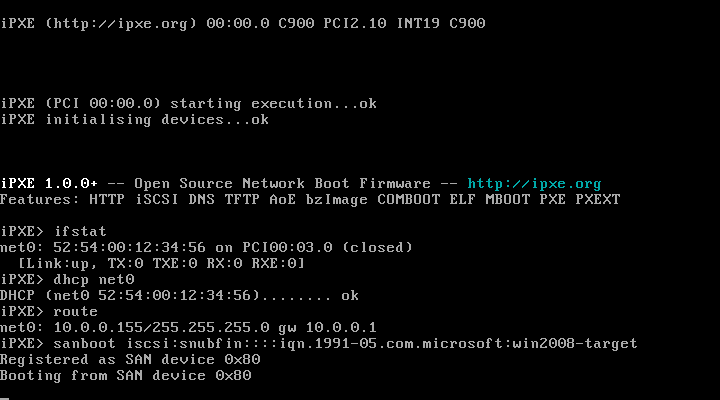
If you're chainloading gPXE from the network, I suspect that you're
actually doing so via the built-in iPXE installation that should be
present in your HVM DomU.  Your initial portion of your network boot
should look something like the top half of this screenshot:
http://ipxe.org/_media/screenshots/iscsiboot.png?cache=

If you configure your DHCP server to instead respond to the iPXE user
class (see here:
http://ipxe.org/howto/chainloading#breaking_the_infinite_loop ), and
have it return the root-path (DHCP Option 17) of your iSCSI target,
perhaps even the one you installed to previously but could not
subsequently boot from, it may very well "just work."

If you're stuck on any of this or have any questions, just respond
back.  But make sure you use the iPXE mailing list, of course!

Cheers,
Andrew Bobulsky


On Tue, Apr 24, 2012 at 4:34 PM, Michael Brown <[email protected]> wrote:
> On Tuesday 24 Apr 2012 21:16:49 Alan McKay wrote:
>> So far what I've tried is the folllowing :
>>
>> gpxe-1.0.1-gpxe.kpxe
>> gpxe-1.0.1-undionly.kkpxe
>> gpxe-1.0.1-undionly.kpxe
>>
>> And they all seem to do the same thing.
>>
>> What am I doing wrong ?
>
> gPXE is no longer maintained, and contains a large number of known bugs.
> Please upgrade to iPXE:
>
>    http://ipxe.org
>
> Michael
> _______________________________________________
> ipxe-devel mailing list
> [email protected]
> https://lists.ipxe.org/mailman/listinfo/ipxe-devel
_______________________________________________
ipxe-devel mailing list
[email protected]
https://lists.ipxe.org/mailman/listinfo/ipxe-devel