On 07/01/2020 17:17, Jasmin Blanchette wrote:
>> I updated to Isabelle/ffb1783dd7e0 today, and since then I can't start
>> Isabelle/jEdit. I've tried with a bare-bones settings file containing only
>>
>>      init_components "$USER_HOME/.isabelle/contrib"
>> "$ISABELLE_HOME/Admin/components/main"
>>
>> When I type "isabelle jedit", the Isabelle logo appears as usual, then a
>> bunch of AWT warnings I'm used to ignore, and after some time (anywhere
>> between 5 and 60 s it seems), the logo goes away and control returns to the
>> command line.
First note that I don't see Isabelle/ffb1783dd7e0 in the public repository,
but I the detailed version is probably irrelevant. I am using current
Isabelle/15c6f253b9f3 for testing.


>> I've tried "isabelle jedit -f", to no avail.
>>
>> I'm running macOS Mojave (10.14.4).

My Mojave installation is already at 10.14.6, and Catalina at 10.15.2. Both
work fine for me, using the command-line tool or the Isabelle.app (e.g. from
https://isabelle.sketis.net/devel/release_snapshot).


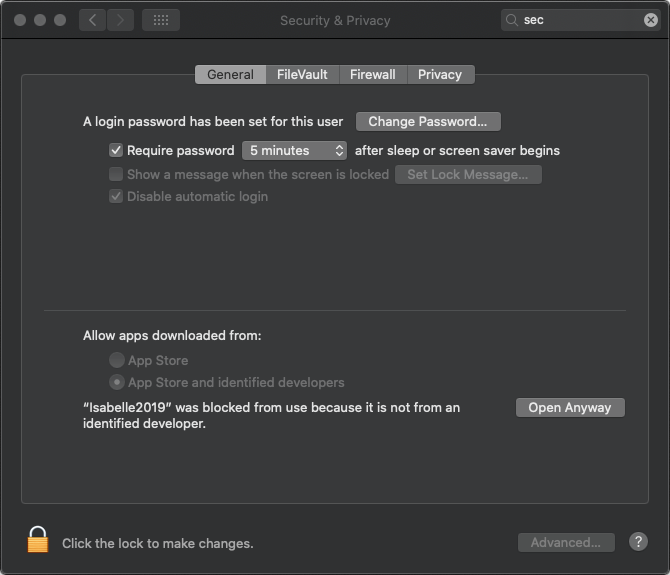
From a distance, I guess that it is a matter of certain options in "Security &
Privacy". Applications that request certain rights, but are rejected in the
first attempt, should show up in various dialogs. E.g. see "General" (as in
https://isabelle.in.tum.de/img/macos_security.png or "Privacy" with "Full Disk
Access" or "Files and Folders" for the Terminal app.


        Makarius
_______________________________________________
isabelle-dev mailing list
[email protected]
https://mailman46.in.tum.de/mailman/listinfo/isabelle-dev