[
https://issues.apache.org/jira/browse/CB-9992?page=com.atlassian.jira.plugin.system.issuetabpanels:all-tabpanel
 ]
jcesarmobile closed CB-9992.
----------------------------
    Resolution: Duplicate
      Assignee: jcesarmobile

I think it's a duplicate of CB-10937 that was fixed.

Retest on latest version of the plugin and if the issue is still present reopen
it.


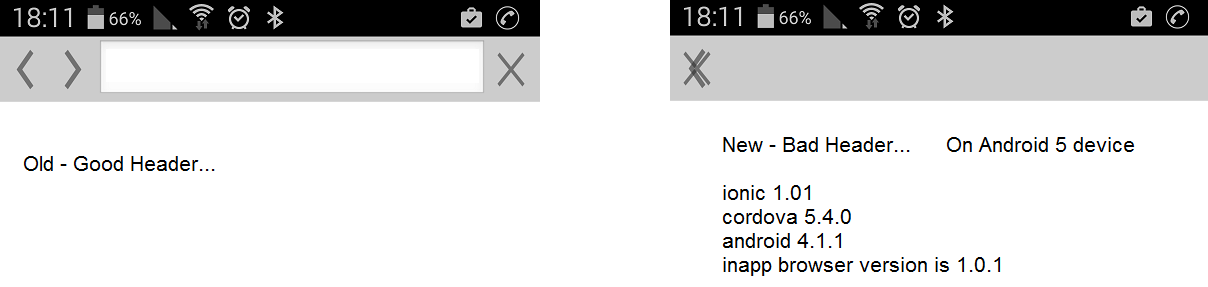
> Top Bar Symbols are distorted on Android 5
> ------------------------------------------
>
>                 Key: CB-9992
>                 URL: https://issues.apache.org/jira/browse/CB-9992
>             Project: Apache Cordova
>          Issue Type: Bug
>          Components: Plugin InAppBrowser
>    Affects Versions: 1.0.0
>         Environment: cordova android 4.1.1
> cordova 5.4.0
> ionic 1.1.0
> inappbrowser 1.0.1
>            Reporter: nadav
>            Assignee: jcesarmobile
>            Priority: Minor
>              Labels: Android, Triaged
>         Attachments: screenshot-1.png
>
>
> im using ionic (phonegap),
> and in the cordova inappbowrser version 1.0.1
> if i open the browser on android 5
> all the top buttons (back,forward,close) are all messes up:
>  one on top of the other all in the left screen corner?
> this buttons bug only happens on android 5 ( on android 4.4 all is good)
> screenshot:
> http://res.cloudinary.com/dwd3rmvqh/image/upload/v1447430131/static/issues_gk0esv.png
> i saw this bug now on samsung galaxy 5 ( android 5)
> LG G3-S ( android 5.0.2)
> so now i cant use the inappbrowser at all.
> the steps i did to install the new inappbrowser are :
> 1.ionic start myApp tabs
> 2. cordova platform add android
> 3.cordova plugin add cordova-plugin-inappbrowser
> thats it.
> and the inappbrowser looks funny
> if any 1 can help


--
This message was sent by Atlassian JIRA
(v6.3.4#6332)

---------------------------------------------------------------------
To unsubscribe, e-mail: [email protected]
For additional commands, e-mail: [email protected]