[
https://issues.apache.org/jira/browse/FLEX-33665?page=com.atlassian.jira.plugin.system.issuetabpanels:all-tabpanel
 ]
Mark Kessler updated FLEX-33665:
--------------------------------

    Comment: was deleted

(was: The original issue was the correct it was using the dataProviders
row/column index to place itself and now it's using the renderers row/column
index.  The Calculation of the x/y from the renderer is where it's going wrong
atm which I was going to create a separate issue for.... but I suppose we can
put it in here.

The X seems fine, just the Y is off.  When I followed it down last night it
looked like this method of GridDimensions.as might be the reason, but I wont be
able to play with it until this evening,
    /**
     *  Returns the Y coordinate of the origin of the specified cell.
     *
     *  @langversion 3.0
     *  @playerversion Flash 10
     *  @playerversion AIR 2.0
     *  @productversion Flex 4.5
     */
    public function getCellY(row:int, col:int):Number
    {
        // no cache so we use default heights for each row.
        if (!variableRowHeight || rowList.length == 0)
            return row * (defaultRowHeight + rowGap);

        if (row == 0)
            return 0;

        // initialize first node.
        if (!recentNode2)
        {
            recentNode2 = rowList.first;
            startY2 = recentNode2.rowIndex * (defaultRowHeight + rowGap);
        }

        var y:Number;
        var recentIndex:int = recentNode2.rowIndex;

        if (row == recentIndex)
            y = startY2;
        else if (row < recentIndex)
            y = getPrevYAt(row, recentNode2, startY2);
        else
            y = getNextYAt(row, recentNode2, startY2);

        return y;
    }
)

> ItemEditors are placed on the wrong position after scrolling an editable
> Spark Datagrid
> ---------------------------------------------------------------------------------------
>
>                 Key: FLEX-33665
>                 URL: https://issues.apache.org/jira/browse/FLEX-33665
>             Project: Apache Flex
>          Issue Type: Bug
>          Components: Spark: DataGrid
>    Affects Versions: Apache Flex 4.10.0
>         Environment: All
>            Reporter: João Saleiro
>            Assignee: Mark Kessler
>            Priority: Critical
>              Labels: datagrid, itemeditor
>             Fix For: Apache Flex Next
>
>   Original Estimate: 4h
>  Remaining Estimate: 4h
>
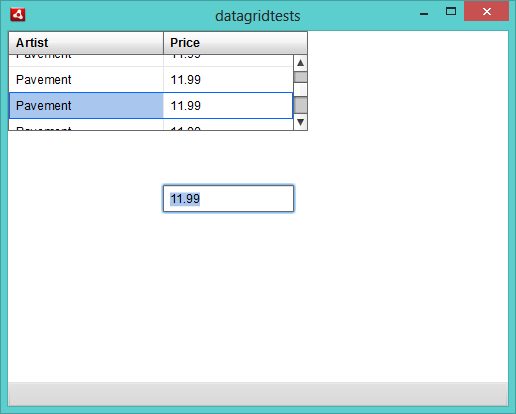
> Create the simplest Datagrid possible and make it editable. If you click on a
> cell after scrolling the datagrid, the item editor will be placed on a wrong
> position, out of the Datagrid.
> Here's what's happening: http://www.boonzi.com/public/flex/datagrid/bug.png
> The code is as simple as:
>     <s:DataGrid  width="300" height="100" dataProvider="{dgArray}"
> editable="true">
>         <s:columns>
>             <s:ArrayList>
>                 <s:GridColumn dataField="Artist"/>
>                 <s:GridColumn dataField="Price"/>
>             </s:ArrayList>
>         </s:columns>
>     </s:DataGrid>
> <fx:Script>
>         <![CDATA[
>             import mx.collections.ArrayCollection;
>             [Bindable]
>             private var dgArray:ArrayCollection = new ArrayCollection([{
> Artist: 'Pavement', Album: 'Slanted and Enchanted', Price: 11.99 }, { Artist:
> 'Pavement', Album: 'Slanted and Enchanted', Price: 11.99 }, { Artist:
> 'Pavement', Album: 'Slanted and Enchanted', Price: 11.99 }, { Artist:
> 'Pavement', Album: 'Slanted and Enchanted', Price: 11.99 }, { Artist:
> 'Pavement', Album: 'Slanted and Enchanted', Price: 11.99 }, { Artist:
> 'Pavement', Album: 'Slanted and Enchanted', Price: 11.99 }, { Artist:
> 'Pavement', Album: 'Slanted and Enchanted', Price: 11.99 }, { Artist:
> 'Pavement', Album: 'Slanted and Enchanted', Price: 11.99 }, { Artist:
> 'Pavement', Album: 'Slanted and Enchanted', Price: 11.99 }, { Artist:
> 'Pavement', Album: 'Slanted and Enchanted', Price: 11.99 }, { Artist:
> 'Pavement', Album: 'Slanted and Enchanted', Price: 11.99 }, { Artist:
> 'Pavement', Album: 'Brighten the Corners', Price: 11.99 }]);
>         ]]>
>     </fx:Script>
> Simply scroll down, and then click any cell to edit it. The itemEditor will
> be placed on the wrong position.

--
This message is automatically generated by JIRA.
If you think it was sent incorrectly, please contact your JIRA administrators
For more information on JIRA, see: http://www.atlassian.com/software/jira