liuzx8888 edited a comment on issue #2604:
URL: https://github.com/apache/iceberg/issues/2604#issuecomment-843273321
@RussellSpitzer yes,it happend in my notebook idea, i can execute merge
susseccful in ${SPARK_HOME}/bin/spark-sql
use like
`./spark-sql --packages org.apache.iceberg:iceberg-spark3-runtime:0.11.1 \
--conf
spark.sql.extensions=org.apache.iceberg.spark.extensions.IcebergSparkSessionExtensions
\
--conf
spark.sql.catalog.spark_catalog=org.apache.iceberg.spark.SparkSessionCatalog \
--conf spark.sql.catalog.spark_catalog.type=hive \
--conf spark.sql.catalog.local=org.apache.iceberg.spark.SparkCatalog \
--conf spark.sql.catalog.local.type=hive \
--conf spark.sql.catalog.local.uri=thrift://ambari6:9083 \
--conf
spark.sql.catalog.local.warehouse=hdfs://ambari5:8020/warehouse/tablespace/managed/hive`
but i faild when config the same property in my source code.
table is not iceberg I think Extensions are not loaded is quite possible,
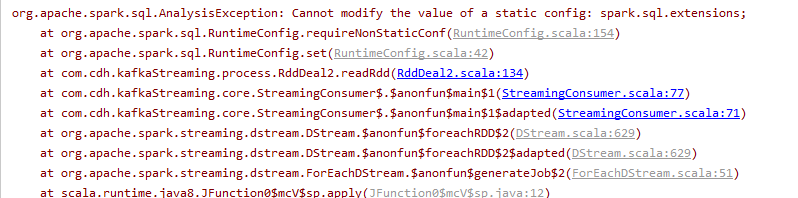
but in my IDEA program, I do not know how to detect it. I tried to execute
spark.conf.set("spark.sql.extensions",
"org.apache.iceberg.spark.extensions.IcebergSparkSessionExtensions"), but it
reported an error.
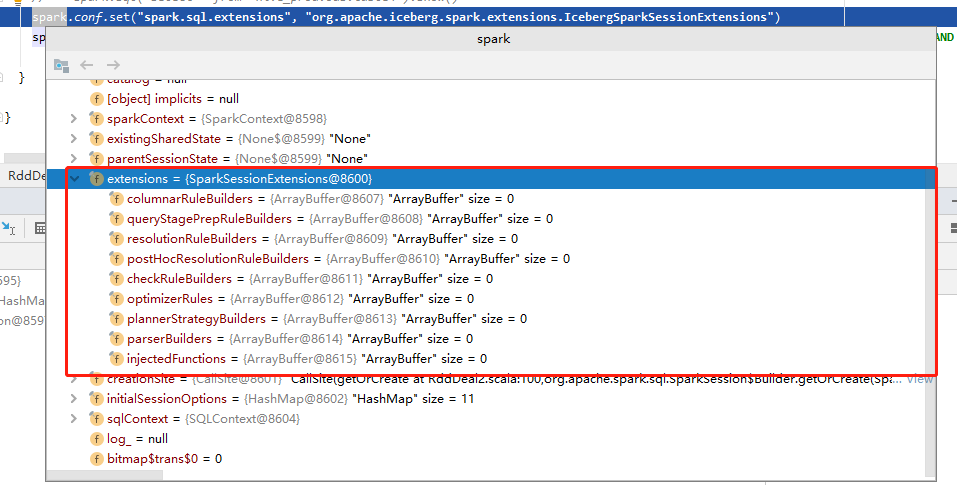
Now I don't know how to load Extensions successfully
--
This is an automated message from the Apache Git Service.
To respond to the message, please log on to GitHub and use the
URL above to go to the specific comment.
For queries about this service, please contact Infrastructure at:
[email protected]
---------------------------------------------------------------------
To unsubscribe, e-mail: [email protected]
For additional commands, e-mail: [email protected]


