Rongnengwei opened a new pull request #996: KYLIN-4206 Add kylin supports aws glue catalog metastroeclient URL: https://github.com/apache/kylin/pull/996 This modification mainly solves the problem of aw glue catalog supported by kylin, and the associated jira is [https://issues.apache.org/jira/browse/KYLIN-4206](https://issues.apache.org/jira/browse/KYLIN-4206)。 1.First you need to modify the aws-glue-data-catalog-client source code. aws-glue-data-catalog-client-for-apache-hive-metastore github address is https://github.com/awslabs/aws-glue-data-catalog-client-for-apache-hive-metastore,aws-glue-client development environment see README.MD. I downloaded hive 2.3.7 locally, so after following the steps in the README.MD file, the version of hive is 2.3.7-SNAPSHOT. 1)Modify the pom.xml file in the home directory. ``` <hive2.version>2.3.7-SNAPSHOT</hive2.version> <spark-hive.version>1.2.1.spark2</spark-hive.version> ``` 2)Modify the class of aws-glue-datacatalog-hive2-client/com.amazonaws.glue.catalog.metastore.AWSCatalogMetastoreClient 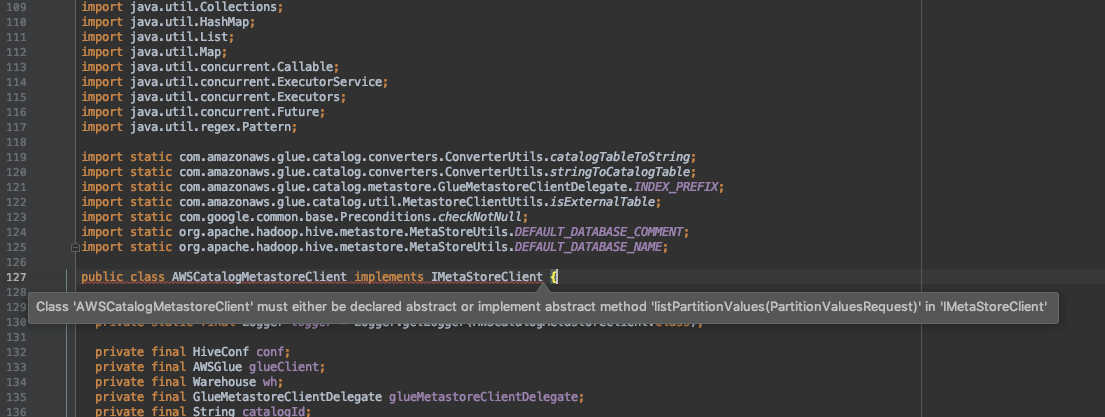 Implementation method ``` @Override public PartitionValuesResponse listPartitionValues (PartitionValuesRequest partitionValuesRequest) throws MetaException, TException, NoSuchObjectException { return null; } ```  3)Modify the class of aws-glue-datacatalog-spark-client/com.amazonaws.glue.catalog.metastore.AWSCatalogMetastoreClient. The problems are as follows: 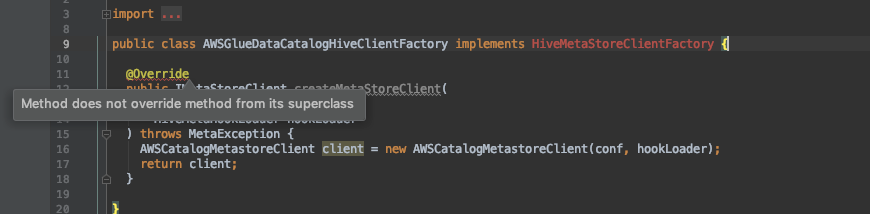 This method is not available in the parent class,so delete the method,Then copy the method of aws-glue-datacatalog-hive2-client / com.amazonaws.glue.catalog.metastore.AWSCatalogMetastoreClient.Add dependency in aws-glue-datacatalog-spark-client / pom.xml file ``` <dependency> <groupId>org.apache.hive</groupId> <artifactId>hive-exec</artifactId> <version>${hive2.version}</version> <scope>provided</scope> </dependency> ``` 4)Package,need to package three projects,as follows. 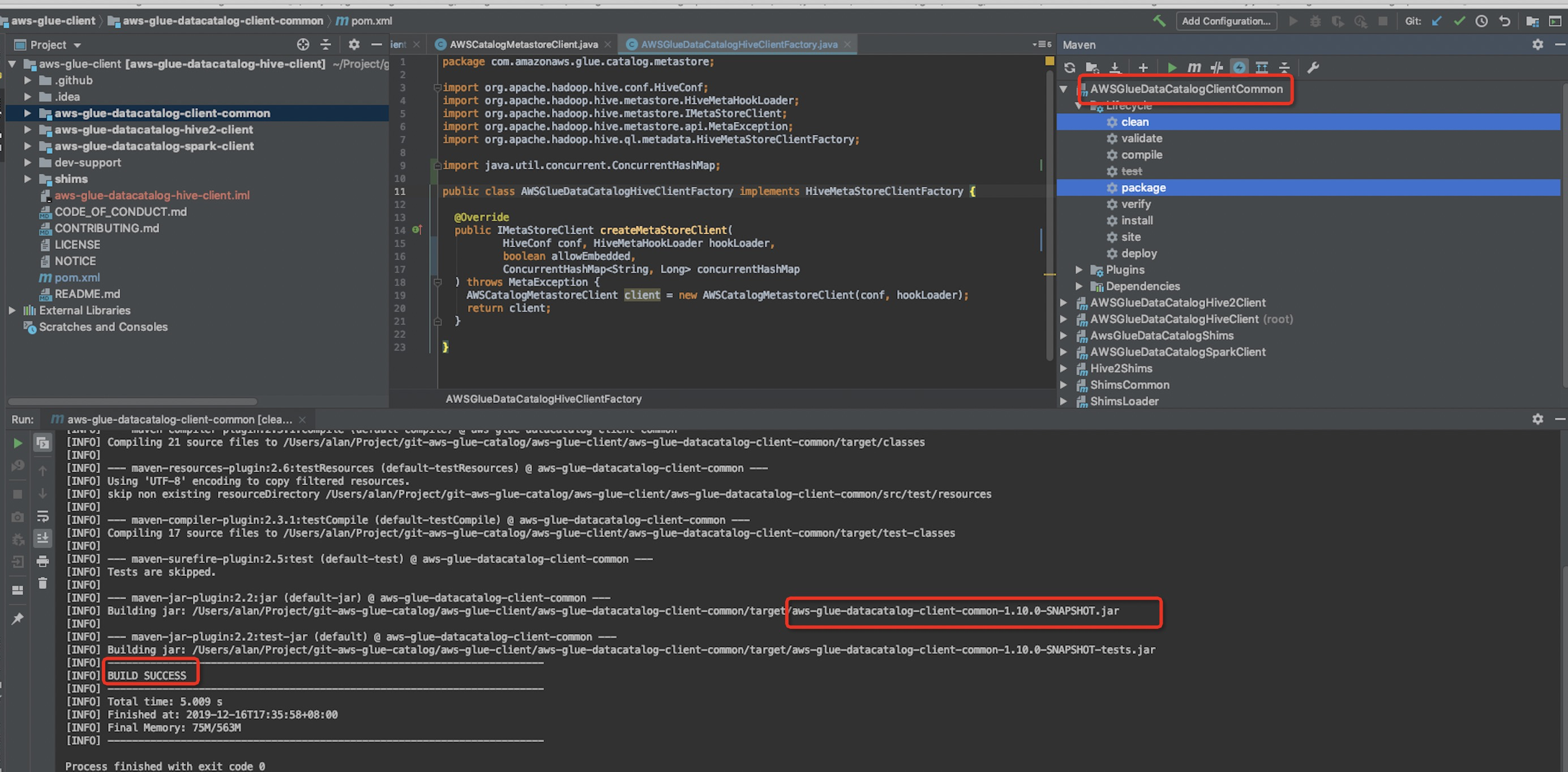 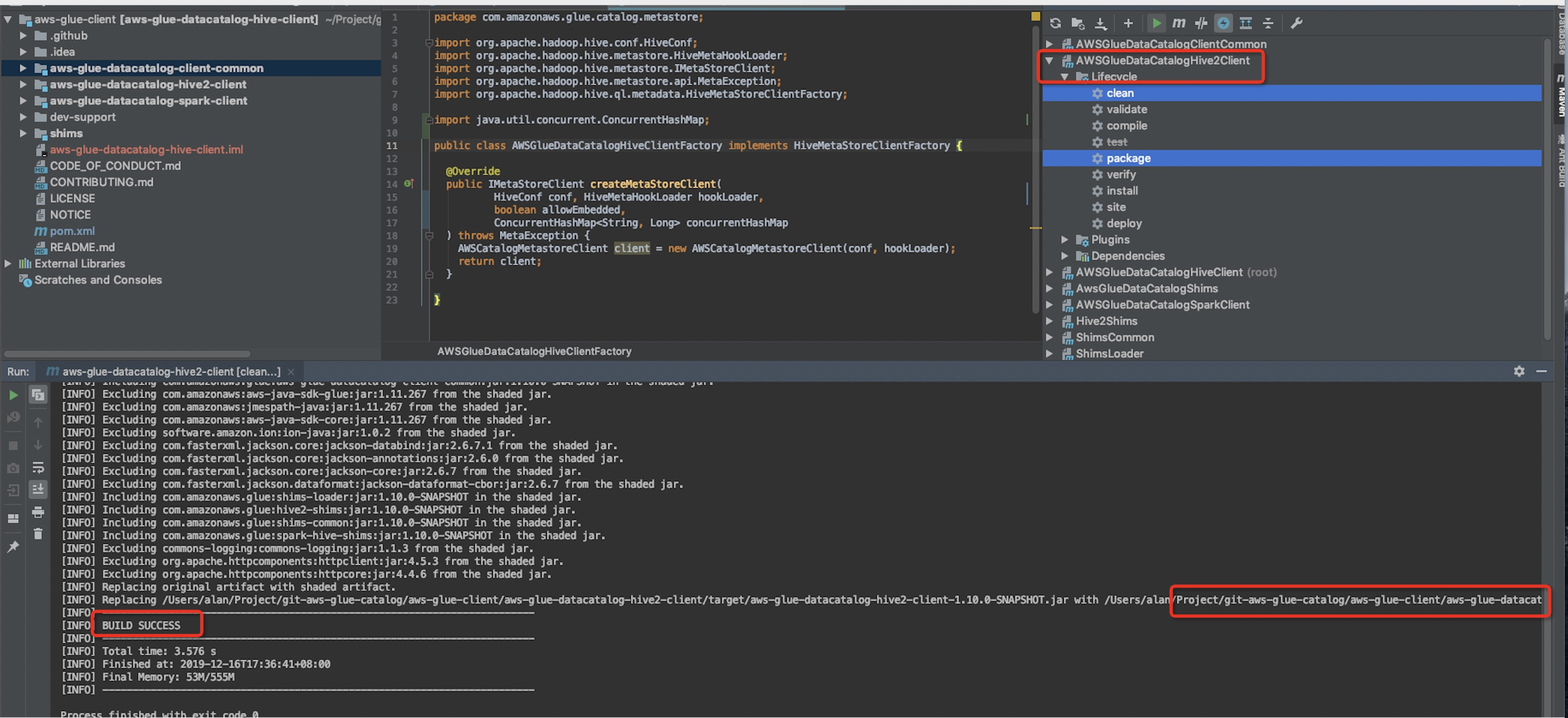 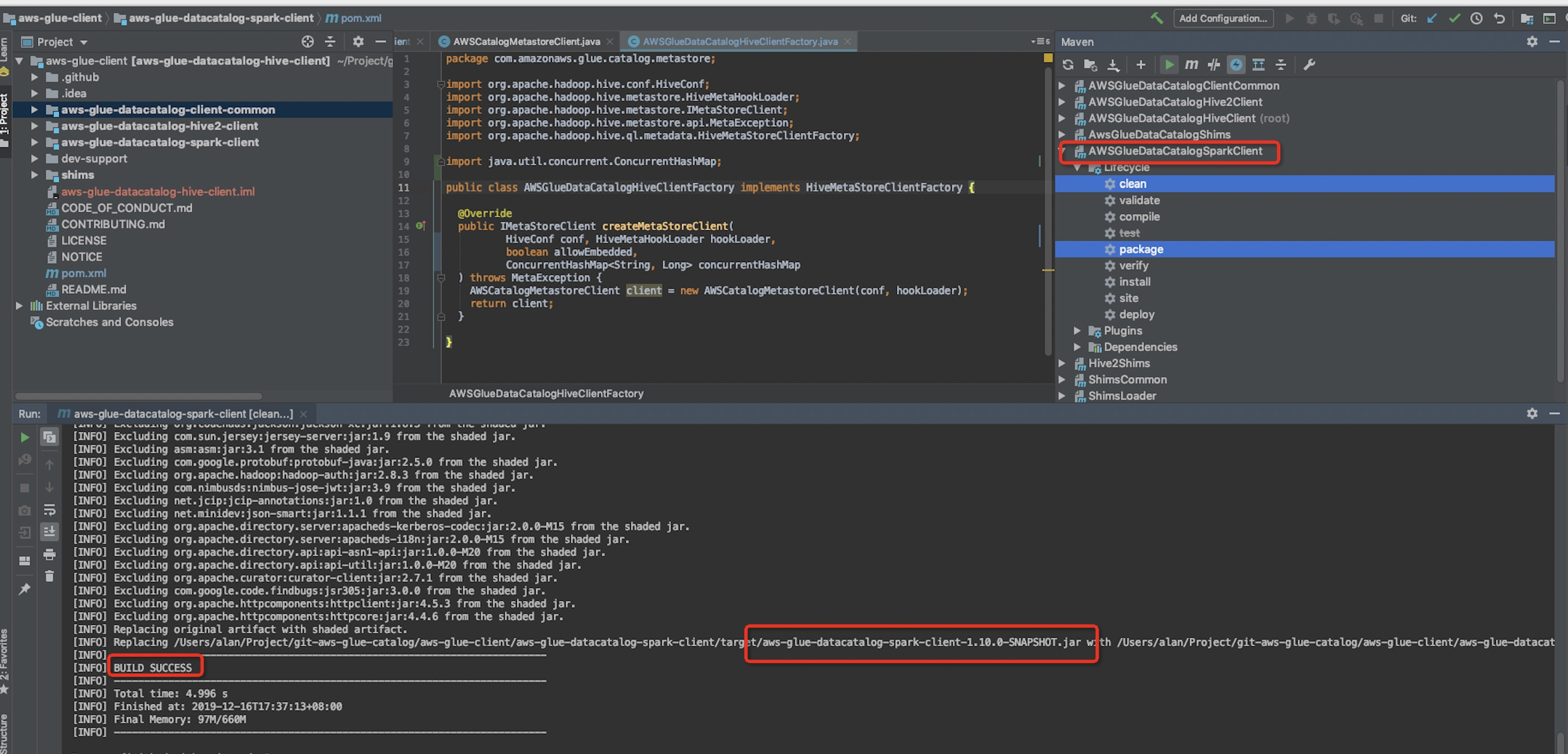 5).Copy the three package ``` aws-glue-datacatalog-client-common-1.10.0-SNAPSHOT.jar aws-glue-datacatalog-hive2-client-1.10.0-SNAPSHOT.jar aws-glue-datacatalog-spark-client-1.10.0-SNAPSHOT.jar ``` to /kylin/lib 2.Modify the source code of kylin,See submission of PR. 1)Add the gluecatalog in the config of kylin.properties. ``` ##The default access HiveMetastoreClient is hcatalog. If AWS user and glue catalog is used, it can be configured as gluecatalog ##kylin.source.hive.metadata-type=hcatalog ``` The default is hcatalog. If you want to use glue, please configure kylin.source.hive.metadata-type = gluecatalog. if config gluecatalog,so need to configure in hive-site.xml,as follows: <property> <name>hive.metastore.client.factory.class</name> <value>com.amazonaws.glue.catalog.metastore.AWSGlueDataCatalogHiveClientFactory</value> </property> ### **kylin install on EMR** Note: The new cluster uses the metadata of the S3 storage hbase. So you need to build the path of S3 s3://*******/hbase s3://*******/kylin 1. Upload .tar.gz to Server 2.Build directory Use root user cd /usr/local mkdir -p kylin Copy the kylin package to /usr/local/kylin/apache-kylin-3.0.0-SNAPSHOT-bin Modify the group the folder belongs to chown -R hadoop:hadoop /usr/local/kylin Switch user sudo su hadoop 3. Configure user global variables vi .bashrc #####hadoop spark kylin######### export HIVE_HOME=/usr/lib/hive export HADOOP_HOME=/usr/lib/hadoop export HBASE_HOME=/usr/lib/hbase export SPARK_HOME=/usr/lib/spark ##kylin export KYLIN_HOME=/usr/local/kylin/apache-kylin-3.0.0-SNAPSHOT-bin export HCAT_HOME=/usr/lib/hive-hcatalog export KYLIN_CONF_HOME=$KYLIN_HOME/conf export tomcat_root=$KYLIN_HOME/tomcat export hive_dependency=$HIVE_HOME/conf:$HIVE_HOME/lib/*:$HIVE_HOME/lib/hive-hcatalog-core.jar:$SPARK_HOME/jars/* export PATH=$KYLIN_HOME/bin:$PATH source .bashrc 4.Configure kylin.properties The jackson-datatype-joda-2.4.6.jar package that comes with hive conflicts with jackson-datatype-joda-2.9.5.jar in kylin / tomcat / weapps / kylin / WEB-INF / lib, so you need to modify the hive Bag mv $HIVE_HOME/lib/jackson-datatype-joda-2.4.6.jar $HIVE_HOME/lib/jackson-datatype-joda-2.4.6.jar.back 1) Configure the jar package to be run by the spark engine. This jar package needs to be generated and uploaded to HDFS. New /usr/local/kylin/apache-kylin-3.0.0-SNAPSHOT-bin/spark_jars Copy the required jar packages to the spark_jars directory cp /usr/lib/spark/jars/*.jar cp /usr/lib/hbase/lib/*.jar /usr/local/kylin/spark_jars Remove lower version of netr-all-4.1.17.Final.jar in spark_jars ##### Package conflict Remove the lower version of netr-all-4.1.17.Final.jar in spark_jars package jar cv0f spark-libs.jar -C /usr/local/kylin/spark_jars/ ./ Configure mr dependent packages cp /usr/lib/hive/lib/*.jar cp /usr/lib/hbase/lib/*.jar /usr/local/kylin/mr_lib Remove the lower version of netr-all-4.1.17.Final.jar in mr_lib kylin.job.mr.lib.dir=/usr/local/kylin/mr_lib 2) Upload spark-libs.ja to hdfs hdfs dfs -mkdir -p /kylin/spark/ hdfs dfs -put spark-libs.jar /kylin/spark ## The metadata store in hbase kylin.metadata.url=kylin_metadata@hbase ## Working folder in HDFS, better be qualified absolute path, make sure user has the right permission to this directory kylin.env.hdfs-working-dir=s3://*******/kylin ## DEV|QA|PROD. DEV will turn on some dev features, QA and PROD has no difference in terms of functions. kylin.env=DEV ##The default access HiveMetastoreClient is hcatalog. If AWS user and glue catalog is used, it can be configured as gluecatalog kylin.source.hive.metadata-type=hcatalog ## kylin zk base path kylin.env.zookeeper-base-path=/kylin ## Kylin server mode, valid value [all, query, job] kylin.server.mode=all ## Display timezone on UI,format like[GMT+N or GMT-N] kylin.web.timezone=GMT+8 ## Hive database name for putting the intermediate flat tables kylin.source.hive.database-for-flat-table=kylin_flat_db_test1 ## Whether redistribute the intermediate flat table before building kylin.source.hive.redistribute-flat-table=false ## The storage for final cube file in hbase kylin.storage.url=hbase ## The prefix of hbase table kylin.storage.hbase.table-name-prefix=KYLIN_ ## HBase Cluster FileSystem, which serving hbase, format as hdfs://hbase-cluster:8020 ## Leave empty if hbase running on same cluster with hive and mapreduce kylin.storage.hbase.cluster-fs=s3://*************/hbase #### SPARK ENGINE CONFIGS ### # ## Hadoop conf folder, will export this as "HADOOP_CONF_DIR" to run spark-submit ## This must contain site xmls of core, yarn, hive, and hbase in one folder kylin.env.hadoop-conf-dir=/etc/hadoop/conf #kylin.engine.spark.max-partition=5000 # ## Spark conf (default is in spark/conf/spark-defaults.conf) kylin.engine.spark-conf.spark.master=yarn kylin.engine.spark-conf.spark.submit.deployMode=cluster kylin.engine.spark-conf.spark.yarn.queue=default kylin.engine.spark-conf.spark.driver.memory=2G kylin.engine.spark-conf.spark.executor.memory=18G kylin.engine.spark-conf.spark.executor.instances=6 kylin.engine.spark-conf.spark.yarn.executor.memoryOverhead=1024 kylin.engine.spark-conf.spark.shuffle.service.enabled=true kylin.engine.spark-conf.spark.eventLog.enabled=true ## manually upload spark-assembly jar to HDFS and then set this property will avoid repeatedly uploading jar at runtime kylin.engine.spark-conf.spark.yarn.archive=hdfs://ip-172-*****:8020/kylin/spark/spark-libs.jar kylin.engine.spark-conf.spark.io.compression.codec=org.apache.spark.io.SnappyCompressionCodec ############define########### kylin.job.jar=/usr/local/kylin/apache-kylin-3.0.0-SNAPSHOT-bin/lib/kylin-job-3.0.0-SNAPSHOT.jar kylin.coprocessor.local.jar=/usr/local/kylin/apache-kylin-3.0.0-SNAPSHOT-bin/lib/kylin-coprocessor-3.0.0-SNAPSHOT.jar kylin.job.mr.lib.dir=/usr/local/kylin/mr_lib kylin.query.max-return-rows=10000000 5. Configure * .XML file kylin_job_conf.xml, configure zk address, zk address is obtained from hbase / conf / hbase-site.xml <property> <name>hbase.zookeeper.quorum</name> <value>ip-172-40-***.ec2.internal</value> </property> <property> <name>mapreduce.task.timeout</name> <value>3600000</value> <description>Set task timeout to 1 hour</description> </property> kylin_hive_conf.xml, configure metastore address <property> <name>hive.metastore.uris</name> <value>thrift://ip-17*******.internal:9083</value> </property> Added at the beginning of the kylin.sh file export HBASE_CLASSPATH_PREFIX=${tomcat_root}/bin/bootstrap.jar:${tomcat_root}/bin/tomcat-juli.jar:${tomcat_root}/lib/*:$hive_dependency:$HBASE_CLASSPATH_PREFIX /usr/lib/hive/conf/hive-site.xml,Configure the use of aws glue to share data sources <property> <name>hive.metastore.client.factory.class</name> <value>com.amazonaws.glue.catalog.metastore.AWSGlueDataCatalogHiveClientFactory</value> </property> 6. Configure hbase rpc timeout Add in hbase-site.xml file: <property> <name>hbase.rpc.timeout</name> <value>3600000</value> </property> 7. Start hadoop historyserver ./mr-jobhistory-daemon.sh start historyserver 8. Start the kylin service ./kylin.sh start 
----------------------------------------------------------------
This is an automated message from the Apache Git Service.
To respond to the message, please log on to GitHub and use the
URL above to go to the specific comment.

For queries about this service, please contact Infrastructure at:
[email protected]


With regards,
Apache Git Services







